Playstore Link :

Image Converter - PNG/JPG/JPEG - Apps on Google Play
Convert any image to JPG JPEG PDF GIF PNG BMP WEBP format
Image Converter - PNG/JPG/JPEG v13.0.29 [Premium]
Requirements: 6.0+
Overview: Image Converter is an image/photo converter that allows you to transform photos or images to other extensions: you can convert into JPG, JPEG, PDF, GIF, PNG, BMP And WEBP.
Image Converter Features :-
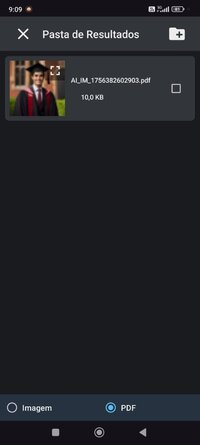
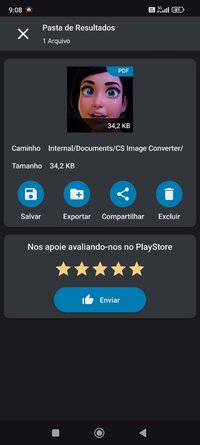
- Save converted image directly to gallery.
- Easy to share, converted images for all
formats like .jpg .pdf .png .jpeg .bmp .gif
and .webp
- Easy to choose image output format type
- Edit output image file name
- Convert image without loosing its quality
and resolution
- You can share directly from the view
images in converted images and from
converted gallery as well.
- Manage all converted images directly
from gallery, you can later share or delete
converted images.
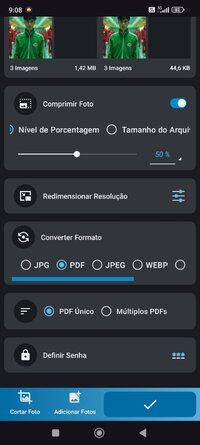
- Easily resize your photos with our intuitive application! Adjust both height and width effortlessly, perfect for social media, websites, and more. Streamlined editing without the complexity – embrace precision and creativity with our user-friendly photo resizing feature.
What's New:
Image Converter- JPG PNG PDF GIF WEBP JPEG BMP
New Features And improvement
- Prevent duplicate photos
- Fix Png Transparency
- Manage Default settings
- Manage export path directly from app
- Percentage Resizer Added
- Preserve Aspect ratio
- Specific Compressor
- Crop aspect ratio added
- Fix bugs
New languages Added
Arabic, Bengali, French, German, Indonesian, Italian, Portuguese, Russian, Spanish, Czech, Dutch, Hebrew, Hindi, Japanese, Korean, Norwegian, Persian.
Requirements: 6.0+
Overview: Image Converter is an image/photo converter that allows you to transform photos or images to other extensions: you can convert into JPG, JPEG, PDF, GIF, PNG, BMP And WEBP.
Image Converter Features :-
- Save converted image directly to gallery.
- Easy to share, converted images for all
formats like .jpg .pdf .png .jpeg .bmp .gif
and .webp
- Easy to choose image output format type
- Edit output image file name
- Convert image without loosing its quality
and resolution
- You can share directly from the view
images in converted images and from
converted gallery as well.
- Manage all converted images directly
from gallery, you can later share or delete
converted images.
- Easily resize your photos with our intuitive application! Adjust both height and width effortlessly, perfect for social media, websites, and more. Streamlined editing without the complexity – embrace precision and creativity with our user-friendly photo resizing feature.
What's New:
Image Converter- JPG PNG PDF GIF WEBP JPEG BMP
New Features And improvement
- Prevent duplicate photos
- Fix Png Transparency
- Manage Default settings
- Manage export path directly from app
- Percentage Resizer Added
- Preserve Aspect ratio
- Specific Compressor
- Crop aspect ratio added
- Fix bugs
New languages Added
Arabic, Bengali, French, German, Indonesian, Italian, Portuguese, Russian, Spanish, Czech, Dutch, Hebrew, Hindi, Japanese, Korean, Norwegian, Persian.
*Special Features*
◉ Premium / Paid features Unlocked
◉ All Debug code removed
◉ Languages: Full Multi Languages
◉ CPU architectures: arm64-v8a, armeabi-v7a, x86, x86_64
◉ Screen DPIs: 120dpi, 160dpi, 240dpi, 320dpi, 480dpi, 640dpi
Credit : - @ youarefinished
Free Download:
! Hidden Content !
You must be registered and either click Like under this post or leave a comment before you can see the hidden links.
You may need to refresh the page after clicking Like. If you’re still having trouble revealing the hidden links, please
read this.
Did you know? VIP Members can see all links instantly, no unlocking required.
Interested? Get VIP here.
Interested? Get VIP here.