Playstore Link:
Image To PDF : Convert To PDF - Apps on Google Play
Convert Multiple Images into a Single PDF
Image to PDF can convert images (jpg, jpeg, png, etc.) to PDF file.
➤ This app allows you to convert your images (JPG, JPEG, PNG, etc.) files into PDF quickly and safely.
➤ You can make Password protected PDF file.
Features
==============================
- Convert your Gallery or Camera capture images into PDF file
- No limits on file size or the number of documents converted
- Resize, crop, doodle, and rotate the images as you like. Optimize images for better PDF output.
- Reordering images with Drag n Drop feature
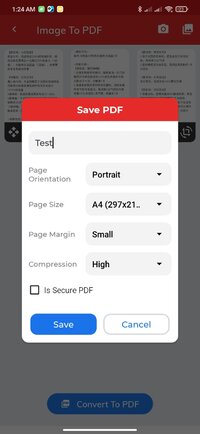
- Supports compression of images (Low, Medium, High)
- You can set passwords to protect your PDF files
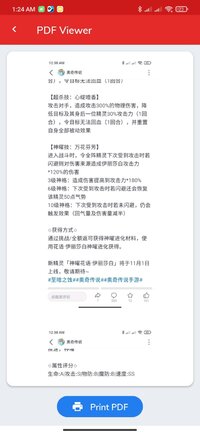
- Open generated PDF file into PDF Viewer app itself
- Supports Print PDF file
- Easily send and share converted PDF files via social media, Bluetooth, Email, quick share, etc.
- Copy generated PDF file To selected folder
- Rename generated PDF file
 How To Use
==============================
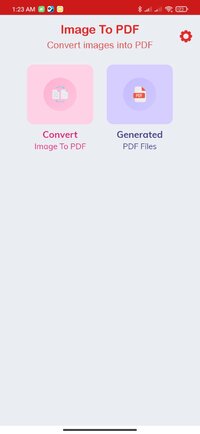
➤ Click on "Convert Image To Pdf"
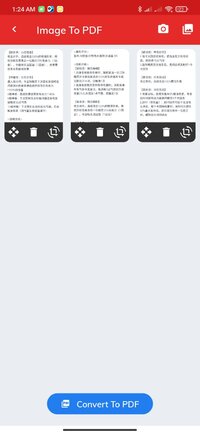
➤ Select images from gallery or Camera option is also available to take new pictures
➤ Reordering images or Delete unwanted images
➤ Click on Convert To PDF button
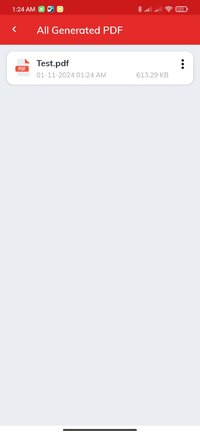
➤ Show all created PDF files in "Generated PDF File" module
➤ Open the PDF with app itself PDF viewer
➤ Print the PDF file
➤ Share, Rename or Delete the PDF from the list
We are working our best on making the Image to PDF Converter better and more useful for you.
What's New:
minor bugs solved
➤ This app allows you to convert your images (JPG, JPEG, PNG, etc.) files into PDF quickly and safely.
➤ You can make Password protected PDF file.
Features
==============================
- Convert your Gallery or Camera capture images into PDF file
- No limits on file size or the number of documents converted
- Resize, crop, doodle, and rotate the images as you like. Optimize images for better PDF output.
- Reordering images with Drag n Drop feature
- Supports compression of images (Low, Medium, High)
- You can set passwords to protect your PDF files
- Open generated PDF file into PDF Viewer app itself
- Supports Print PDF file
- Easily send and share converted PDF files via social media, Bluetooth, Email, quick share, etc.
- Copy generated PDF file To selected folder
- Rename generated PDF file
How To Use ==============================
➤ Click on "Convert Image To Pdf"
➤ Select images from gallery or Camera option is also available to take new pictures
➤ Reordering images or Delete unwanted images
➤ Click on Convert To PDF button
➤ Show all created PDF files in "Generated PDF File" module
➤ Open the PDF with app itself PDF viewer
➤ Print the PDF file
➤ Share, Rename or Delete the PDF from the list
We are working our best on making the Image to PDF Converter better and more useful for you.
What's New:
minor bugs solved
*Special Features*
 Mod info:
× Premium Features Unlocked
× All debug info removed
× APK Fully Cleaned
× Original Signature Changed
○ credit :
Modded by TurboModsFree Download:
! Hidden Content !
You must be registered and either click Like under this post or leave a comment before you can see the hidden links.
You may need to refresh the page after clicking Like. If you’re still having trouble revealing the hidden links, please
read this.
Did you know? VIP Members can see all links instantly, no unlocking required.
Interested? Get VIP here.
Interested? Get VIP here.