Playstore Link :
GitHub - T8RIN/ImageToolbox: 🖼️ Image Toolbox is a powerful app for advanced image manipulation. It offers dozens of features, from basic tools like crop and draw to filters, OCR, and a wide range of image processing options
🖼️ Image Toolbox is a powerful app for advanced image manipulation. It offers dozens of features, from basic tools like crop and draw to filters, OCR, and a wide range of image processing options -...
 github.com

Image Toolbox - Edit & Convert - Apps on Google Play
Edit, create & convert images with powerful AI — your all-in-one studio
Image Toolbox Ver. 3.8.1-alpha01 Build 226 [GitHub] Untouched APK | FREE APK
Requirements: 5.0+
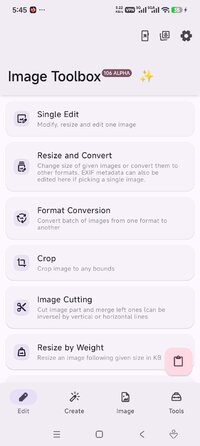
Overview: Filter, Resize, Compare, Crop - do anything with your images
Image Toolbox with these
Features:
Batch processing
Applying filter chains (More than 45 various filters)
AES-256 GCM No Padding files encryption and decryption
EXIF metadata editing/deleting
Loading images from internet
Background Removing
By drawing
Automatically
Drawing on Image/Background
Pen
Neon
Highlighter
Image Resizing
Width changing
Height changing
Adaptive resize
Resize retaining aspect ratio
Resize by given limits
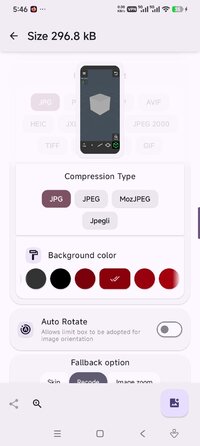
Image Shrinking
Quality compressing
Preset shrinking
Reducing size by given weight (in KB)
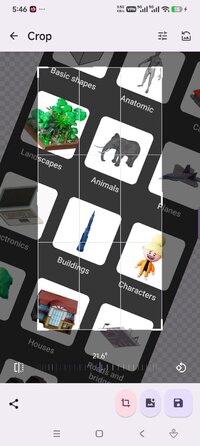
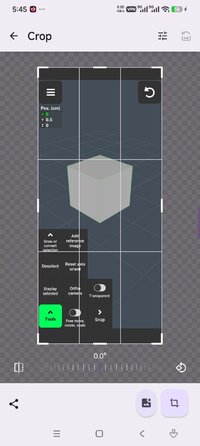
Cropping
Regular crop
Crop by aspect ratio
Crop with shape mask
Rounded Corners
Cut Corners
Oval
Squircle
Octagon
Rounded Pentagon
Clover
David Star
Kotlin Logo
Heart
Star
Image Mask
Format Conversion
HEIF
HEIC
AVIF
WEBP
JPEG
JPG
PNG
SVG, GIF to WEBP, PNG, JPEG, JPG, HEIF, HEIC, AVIF
Telegram sticker PNG format
Color Utils
Palette generation
Picking color from image
Additional Features
Rotating
Flipping
Comparing images
Previewing SVG, GIF and almost all types of images
Saving to any folder
➡ Untouched apk with Original Hash Signature
➡ No changes were applied
➡ CPU architectures: Universal
➡ Screen DPIs: 160dpi, 240dpi, 320dpi, 480dpi, 640dpi
What's New:
• Improved markup layers history
• Added scale control for markup layers
• Added position input for markup layers
• Added rtl support for markup layers by #2677
• Added ability to lock markup layer
• Added ability to cancel ongoing AI model downloads by #2688
• Added shadow and text transform to markup layers
• Added PDF annotation remover tool by #2694
• Improved image cutting tool preview by #2687
• Improved layer previews
• Fixed markup layers render by #2683
• Fixed krita palette export by #2682
• Fixed background remover visual bug with bucket fill by #2673
• Fixed external image editing intent handling by #2684
Requirements: 5.0+
Overview: Filter, Resize, Compare, Crop - do anything with your images
Image Toolbox with these
Features:
Batch processing
Applying filter chains (More than 45 various filters)
AES-256 GCM No Padding files encryption and decryption
EXIF metadata editing/deleting
Loading images from internet
Background Removing
By drawing
Automatically
Drawing on Image/Background
Pen
Neon
Highlighter
Image Resizing
Width changing
Height changing
Adaptive resize
Resize retaining aspect ratio
Resize by given limits
Image Shrinking
Quality compressing
Preset shrinking
Reducing size by given weight (in KB)
Cropping
Regular crop
Crop by aspect ratio
Crop with shape mask
Rounded Corners
Cut Corners
Oval
Squircle
Octagon
Rounded Pentagon
Clover
David Star
Kotlin Logo
Heart
Star
Image Mask
Format Conversion
HEIF
HEIC
AVIF
WEBP
JPEG
JPG
PNG
SVG, GIF to WEBP, PNG, JPEG, JPG, HEIF, HEIC, AVIF
Telegram sticker PNG format
Color Utils
Palette generation
Picking color from image
Additional Features
Rotating
Flipping
Comparing images
Previewing SVG, GIF and almost all types of images
Saving to any folder
➡ Untouched apk with Original Hash Signature
➡ No changes were applied
➡ CPU architectures: Universal
➡ Screen DPIs: 160dpi, 240dpi, 320dpi, 480dpi, 640dpi
What's New:
• Improved markup layers history
• Added scale control for markup layers
• Added position input for markup layers
• Added rtl support for markup layers by #2677
• Added ability to lock markup layer
• Added ability to cancel ongoing AI model downloads by #2688
• Added shadow and text transform to markup layers
• Added PDF annotation remover tool by #2694
• Improved image cutting tool preview by #2687
• Improved layer previews
• Fixed markup layers render by #2683
• Fixed krita palette export by #2682
• Fixed background remover visual bug with bucket fill by #2673
• Fixed external image editing intent handling by #2684
*Special Features*
➡ Untouched apk with Original Hash Signature
➡ No changes were applied
➡ CPU architectures: Universal
➡ Screen DPIs: 160dpi, 240dpi, 320dpi, 480dpi, 640dpi
Free Download:
! Hidden Content !
You must be registered and either click Like under this post or leave a comment before you can see the hidden links.
You may need to refresh the page after clicking Like. If you’re still having trouble revealing the hidden links, please
read this.
Did you know? VIP Members can see all links instantly, no unlocking required.
Interested? Get VIP here.
Interested? Get VIP here.