Playstore Link :

Internet Speed Monitor - Apps on Google Play
Monitor your internet speed in real-time — always visible, even during use
Internet Speed Monitor Ver. 1.1.3 MOD APK | Pro / Paid Unlocked
Requirements: Android 7.0 and above
Overview: Monitor your internet speed in real-time with this lightweight, battery-efficient overlay app. Keep track of upload and download speeds without interrupting your workflow. Perfect for streaming, video calls, and mobile hotspots, ensuring you stay connected effortlessly.
Real-Time Internet Speed Monitor with Overlay Display
Monitor your internet speed in real time with our lightweight Android app. Internet Speed Meter Live provides continuous monitoring with an overlay display that works while you use other apps.
Key Features
• Real-time speed measurement with overlay display
• Battery-efficient lightweight design
• Monitor upload and download speeds separately
• WiFi and mobile data (4G/5G) network detection
• VPN compatible speed test results
Always-Visible Speed Monitoring
The overlay display lets you monitor internet speed while using any other app. Perfect for video calls, streaming, or file downloads. No need to constantly switch between apps for speed tests.
Customization Options
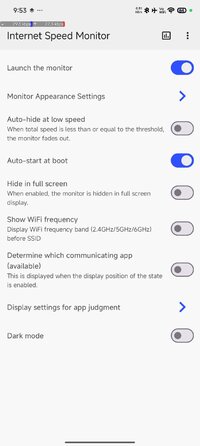
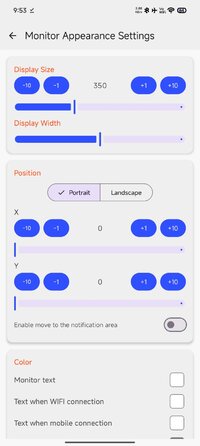
• Adjust display position, size, color, and transparency
• Choose display format and update intervals
• Measurement units and notification settings
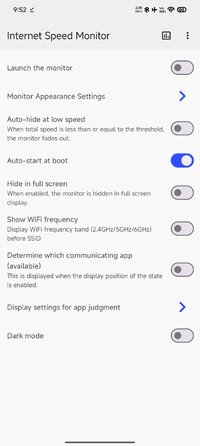
• Auto-start on device boot
• Pause function for flexible control
Free Version Features
• Real-time internet speed monitoring and display
• Upload and download speed measurements
• WiFi and mobile data detection
• Notification panel controls
• Minimal battery usage
• Customizable overlay display
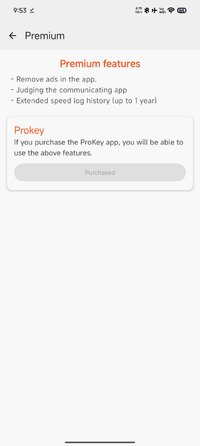
PRO Version Features
• Identify which apps use your network
• Complete ad removal
Real-World Use Cases
• Remote Work: Monitor speed during video calls to ensure stable connections
• Streaming: Keep an eye on bandwidth during movies or gaming to avoid buffering
• Mobile Hotspot: Monitor data usage when sharing your connection
• Troubleshooting: Track speed variations to identify patterns and resolve issues
Technical Requirements
• Android 5.0 and above
• VPN environment support (Ver 1.0.4+)
• Works with all major carriers and WiFi networks
Required Permissions
• Display over other apps: Required for overlay display functionality
• Network access: Essential for measuring internet speed and analytics
• Device ID: Used by PRO version to identify network usage by apps
• WiFi connection info: Needed to distinguish between WiFi and mobile data
• Run at startup: Enables automatic monitoring when device boots
Privacy & Security
We prioritize your privacy. The app only processes speed measurement data and does not access your internet communications. Your personal information remains completely private.
Important Note
When overlay display is active, you may need to temporarily disable it to enter passwords in browsers. You can easily pause through the notification panel.
Why Choose Our Speed Monitor?
Unlike basic speed test apps that only work when actively run, our monitor provides continuous, real-time monitoring that integrates seamlessly with daily device usage.
Modifications:
✪ Pro / Paid features unlocked;
✪ Cleaned all useless files;
✪ All Debug Codes Removed;
✪ CPUs: armeabi-v7a, arm64-v8a;
➥ Modded By TRUMods
What's New:
Ver 1.1.3
- Adjusted the speed display for the overlay
- Improved the color customization feature
- Other minor bug fixes
Ver 1.1.2
- Added an option to hide the internet speed monitor when the speed is low.
- Simplified the display of Wi-Fi frequency.
- Added an option for a shortened display of internet speed units.
- Other minor bug fixes.
If you like the Internet Speed Monitor, please support us with a 5-star rating.
Requirements: Android 7.0 and above
Overview: Monitor your internet speed in real-time with this lightweight, battery-efficient overlay app. Keep track of upload and download speeds without interrupting your workflow. Perfect for streaming, video calls, and mobile hotspots, ensuring you stay connected effortlessly.
Real-Time Internet Speed Monitor with Overlay Display
Monitor your internet speed in real time with our lightweight Android app. Internet Speed Meter Live provides continuous monitoring with an overlay display that works while you use other apps.
Key Features
• Real-time speed measurement with overlay display
• Battery-efficient lightweight design
• Monitor upload and download speeds separately
• WiFi and mobile data (4G/5G) network detection
• VPN compatible speed test results
Always-Visible Speed Monitoring
The overlay display lets you monitor internet speed while using any other app. Perfect for video calls, streaming, or file downloads. No need to constantly switch between apps for speed tests.
Customization Options
• Adjust display position, size, color, and transparency
• Choose display format and update intervals
• Measurement units and notification settings
• Auto-start on device boot
• Pause function for flexible control
Free Version Features
• Real-time internet speed monitoring and display
• Upload and download speed measurements
• WiFi and mobile data detection
• Notification panel controls
• Minimal battery usage
• Customizable overlay display
PRO Version Features
• Identify which apps use your network
• Complete ad removal
Real-World Use Cases
• Remote Work: Monitor speed during video calls to ensure stable connections
• Streaming: Keep an eye on bandwidth during movies or gaming to avoid buffering
• Mobile Hotspot: Monitor data usage when sharing your connection
• Troubleshooting: Track speed variations to identify patterns and resolve issues
Technical Requirements
• Android 5.0 and above
• VPN environment support (Ver 1.0.4+)
• Works with all major carriers and WiFi networks
Required Permissions
• Display over other apps: Required for overlay display functionality
• Network access: Essential for measuring internet speed and analytics
• Device ID: Used by PRO version to identify network usage by apps
• WiFi connection info: Needed to distinguish between WiFi and mobile data
• Run at startup: Enables automatic monitoring when device boots
Privacy & Security
We prioritize your privacy. The app only processes speed measurement data and does not access your internet communications. Your personal information remains completely private.
Important Note
When overlay display is active, you may need to temporarily disable it to enter passwords in browsers. You can easily pause through the notification panel.
Why Choose Our Speed Monitor?
Unlike basic speed test apps that only work when actively run, our monitor provides continuous, real-time monitoring that integrates seamlessly with daily device usage.
Modifications:
✪ Pro / Paid features unlocked;
✪ Cleaned all useless files;
✪ All Debug Codes Removed;
✪ CPUs: armeabi-v7a, arm64-v8a;
➥ Modded By TRUMods
What's New:
Ver 1.1.3
- Adjusted the speed display for the overlay
- Improved the color customization feature
- Other minor bug fixes
Ver 1.1.2
- Added an option to hide the internet speed monitor when the speed is low.
- Simplified the display of Wi-Fi frequency.
- Added an option for a shortened display of internet speed units.
- Other minor bug fixes.
If you like the Internet Speed Monitor, please support us with a 5-star rating.
*Special Features*
1 . Pro / Paid features unlocked
Credit to : TRUMods
Free Download:
! Hidden Content !
You must be registered and either click Like under this post or leave a comment before you can see the hidden links.
You may need to refresh the page after clicking Like. If you’re still having trouble revealing the hidden links, please
read this.
Did you know? VIP Members can see all links instantly, no unlocking required.
Interested? Get VIP here.
Interested? Get VIP here.