Playstore Link :
GitHub - fcaronte/KingInstaller: Porting of KingInstaller get from GitLab by annexhack
Porting of KingInstaller get from GitLab by annexhack - fcaronte/KingInstaller
 github.com
Install packages "as Google Play Store", to work around restrictions!
Useful for Android Auto.
Installation
Download and install the latest King Installer release
Settings => Apps
Special app access => All files access => KingInstaller => Check Allow access to manage all files
See all apps => KingInstaller => Install unknown apps => Check Allow from this source
Usage
If the .apk is already installed => Uninstall it first
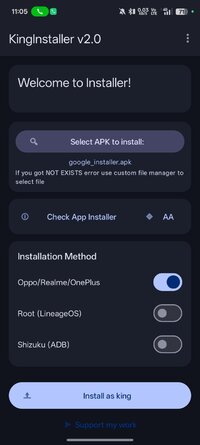
KingInstaller
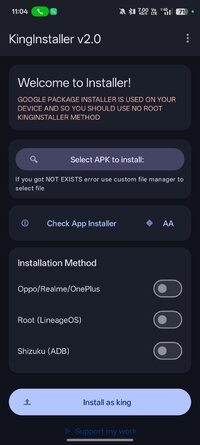
Click Select file ... => Select .apk to install
Optional, use maximum 1 check:
Check Enable if you use Oppo, Realme or OnePlus phone
Check Enable if you use rooted (LineageOS) phone
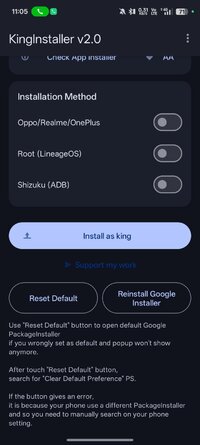
Click Install as king
Optional:
If checked Enable if you use Oppo, Realme or OnePlus phone => Select Default Package installer => Install
If checked Enable if you use rooted (LineageOS) phone => Grant Root access
Wait for text-field with .apk file-path to clear
Validate if package installed "as Google Play Store"
Verify app installation
To verify if the process of installing an app "as Google Play Store" went correctly, check as following:
Settings => Apps => See all apps => Name of installed App => Store (at the bottom)
There you should see either of following, App installed from ... messages:
Google Play Store - On devices with Google Play Store enabled
FakeStore - On devices with MicroG (Google Play Store stub)
license checker - On AVDs without Google Play
Notes
Make sure to enable Unknown Sources in Android Auto's Developer Settings.
Useful for Android Auto.
Installation
Download and install the latest King Installer release
Settings => Apps
Special app access => All files access => KingInstaller => Check Allow access to manage all files
See all apps => KingInstaller => Install unknown apps => Check Allow from this source
Usage
If the .apk is already installed => Uninstall it first
KingInstaller
Click Select file ... => Select .apk to install
Optional, use maximum 1 check:
Check Enable if you use Oppo, Realme or OnePlus phone
Check Enable if you use rooted (LineageOS) phone
Click Install as king
Optional:
If checked Enable if you use Oppo, Realme or OnePlus phone => Select Default Package installer => Install
If checked Enable if you use rooted (LineageOS) phone => Grant Root access
Wait for text-field with .apk file-path to clear
Validate if package installed "as Google Play Store"
Verify app installation
To verify if the process of installing an app "as Google Play Store" went correctly, check as following:
Settings => Apps => See all apps => Name of installed App => Store (at the bottom)
There you should see either of following, App installed from ... messages:
Google Play Store - On devices with Google Play Store enabled
FakeStore - On devices with MicroG (Google Play Store stub)
license checker - On AVDs without Google Play
Notes
Make sure to enable Unknown Sources in Android Auto's Developer Settings.
*Special Features*
★ Untouched apk with Original Hash Signature
★ No changes were applied
Free Download:
! Hidden Content !
You must be registered and either click Like under this post or leave a comment before you can see the hidden links.
You may need to refresh the page after clicking Like. If you’re still having trouble revealing the hidden links, please
read this.
Did you know? VIP Members can see all links instantly, no unlocking required.
Interested? Get VIP here.
Interested? Get VIP here.