Playstore Link:

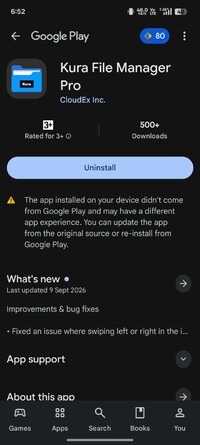
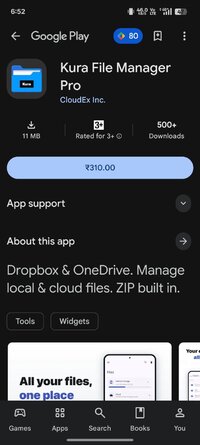
Kura File Manager Pro - Apps on Google Play
Dropbox & OneDrive. Manage local & cloud files. ZIP built in.
Kura File Manager is a fast, clean, and intuitive next-generation file manager. Internal storage, SD card, and USB drives — plus Dropbox and OneDrive — all your files in one place.
Manage local and cloud together
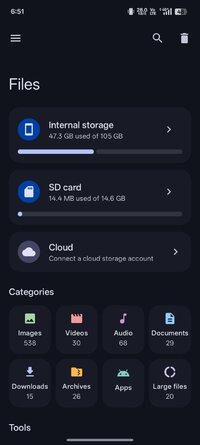
- Internal storage / SD card / USB drive (OTG) support
- Browse Dropbox and OneDrive right inside the app
- See cloud files at a glance with thumbnails
- Easy upload and download to the cloud
Every operation you need
- Copy / move / delete / rename
- Multi-select and batch operations
- Open with another app / share
- Copy file name and path
Built-in ZIP compression and extraction
- Compress files and folders into a ZIP
- Extract ZIP archives on the spot
- Handle archives without installing extra apps
Find files fast
- Categories: images / videos / audio / documents / downloads / apps
- One-tap access to recent files
- Add frequently used folders to Favorites
- Quick search by file name
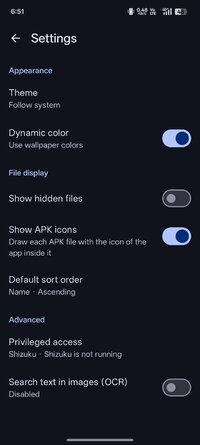
- Switch between list and grid, sort, show hidden files
Smart tools to tidy your storage
- Storage analyzer: see what is taking up space
- Duplicate finder: find and remove wasteful duplicates
- Empty folder cleaner: sweep away scattered empty folders
- APK extract: export the APK of installed apps
A safety-net trash
- Deleted files are kept in the trash for 30 days
- Restore files even after an accidental delete
Beautiful and easy to use
- Material You / dynamic color blends with your wallpaper
- Dark theme that is easy on the eyes
- A simple, intuitive layout
Why Kura File Manager
- All-in-one, from local storage to the cloud
- Fast and smooth performance
- Simple, beautiful, easy-to-navigate design
- A safety-net trash that lets you undo deletions
From everyday file tidying to working with the cloud and clearing out your storage — make Kura File Manager your daily companion.
Manage local and cloud together
- Internal storage / SD card / USB drive (OTG) support
- Browse Dropbox and OneDrive right inside the app
- See cloud files at a glance with thumbnails
- Easy upload and download to the cloud
Every operation you need
- Copy / move / delete / rename
- Multi-select and batch operations
- Open with another app / share
- Copy file name and path
Built-in ZIP compression and extraction
- Compress files and folders into a ZIP
- Extract ZIP archives on the spot
- Handle archives without installing extra apps
Find files fast
- Categories: images / videos / audio / documents / downloads / apps
- One-tap access to recent files
- Add frequently used folders to Favorites
- Quick search by file name
- Switch between list and grid, sort, show hidden files
Smart tools to tidy your storage
- Storage analyzer: see what is taking up space
- Duplicate finder: find and remove wasteful duplicates
- Empty folder cleaner: sweep away scattered empty folders
- APK extract: export the APK of installed apps
A safety-net trash
- Deleted files are kept in the trash for 30 days
- Restore files even after an accidental delete
Beautiful and easy to use
- Material You / dynamic color blends with your wallpaper
- Dark theme that is easy on the eyes
- A simple, intuitive layout
Why Kura File Manager
- All-in-one, from local storage to the cloud
- Fast and smooth performance
- Simple, beautiful, easy-to-navigate design
- A safety-net trash that lets you undo deletions
From everyday file tidying to working with the cloud and clearing out your storage — make Kura File Manager your daily companion.
*Special Features*
● Supported Languages: af, am, ar, as, az, be, bg, bn, bs, ca, cs, cs-CZ, da, da-DK, de, de-DE, el, el-GR, en-AU, en-CA, en-GB, en-IN, en-XC, es, es-ES, es-US, et, eu, fa, fi, fi-FI, fr, fr-CA, fr-FR, gl, gu, hi, hi-IN, hr, hu, hu-HU, hy, in, is, it, it-IT, iw, iw-IL, ja, ka, kk, km, kn, ko, ko-KR, ky, lo, lt, lv, mk, ml, mn, mr, ms, my, nb, ne, nl, nl-NL, no-NO, or, pa, pl, pl-PL, pt, pt-BR, pt-PT, ro, ru, ru-RU, si, sk, sl, sq, sr, sr-Latn, sv, sv-SE, sw, ta, te, th, tl, tr, tr-TR, uk, ur, uz, vi, zh-CN, zh-HK, zh-TW, zu;
● Supported Cpu Architecture: Armeabi-v7a, Arm64-v8a, X86, X86_64;
● Supported Screen Dpi: Ldpi, Mdpi, Tvdpi, Hdpi, Xhdpi, Xxhdpi, Xxxhdpi.
● Untouch Paid Apk With Original Hash Signature.
● Certificate MD5 Digest: cca2fb23db654b36a223002a5e15a3f2.
.Apks Bundle Installation:
SAI Instructions: [No Root]
1. Download And Install Latest SAI App (Split APK Installer) - Releases · Aefyr/SAI
2. Download this .apks Archive App;
3. Install And Open SAI / Choose "Install APKs" Button / Find And Select Downloaded .apks Archive App;
4. Wait For Install And Done. Enjoy!.
Lucky Patcher Instructions: [No Root]
1. Download And Install Latest Lucky Patcher App;
2. Install And Open Lucky Patcher And Choose 'Rebuild & Install';
3. Find And Select Downloaded This .apks Archive App;
4. Wait For Install And Done. Enjoy!.
PS: Make Sure After Open SAI or Lucky Patcher You Allowed Storage Permission And Install Unknown Apps Permission!
Credit: TryRoom
Free Download:
! Hidden Content !
You must be registered and either click Like under this post or leave a comment before you can see the hidden links.
You may need to refresh the page after clicking Like. If you’re still having trouble revealing the hidden links, please
read this.
Did you know? VIP Members can see all links instantly, no unlocking required.
Interested? Get VIP here.
Interested? Get VIP here.