The "no certificates" error means you installed the Unsigned APK, it only works on rooted devices with signature patch. Please use the first link, "Signed APK (MAIN)", it installs on every device.
For the 55% loading: uninstall your MT Manager signed version, install the Signed APK (MAIN), and keep a stable connection on first launch, it downloads game updates. If it still stops, tap "Fix Game" at the top right of the loading screen and try again.
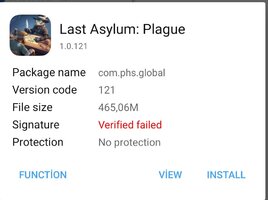
I first tried to install signed apk but same certificate error. Signature failed. I tried to install on Virtual master and same error. This screenshots your signed apk. I can't found a method to install it. :( My phone Android 15+
I first tried to install signed apk but same certificate error. Signature failed. I tried to install on Virtual master and same error. My phone Android 15+
I tested the Signed APK on Android 15 and it installs fine, so the file is OK. MT Manager's "signature failed" is a false alarm for this APK, Android uses a newer signature check.
The mod is ARM64 only, so it won't install in Virtual Master (32-bit) or on 32-bit phones. Please check:
1. Your phone is 64-bit (arm64-v8a), you can see it in an app like CPU-Z.
2. You have at least 2 GB free storage.
3. Download the Signed APK again (try the Mirror link) and install it with the normal Android installer, not MT Manager.
If it still fails, tell me your phone model.
This site uses cookies to help personalise content, tailor your experience and to keep you logged in if you register.
By continuing to use this site, you are consenting to our use of cookies.