VolcanoMods
Platinian On Fire
Playstore Link:

MacroDroid - Device Automation - Apps on Google Play
Number one automation app for Android - Over 30 million Downloads.
MacroDroid is a task automation and configuration app that focuses heavily on usability with a simple, attractive UI and logical step by step process.
==========
A few examples of what MacroDroid can automate:
==========
Turn on the Wifi connection when you launch a particular app (and off again when closed).
Auto respond to a specific incoming SMS by sending your current location.
Toggle the power button to tell you the time (without taking out of your pocket).
Use NFC tags to configure the device (turn on bluetooth, set volume etc).
==========
Creating a custom macro is easy:
==========
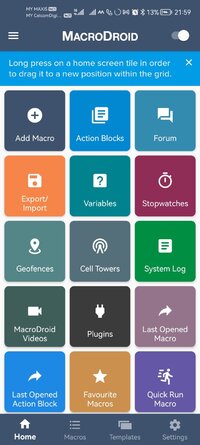
Click 'Add Macro'
Select a trigger from the list - (e.g. Battery Level).
Configure trigger specific settings (e.g. Battery Level - 10%)
Select an action from the list (e.g Configure Wifi)
Configure action specific setting (e.g. Disable Wifi)
Add more actions as required
(Optionally) add constraints from the list (e.g. Day of the Week)
Configure constraints as required (e.g. Saturday and Sunday)
Add more constraints as required
Choose a name and category for the macro
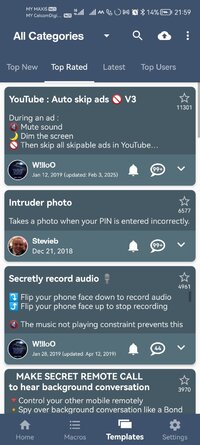
MacroDroid includes many built in and user shared templates to demonstrate the power and flexibility of the application and help you get started. These templates can be used as is, or easily customised to meet your needs.
This app uses the Device Administrator permission (BIND_DEVICE_ADMIN). This permission is used by the failed login trigger (nothing else) and will only be enabled if you explicitly give MacroDroid device admin access from within the app.
This app uses Accessibility services. It is a useful tool to help those with disabilities use their device more easily. MacroDroid is widely embraced by the blind community and those with limited motor skills to provide simple automations to greatly simplify device usage.
==========
Pro Version
==========
The free version of MacroDroid is limited to five macros and displays adverts. You can upgrade in the application to allow unlimited macros and remove all adverts. In addition Pro users can share their macros with the community using the built in template store.
=======
Support
=======
Please use the in-app forum for all usage questions and feature requests, or access the forums via http://www.macrodroid.com.
To report bugs or other issues please contact me at [email protected] with as much information as possible (including device and OS version).
What's New:
Version 5.60 (January 2026)
===========================
Added (Experimental) Debug Mode option in Edit Macro and Edit Action Block Screens to enable step by step debugging.
Added File Shared to MacroDroid trigger.
Updated Weather trigger to support option to use last known location (instead of a fixed location).
Updated Regular Interval trigger to support setting the interval and reference time by variable.
Updated Day/Time trigger to support setting the days and time by variable.
Updated Day of Week/Month trigger to support setting the days and time by variable.
Updated Enable/Disable macro option to add a user prompt option.
Updated Record Microphone action to support Ogg format with Opus encoding and added selectable sample/bit rate where applicable.
Updated Write to File action to support All Files Access mode (enables dynamic folder path).
Updated scene components to add configurable padding setting to each item.
Updated Text Shared to MacroDroid trigger to support capturing extras to a dictionary variable.
Updated Text Manipulation (Replace All) to add an optional conversion of \n to newlines (previous fixed behaviour).
Updated Clear Log action so it can clear only the log data for a specific macro.
Updated Notification Interaction action to support separate title and text filters.
Added save changes option to menu in Java and JavaScript editing screens.
Added text alignment option to scene button.
Added 'Create home screen shorcut' option to long press on action block list screen.
Fixed issue where File Changed Trigger would not work correclty when multiple triggers are monitoring the same directory.
Fixed issue where UDP Command action would not send new lines correctly.
Fixed issue with File Operation (All File Access) where it would not delete files correctly.
Fixed issue where action block/macro link would not appear in user log when using the 'Add macro link' option when running from an action block.
Fixed bug in Calendar trigger where a calendar end event would not fire if you had another calendar end event configured with advanced start time.
Fixed issue where HTTP PUT upload had a fixed 10 second timeout and would ignore whatever value was set.
Fixed issue where character set would not be saved correctly on Read Screenshot Contents action.
Fixed issue where floating text position would not be correct when in immersive mode (full screen) app.
Fixed issue where traditional Chinese language would not work in some cases.
==========
A few examples of what MacroDroid can automate:
==========
Turn on the Wifi connection when you launch a particular app (and off again when closed).
Auto respond to a specific incoming SMS by sending your current location.
Toggle the power button to tell you the time (without taking out of your pocket).
Use NFC tags to configure the device (turn on bluetooth, set volume etc).
==========
Creating a custom macro is easy:
==========
Click 'Add Macro'
Select a trigger from the list - (e.g. Battery Level).
Configure trigger specific settings (e.g. Battery Level - 10%)
Select an action from the list (e.g Configure Wifi)
Configure action specific setting (e.g. Disable Wifi)
Add more actions as required
(Optionally) add constraints from the list (e.g. Day of the Week)
Configure constraints as required (e.g. Saturday and Sunday)
Add more constraints as required
Choose a name and category for the macro
MacroDroid includes many built in and user shared templates to demonstrate the power and flexibility of the application and help you get started. These templates can be used as is, or easily customised to meet your needs.
This app uses the Device Administrator permission (BIND_DEVICE_ADMIN). This permission is used by the failed login trigger (nothing else) and will only be enabled if you explicitly give MacroDroid device admin access from within the app.
This app uses Accessibility services. It is a useful tool to help those with disabilities use their device more easily. MacroDroid is widely embraced by the blind community and those with limited motor skills to provide simple automations to greatly simplify device usage.
==========
Pro Version
==========
The free version of MacroDroid is limited to five macros and displays adverts. You can upgrade in the application to allow unlimited macros and remove all adverts. In addition Pro users can share their macros with the community using the built in template store.
=======
Support
=======
Please use the in-app forum for all usage questions and feature requests, or access the forums via http://www.macrodroid.com.
To report bugs or other issues please contact me at [email protected] with as much information as possible (including device and OS version).
What's New:
Version 5.60 (January 2026)
===========================
Added (Experimental) Debug Mode option in Edit Macro and Edit Action Block Screens to enable step by step debugging.
Added File Shared to MacroDroid trigger.
Updated Weather trigger to support option to use last known location (instead of a fixed location).
Updated Regular Interval trigger to support setting the interval and reference time by variable.
Updated Day/Time trigger to support setting the days and time by variable.
Updated Day of Week/Month trigger to support setting the days and time by variable.
Updated Enable/Disable macro option to add a user prompt option.
Updated Record Microphone action to support Ogg format with Opus encoding and added selectable sample/bit rate where applicable.
Updated Write to File action to support All Files Access mode (enables dynamic folder path).
Updated scene components to add configurable padding setting to each item.
Updated Text Shared to MacroDroid trigger to support capturing extras to a dictionary variable.
Updated Text Manipulation (Replace All) to add an optional conversion of \n to newlines (previous fixed behaviour).
Updated Clear Log action so it can clear only the log data for a specific macro.
Updated Notification Interaction action to support separate title and text filters.
Added save changes option to menu in Java and JavaScript editing screens.
Added text alignment option to scene button.
Added 'Create home screen shorcut' option to long press on action block list screen.
Fixed issue where File Changed Trigger would not work correclty when multiple triggers are monitoring the same directory.
Fixed issue where UDP Command action would not send new lines correctly.
Fixed issue with File Operation (All File Access) where it would not delete files correctly.
Fixed issue where action block/macro link would not appear in user log when using the 'Add macro link' option when running from an action block.
Fixed bug in Calendar trigger where a calendar end event would not fire if you had another calendar end event configured with advanced start time.
Fixed issue where HTTP PUT upload had a fixed 10 second timeout and would ignore whatever value was set.
Fixed issue where character set would not be saved correctly on Read Screenshot Contents action.
Fixed issue where floating text position would not be correct when in immersive mode (full screen) app.
Fixed issue where traditional Chinese language would not work in some cases.
*Special Features*
1. Pro Unlocked
Free Download:
! Hidden Content !
You must be registered and either click Like under this post or leave a comment before you can see the hidden links.
You may need to refresh the page after clicking Like. If you’re still having trouble revealing the hidden links, please
read this.
Did you know? VIP Members can see all links instantly, no unlocking required.
Interested? Get VIP here.
Interested? Get VIP here.