Playstore Link:
Mixing Station - Apps on Google Play
Remote control digital audio mixers with your smartphone or tablet
Requirements: 5.0+
Overview: Remote control digital audio mixers with your smartphone or tablet.
Image
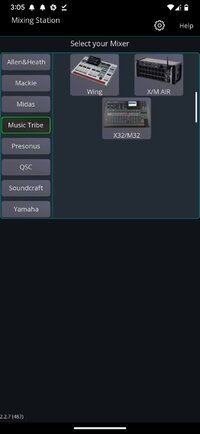
This app allows you to REMOTE CONTROL the following digital mixers:
- Behringer WING
- X32 / M32
- XAir / MR18
- A&H SQ series
- A&H Qu series
- A&H dLive series
- A&H Avantis series
- A&H GLD series
- Soundcraft Si series
- Soundcraft Vi series
- Mackie DL32S/16S DL32R DL1608
Note: In app purchases are required for certain mixers.
Features:
- Fully customizable UI
- Create unlimited DCA groups (IDCAs)
- Customizable layers, layouts, channel order and mutegroup labels
- RTA overlay in PEQ /GEQ view
- Channel linking and relative ganging
- Gain reduction history for gate and dynamics
- Peak hold for all meters, editable hold times
- Peq preview in channel strip
- High contrast mode for outdoor usage
- Popgroups
- Routing Matrix
- Up to 32 channels channels per layer
- Mix copy
- Feedback detection for ringing out wedges
- More features available depending on the connected mixer model
Note: This app is not a DAW! It does not play any audio! It is for remote controlling only.
For more details visit the manual:Mixing Station Docs
What's New:
Changelog 2.2.7
= Fixed
- Can't go back from layout when "open on startup" is used
- Crash when connecting to some DM3
- Layouts can't load when using embedded custom styles
- Not possible to exit layout with "open on startup" flag
- SL3: MS Scene: Output routing not recalled
- SL64S: Saving, then recalling MS Input Routes throw error, and doest recall any
- Soundcraft UI: Invalid Matrix sends
- Soundcraft UI: Remove invalid pans
Full changelog:Mixing Station
Overview: Remote control digital audio mixers with your smartphone or tablet.
Image
This app allows you to REMOTE CONTROL the following digital mixers:
- Behringer WING
- X32 / M32
- XAir / MR18
- A&H SQ series
- A&H Qu series
- A&H dLive series
- A&H Avantis series
- A&H GLD series
- Soundcraft Si series
- Soundcraft Vi series
- Mackie DL32S/16S DL32R DL1608
Note: In app purchases are required for certain mixers.
Features:
- Fully customizable UI
- Create unlimited DCA groups (IDCAs)
- Customizable layers, layouts, channel order and mutegroup labels
- RTA overlay in PEQ /GEQ view
- Channel linking and relative ganging
- Gain reduction history for gate and dynamics
- Peak hold for all meters, editable hold times
- Peq preview in channel strip
- High contrast mode for outdoor usage
- Popgroups
- Routing Matrix
- Up to 32 channels channels per layer
- Mix copy
- Feedback detection for ringing out wedges
- More features available depending on the connected mixer model
Note: This app is not a DAW! It does not play any audio! It is for remote controlling only.
For more details visit the manual:Mixing Station Docs
What's New:
Changelog 2.2.7
= Fixed
- Can't go back from layout when "open on startup" is used
- Crash when connecting to some DM3
- Layouts can't load when using embedded custom styles
- Not possible to exit layout with "open on startup" flag
- SL3: MS Scene: Output routing not recalled
- SL64S: Saving, then recalling MS Input Routes throw error, and doest recall any
- Soundcraft UI: Invalid Matrix sends
- Soundcraft UI: Remove invalid pans
Full changelog:Mixing Station
*Special Features*
● Pro Unlocked
● AOSP
● Full Multi Languages
● Architectures: arm64-v8a, armeabi-v7a, x86, x86_64
♤ credit ♤ - ► : vedserega
Free Download:
! Hidden Content !
You must be registered and either click Like under this post or leave a comment before you can see the hidden links.
You may need to refresh the page after clicking Like. If you’re still having trouble revealing the hidden links, please
read this.
Did you know? VIP Members can see all links instantly, no unlocking required.
Interested? Get VIP here.
Interested? Get VIP here.