Help! Mob Control 2.78.0: How to hack Skip It's?

Assuagement

Rookie
I found out how to manipulate with amount of golden coins, amount of heroes cards, levels of heroes, XP of buildings.

But i still can't find the way how to get unlimited amount of Skip It's and points of in-building upgrade.

If there's someone who knows how to do this, please, let me know.

I've used Game Guardian to do the whole thing.
 
There are other ways to change values in the game manually. Here is how you can edit your save data files:

  1. Close the Game Completely: Make sure Mob Control is fully closed and cleared from your background apps.
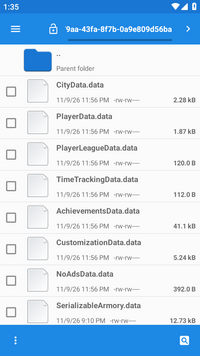
  2. Locate the Folder: Use an on-device file manager app (like ZArchiver) or connect your phone to a PC. Navigate to:

    Android/data/com.vincentb.MobControl/files/NakamaLocal
  3. Open CityData.data: Find the file named CityData.data and open it with a text editor. Copy all of the text inside.
  4. Decode Base64: Go to any online Base64 decoder website, paste the text into the empty field, scroll down, and click Decode.
  5. Edit Your Values: Look through the decoded text to find your current city levels. Edit the numbers to your desired values (following the appropriate limits, such as maxing out your cities up to 50, 100, 100, 100).
  6. Encode Back: Copy all of the edited text, paste it into a Base64 encoder, and click Encode.
  7. Save the File: Paste the newly encoded string back into your CityData.data file, overwrite it, and save.
Verification: Launch the game and check your city levels to confirm the changes took effect properly.
 

Part 2: How to Edit Skipets Safely (SkipetsData.data)​

If you want to modify your Skipets using the specific save file, follow these exact steps to avoid bans or sync flags:

  1. Open SkipetsData.data: In the same NakamaLocal folder, locate and open SkipetsData.data with a text editor and copy its contents.
  2. Decode Base64: Paste the contents into an online Base64 decoder and click Decode to view the readable JSON structure.
  3. Update Your Quantities Safely:
    • Locate m_OwnedAmount and your m_SkipetsStorage block (m_Earned and m_Spent).
    • Always update both m_OwnedAmount and m_SkipetsStorage.m_Earned by the exact same delta increment so your internal math audit logs match (Earned - Spent).
    • Use conservative increments (like adding smaller, realistic amounts rather than massive spikes) to keep your account behavior looking natural.
  4. Preserve Status Flags: Ensure that m_WereSkipetsPurchased remains true and m_AreSkipetsPaused remains false so the game's security flags don't trigger.
  5. Re-Encode & Save: Copy your modified decoded text, paste it into a Base64 encoder, click Encode, and paste the resulting string back into SkipetsData.data, then save the file.
Verification: Open the game up and check your Skipets balance to ensure everything loaded without a sync error.
 

Attachments

  • Screenshot_20261110-013539.png
    Screenshot_20261110-013539.png
    84.9 KB · Views: 12
Adding to what others found here: Skip It's are the hard part in Mob Control because in the newer builds the ticket count is validated against the server, so even when you find and change the value in GameGuardian it tends to revert after the next sync, and as moetox01 said, forcing it can flag the account. What works reliably is the building points trick mentioned above: set a building level to 151 to grab the 150 skill points, spend them, then set the level back to 100 so nothing looks off. For coins and hero cards, searching the exact value as DWORD right after a match and refining once usually isolates the address within two or three passes. Editing while offline and only reconnecting after you are done also helps, since the check happens at sync time.
I tried mod from other side can add skip it and mob token.. And work normally without banned.and people in Facebook talking about it, the top player using thats hack to reach top in war clan etc
 
You are not failing to find the address. Skip Its are audited on the server, which is why every GameGuardian edit you make gets corrected back. The NakamaLocal folder in the game's data is the giveaway - the client keeps a local mirror of your save and reconciles it at sync, so a raw memory write is only ever a temporary lie.

Coins and hero cards survive a GG edit because they are simple counters. Skip Its are not - they are stored as Earned minus Spent, and the game checks that the arithmetic holds. Change the total without changing the ledger and the next sync rewinds you. Change both and it sticks.

So drop GG for this and edit the save file instead. Credit to @Bangerfist for the method, this is his finding expanded.

Before you start
  • Back up the whole NakamaLocal folder to somewhere outside the game directory. If a sync error appears you restore it and lose nothing.
  • Fully close the game and kill it from recents. Do not just minimise it - the file is written on background and you will overwrite your own edit.
  • Do this on an alt if you care about the account. @moetox01 already reported a ban from forcing the value in memory.

1. Locate the file
Path:

Code:
Android/data/com.vincentb.MobControl/files/NakamaLocal

Open SkipetsData.data with a text editor, select everything, copy it.

2. Decode it
Paste the string into any Base64 decoder and decode. You get readable JSON.

3. Make the edit that survives
Find two things:

  • m_OwnedAmount
  • m_SkipetsStorage with its m_Earned and m_Spent pair
Raise m_OwnedAmount and m_SkipetsStorage.m_Earned by the same delta. If you add 500 to one and 500 to the other, the audit still balances and the server accepts it. Add to the total only and it gets rolled back on the next sync, which is exactly what you have been seeing.

Leave m_Spent alone.

4. Preserve the flags
  • m_WereSkipetsPurchased must stay true
  • m_AreSkipetsPaused must stay false
Flip either and the game treats the account as having an odd state, which is what triggers the flags people call bans.

5. Encode and write back
Copy the edited JSON, Base64 encode it, paste the result back over the whole contents of SkipetsData.data, save. Launch the game and check the balance. If it loads without a sync error, you are done. If you get a sync error, close the game and restore your backup.

6. Keep the numbers plausible
Adding 50,000 in one go works but is the most visible thing you can do. Adding 200 to 500 per session, with matching m_Earned, looks like normal play and survives far longer.

Building points - do this one first, it is safest
No file editing and no risk. From @Yoshi211001 and @sargentocheems: raise a building's level to 151 (or 199 for the 200 case), collect the 150 skill points that unlock at that level, spend them all, then set the level back to 100 so nothing looks out of place. Repeat per building. This is the only part of your question with a clean answer and no audit trail behind it.

Same file, other values
CityData.data in the same folder holds city levels, and the same Base64 round trip applies. Stay inside the caps - 50 / 100 / 100 / 100 - because exceeding a cap is an instant mismatch at sync.

Why GG still has a use
For coins and hero cards, keep doing what already works for you: search the exact value as DWORD right after a match and refine. Those are not audited, so a memory write is enough and you never touch a file. Just do it offline and reconnect only when you are finished - the check runs at sync, not while you play.

 
You are not failing to find the address. Skip Its are audited on the server, which is why every GameGuardian edit you make gets corrected back. The NakamaLocal folder in the game's data is the giveaway - the client keeps a local mirror of your save and reconciles it at sync, so a raw memory write is only ever a temporary lie.

Coins and hero cards survive a GG edit because they are simple counters. Skip Its are not - they are stored as Earned minus Spent, and the game checks that the arithmetic holds. Change the total without changing the ledger and the next sync rewinds you. Change both and it sticks.

So drop GG for this and edit the save file instead. Credit to @Bangerfist for the method, this is his finding expanded.

Before you start
  • Back up the whole NakamaLocal folder to somewhere outside the game directory. If a sync error appears you restore it and lose nothing.
  • Fully close the game and kill it from recents. Do not just minimise it - the file is written on background and you will overwrite your own edit.
  • Do this on an alt if you care about the account. @moetox01 already reported a ban from forcing the value in memory.

1. Locate the file
Path:

Code:
Android/data/com.vincentb.MobControl/files/NakamaLocal

Open SkipetsData.data with a text editor, select everything, copy it.

2. Decode it
Paste the string into any Base64 decoder and decode. You get readable JSON.

3. Make the edit that survives
Find two things:

  • m_OwnedAmount
  • m_SkipetsStorage with its m_Earned and m_Spent pair
Raise m_OwnedAmount and m_SkipetsStorage.m_Earned by the same delta. If you add 500 to one and 500 to the other, the audit still balances and the server accepts it. Add to the total only and it gets rolled back on the next sync, which is exactly what you have been seeing.

Leave m_Spent alone.

4. Preserve the flags
  • m_WereSkipetsPurchased must stay true
  • m_AreSkipetsPaused must stay false
Flip either and the game treats the account as having an odd state, which is what triggers the flags people call bans.

5. Encode and write back
Copy the edited JSON, Base64 encode it, paste the result back over the whole contents of SkipetsData.data, save. Launch the game and check the balance. If it loads without a sync error, you are done. If you get a sync error, close the game and restore your backup.

6. Keep the numbers plausible
Adding 50,000 in one go works but is the most visible thing you can do. Adding 200 to 500 per session, with matching m_Earned, looks like normal play and survives far longer.

Building points - do this one first, it is safest
No file editing and no risk. From @Yoshi211001 and @sargentocheems: raise a building's level to 151 (or 199 for the 200 case), collect the 150 skill points that unlock at that level, spend them all, then set the level back to 100 so nothing looks out of place. Repeat per building. This is the only part of your question with a clean answer and no audit trail behind it.

Same file, other values
CityData.data in the same folder holds city levels, and the same Base64 round trip applies. Stay inside the caps - 50 / 100 / 100 / 100 - because exceeding a cap is an instant mismatch at sync.

Why GG still has a use
For coins and hero cards, keep doing what already works for you: search the exact value as DWORD right after a match and refine. Those are not audited, so a memory write is enough and you never touch a file. Just do it offline and reconnect only when you are finished - the check runs at sync, not while you play.


Appreciate the detailed breakdown! You hit the nail on the head regarding why memory edits on audited counters get rolled back during syncs—editing the underlying file directly is definitely the safer, more persistent route to bypass those server checks. Thanks for sharing the extra tips on keeping the delta numbers plausible too!
 
You are not failing to find the address. Skip Its are audited on the server, which is why every GameGuardian edit you make gets corrected back. The NakamaLocal folder in the game's data is the giveaway - the client keeps a local mirror of your save and reconciles it at sync, so a raw memory write is only ever a temporary lie.

Coins and hero cards survive a GG edit because they are simple counters. Skip Its are not - they are stored as Earned minus Spent, and the game checks that the arithmetic holds. Change the total without changing the ledger and the next sync rewinds you. Change both and it sticks.

So drop GG for this and edit the save file instead. Credit to @Bangerfist for the method, this is his finding expanded.

Before you start
  • Back up the whole NakamaLocal folder to somewhere outside the game directory. If a sync error appears you restore it and lose nothing.
  • Fully close the game and kill it from recents. Do not just minimise it - the file is written on background and you will overwrite your own edit.
  • Do this on an alt if you care about the account. @moetox01 already reported a ban from forcing the value in memory.

1. Locate the file
Path:

Code:
Android/data/com.vincentb.MobControl/files/NakamaLocal

Open SkipetsData.data with a text editor, select everything, copy it.

2. Decode it
Paste the string into any Base64 decoder and decode. You get readable JSON.

3. Make the edit that survives
Find two things:

  • m_OwnedAmount
  • m_SkipetsStorage with its m_Earned and m_Spent pair
Raise m_OwnedAmount and m_SkipetsStorage.m_Earned by the same delta. If you add 500 to one and 500 to the other, the audit still balances and the server accepts it. Add to the total only and it gets rolled back on the next sync, which is exactly what you have been seeing.

Leave m_Spent alone.

4. Preserve the flags
  • m_WereSkipetsPurchased must stay true
  • m_AreSkipetsPaused must stay false
Flip either and the game treats the account as having an odd state, which is what triggers the flags people call bans.

5. Encode and write back
Copy the edited JSON, Base64 encode it, paste the result back over the whole contents of SkipetsData.data, save. Launch the game and check the balance. If it loads without a sync error, you are done. If you get a sync error, close the game and restore your backup.

6. Keep the numbers plausible
Adding 50,000 in one go works but is the most visible thing you can do. Adding 200 to 500 per session, with matching m_Earned, looks like normal play and survives far longer.

Building points - do this one first, it is safest
No file editing and no risk. From @Yoshi211001 and @sargentocheems: raise a building's level to 151 (or 199 for the 200 case), collect the 150 skill points that unlock at that level, spend them all, then set the level back to 100 so nothing looks out of place. Repeat per building. This is the only part of your question with a clean answer and no audit trail behind it.

Same file, other values
CityData.data in the same folder holds city levels, and the same Base64 round trip applies. Stay inside the caps - 50 / 100 / 100 / 100 - because exceeding a cap is an instant mismatch at sync.

Why GG still has a use
For coins and hero cards, keep doing what already works for you: search the exact value as DWORD right after a match and refine. Those are not audited, so a memory write is enough and you never touch a file. Just do it offline and reconnect only when you are finished - the check runs at sync, not while you play.


Thanks again for breaking down the server-side audit mechanics, @Wxrnin Just dropping a quick note here to let everyone know I've posted an important update and safety guide with rules for editing cards and avoiding loading loops right above.
 
Thanks again for breaking down the server-side audit mechanics, @Wxrnin Just dropping a quick note here to let everyone know I've posted an important update and safety guide with rules for editing cards and avoiding loading loops right above.
No problem, I'm here to help but not spoonfeed. I'll maybe spoonfeed here and there when I feel like it but I'm not always spoonfeeding haha, I'd prefer let everyone learn by themselves while I explain the best route for their learning path. Once again, your all welcome.
 
No problem, I'm here to help but not spoonfeed. I'll maybe spoonfeed here and there when I feel like it but I'm not always spoonfeeding haha, I'd prefer let everyone learn by themselves while I explain the best route for their learning path. Once again, your all welcome.
Totally agree, teaching the mechanics is definitely the way to go so everyone learns how it works safely. Thanks again!
 
Back
Top Bottom