Playstore Link :

MobilePDF Editor: Image to PDF - Apps on Google Play
All-in-one PDF editor & scanner: edit, annotate, sign, merge, split PDF
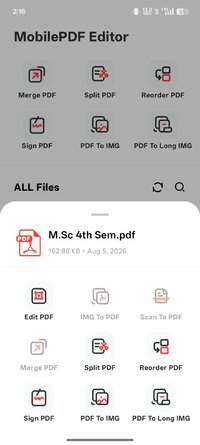
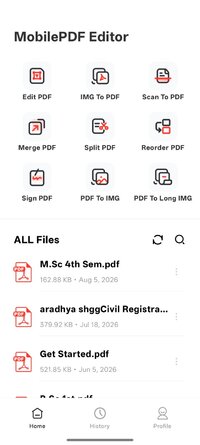
You can edit, annotate, scan, sign, convert, and reorganize PDFs anytime and anywhere. It helps you achieve a paperless workflow for work and study, perfectly suitable for office workers, students, and freelancers.
PDF Edit & Annotate
Freely draw, comment, highlight, and mark up PDFs. Emphasize key content and add notes or handwritten remarks with ease.
Image to PDF
Batch convert photos and screenshots into high-quality PDF files in one tap. Ideal for organizing notes, certificates, and various documents.
Scan to PDF
Use your camera to scan paper documents, receipts, whiteboard notes, and certificates. Generate standard and clear PDF files instantly.
 Split & Merge PDFs
Extract specific pages from large PDFs or combine multiple files into one. Easily manage lengthy documents.
Reorder PDF Pages
Drag and drop to adjust page sequences. Freely reorganize reports, resumes, and all kinds of materials.
PDF Signature
Create handwritten signatures or import signature images. Sign contracts, forms, and agreements anytime, going completely paperless.
PDF to Image
Export single pages or entire PDFs into high-definition images for saving, sharing, and further editing.
PDF to Long Image
Merge multiple PDF pages into one long image while keeping the original layout. Easily share articles, study notes, and work reports without page separation.
Instant Import & Use
Import PDFs, pictures, and scanned files from your gallery, file manager, or camera. Start editing, signing, splitting, and converting without extra conversion steps.
Advanced Editing & Reusable Signatures
Use rich markup and highlighting tools. Save multiple signatures for repeated use on any document to boost productivity.
Local Privacy Protection
All your PDFs, images, and signatures are stored locally on your device. We strictly respect user privacy and will never access, leak, or share your personal files without authorization.
Ideal for scenarios:
 Contracts, invoices & office forms
Study notes, courses & reports
Certificates, applications & archives
Daily receipts, business & study documents
PDF Edit & Annotate
Freely draw, comment, highlight, and mark up PDFs. Emphasize key content and add notes or handwritten remarks with ease.
Image to PDF
Batch convert photos and screenshots into high-quality PDF files in one tap. Ideal for organizing notes, certificates, and various documents.
Scan to PDF
Use your camera to scan paper documents, receipts, whiteboard notes, and certificates. Generate standard and clear PDF files instantly.
Split & Merge PDFsExtract specific pages from large PDFs or combine multiple files into one. Easily manage lengthy documents.
Reorder PDF Pages
Drag and drop to adjust page sequences. Freely reorganize reports, resumes, and all kinds of materials.
PDF Signature
Create handwritten signatures or import signature images. Sign contracts, forms, and agreements anytime, going completely paperless.
PDF to Image
Export single pages or entire PDFs into high-definition images for saving, sharing, and further editing.
PDF to Long Image
Merge multiple PDF pages into one long image while keeping the original layout. Easily share articles, study notes, and work reports without page separation.
Instant Import & Use
Import PDFs, pictures, and scanned files from your gallery, file manager, or camera. Start editing, signing, splitting, and converting without extra conversion steps.
Advanced Editing & Reusable Signatures
Use rich markup and highlighting tools. Save multiple signatures for repeated use on any document to boost productivity.
Local Privacy Protection
All your PDFs, images, and signatures are stored locally on your device. We strictly respect user privacy and will never access, leak, or share your personal files without authorization.
Ideal for scenarios:
Contracts, invoices & office forms Study notes, courses & reports Certificates, applications & archives Daily receipts, business & study documents*Special Features*
☆PRO features unlocked
☆Apk Fully Optimized
☆Ads Layout removed/Ad activity Removed
☆Optimized Graphics/Zipaligned
☆Remove default .source name of java files;
☆Cleaned Package for fast load
☆Debug Info Removed
Free Download:
! Hidden Content !
You must be registered and either click Like under this post or leave a comment before you can see the hidden links.
You may need to refresh the page after clicking Like. If you’re still having trouble revealing the hidden links, please
read this.
Did you know? VIP Members can see all links instantly, no unlocking required.
Interested? Get VIP here.
Interested? Get VIP here.