Playstore Link :
https://****/mtmanager
MT Manager v2.18.5 build 25070709
Requirements: 5.0 and up
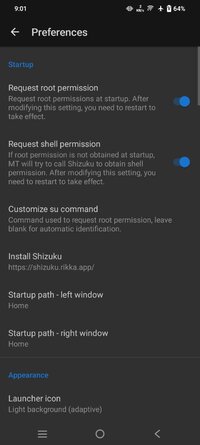
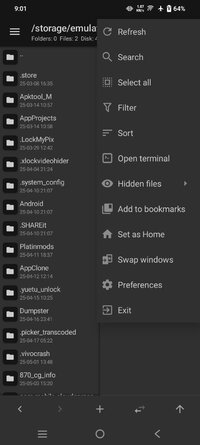
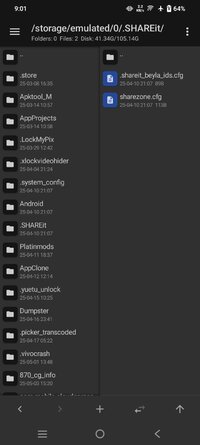
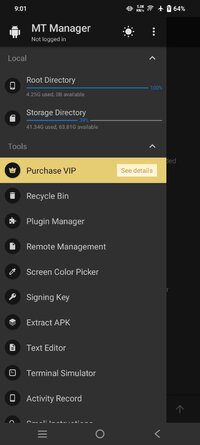
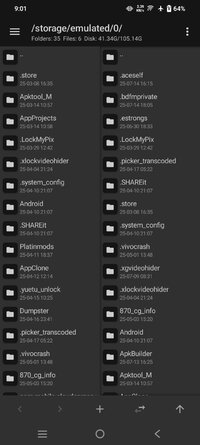
Overview: MT Manager is a very powerful file manager and apk editor, you can use it to do a lot of things on your device, such as managing files, modifying and translating applications, editing text and so on.
Features:
- FTP client
- Viewing the java code
- Support for keystore and jks signatures [VIP]
- Search History
- Search in XML files
- Search by ID in arsc
- Support for several dictionaries in the translator (UTF-8 without BOM) [VIP]
- Removing and adding localizations
- Fast transfer of unique strings to the desired localization
- Batch operations (delete, copy, move, rename)
- APK/ZIP Signing
- Cloning of APKs
- Optimizing APK
- APK Encryption
- Creating a backup (.bak)
- Convenient color change in arsc
- Current Activities List
- Remote access via WiFi
- Decompilation / Compiling XML [VIP] (non-vip is limited to only 200-lines)
- Arsc Editor
- DEX Editor
- Fix DEX files [VIP]
- Text editor with syntax highlighting
- Comparison of text files up to 500 KB [VIP]
- View fonts (.ttf)
- Executing scripts
- Working with RAR (opening / unpacking)
- Work with ZIP (compression / unpacking)
- Multi-choice
- View / edit / delete / add classes, methods, domains, permanent
- Baidu Translator, Yandex and Google [VIP]
What's New:
-- All types of network storage support a separate configuration of thumbnail loading options
- Object Storage S3 supports separately configuring the domain name used when downloading files (which can solve the problem that Tencent Cloud COS cannot download APK/IPA files)
- Object storage S3 automatically sets the file Content-Type type when uploading a file
- fixes object storage incompatibility with Cloudflare R2 and supports loading Bucket with one click
- Fixes an issue where the SFTP feature does not support some modern encryption algorithms resulting in an inability to connect
- fix for incompatibility and garbled characters in the WebDav functionality for some special file names
- Prioritize APK Installer: Shizuku > Dhizuku
- The APK icon extraction function supports selecting the extraction format (ZIP/PNG/WEBP)
- There is no need to unpack/download the vector svg/xml file locally first when converting it
- Optimize adding files to ZIP and tick Delete source files, do not delete files that are skipped
- Optimize the dex2jar function to not replace ‘-’ with ‘_’ when handling Lambada class names
- fix an issue with Dex string decryption feature
- Optimize the cover image display scheme of the music player notification bar
- The music player supports extracting picture files by long pressing the cover
- support to display the actual size of KernelSU’s modules.img sparse file
- New main setting options: Swipe the bookmark gesture to distinguish left and right. Please see the instructions in the settings for specific usage
- The text editor will retain the scrolling position versus the cursor position instead of going back to the top after reloading the file
- ParseColor, the text editor syntax highlighting engine, adds RGBX/XRGB types, please see the official website documentation for details
- The text comparator can select multiple difference texts and send them all to the other side (previously only sending a single difference text was supported)
- Fix the problem of playing only one music file in list loop and shuffle mode, and it will get stuck after playback is completed
- fix for not reloading the list of manually hidden files after restoring the cloud backup
- Fixes an issue where the remote administration function sometimes fails to obtain the IP address
Requirements: 5.0 and up
Overview: MT Manager is a very powerful file manager and apk editor, you can use it to do a lot of things on your device, such as managing files, modifying and translating applications, editing text and so on.
Features:
- FTP client
- Viewing the java code
- Support for keystore and jks signatures [VIP]
- Search History
- Search in XML files
- Search by ID in arsc
- Support for several dictionaries in the translator (UTF-8 without BOM) [VIP]
- Removing and adding localizations
- Fast transfer of unique strings to the desired localization
- Batch operations (delete, copy, move, rename)
- APK/ZIP Signing
- Cloning of APKs
- Optimizing APK
- APK Encryption
- Creating a backup (.bak)
- Convenient color change in arsc
- Current Activities List
- Remote access via WiFi
- Decompilation / Compiling XML [VIP] (non-vip is limited to only 200-lines)
- Arsc Editor
- DEX Editor
- Fix DEX files [VIP]
- Text editor with syntax highlighting
- Comparison of text files up to 500 KB [VIP]
- View fonts (.ttf)
- Executing scripts
- Working with RAR (opening / unpacking)
- Work with ZIP (compression / unpacking)
- Multi-choice
- View / edit / delete / add classes, methods, domains, permanent
- Baidu Translator, Yandex and Google [VIP]
What's New:
-- All types of network storage support a separate configuration of thumbnail loading options
- Object Storage S3 supports separately configuring the domain name used when downloading files (which can solve the problem that Tencent Cloud COS cannot download APK/IPA files)
- Object storage S3 automatically sets the file Content-Type type when uploading a file
- fixes object storage incompatibility with Cloudflare R2 and supports loading Bucket with one click
- Fixes an issue where the SFTP feature does not support some modern encryption algorithms resulting in an inability to connect
- fix for incompatibility and garbled characters in the WebDav functionality for some special file names
- Prioritize APK Installer: Shizuku > Dhizuku
- The APK icon extraction function supports selecting the extraction format (ZIP/PNG/WEBP)
- There is no need to unpack/download the vector svg/xml file locally first when converting it
- Optimize adding files to ZIP and tick Delete source files, do not delete files that are skipped
- Optimize the dex2jar function to not replace ‘-’ with ‘_’ when handling Lambada class names
- fix an issue with Dex string decryption feature
- Optimize the cover image display scheme of the music player notification bar
- The music player supports extracting picture files by long pressing the cover
- support to display the actual size of KernelSU’s modules.img sparse file
- New main setting options: Swipe the bookmark gesture to distinguish left and right. Please see the instructions in the settings for specific usage
- The text editor will retain the scrolling position versus the cursor position instead of going back to the top after reloading the file
- ParseColor, the text editor syntax highlighting engine, adds RGBX/XRGB types, please see the official website documentation for details
- The text comparator can select multiple difference texts and send them all to the other side (previously only sending a single difference text was supported)
- Fix the problem of playing only one music file in list loop and shuffle mode, and it will get stuck after playback is completed
- fix for not reloading the list of manually hidden files after restoring the cloud backup
- Fixes an issue where the remote administration function sometimes fails to obtain the IP address
*Special Features*
Package Info:
● Languages: Full Multi Languages;
● CPUs: armeabi-v7a, arm64-v8a, x86, x86_64
● Screen DPIs: 160dpi, 240dpi, 320dpi, 480dpi, 640dpi;
● Untouched apk with Original Hash Signature, no [Mod] or changes was applied;
● Certificate MD5 digest: 1a32f661095560285c0f7ea0b521cb45
Free Download:
! Hidden Content !
You must be registered and either click Like under this post or leave a comment before you can see the hidden links.
You may need to refresh the page after clicking Like. If you’re still having trouble revealing the hidden links, please
read this.
Did you know? VIP Members can see all links instantly, no unlocking required.
Interested? Get VIP here.
Interested? Get VIP here.