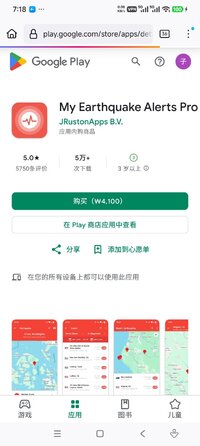
Playstore Link:

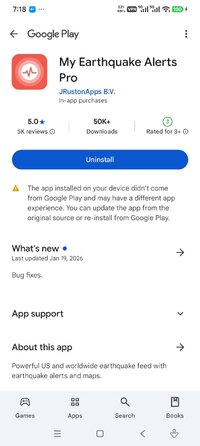
My Earthquake Alerts Pro - Apps on Google Play
Powerful US and worldwide earthquake feed with earthquake alerts and maps.
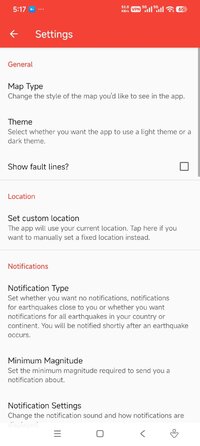
My Earthquake Alerts Pro is a powerful earthquake monitoring app which delivers all of the information you need, with push notifications included. It also includes a beautifully simple design optimized for the latest versions of Android.
FEATURES
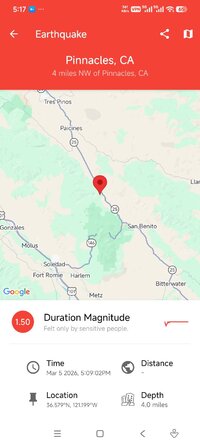
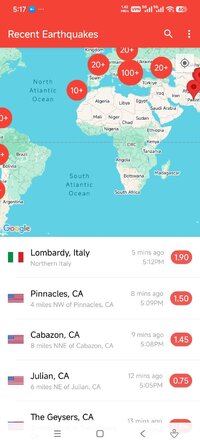
- Live quake map which can detect and track earthquakes from all around the world.
- Earthquake alerts customized for you, with no restrictions.
- Powerful search feature to find earthquake history dating back to 1970!
- Beautiful & simple design - view the quake feed on a map and in a list.
- Find the exact location, the depth and the distance away from you.
- Uses information from a wide variety of US and worldwide earthquake networks, including the USGS and EMSC.
- Pro version offers the same great functionality of My Earthquake Alerts but without any advertisements!
If you need information or notifications about the latest earthquakes near to you, download My Earthquake Alerts Pro today.
FEATURES
- Live quake map which can detect and track earthquakes from all around the world.
- Earthquake alerts customized for you, with no restrictions.
- Powerful search feature to find earthquake history dating back to 1970!
- Beautiful & simple design - view the quake feed on a map and in a list.
- Find the exact location, the depth and the distance away from you.
- Uses information from a wide variety of US and worldwide earthquake networks, including the USGS and EMSC.
- Pro version offers the same great functionality of My Earthquake Alerts but without any advertisements!
If you need information or notifications about the latest earthquakes near to you, download My Earthquake Alerts Pro today.
*Special Features*
● Supported Languages: af, am, ar, as, az, be, bg, bn, bs, ca, cs, da, de, el, en-AU, en-CA, en-GB, en-IN, en-XC, es, es-419, es-US, et, eu, fa, fi, fr, fr-CA, gl, gu, hi, hr, hu, hy, in, is, it, iw, ja, ka, kk, km, kn, ko, ky, lo, lt, lv, mk, ml, mn, mr, ms, my, nb, ne, nl, nn, no, or, pa, pl, pt, pt-BR, pt-PT, ro, ru, si, sk, sl, sq, sr, sr-Latn, sv, sw, ta, te, th, tl, tr, uk, ur, uz, vi, zh, zh-CN, zh-HK, zh-TW, zu;
● Supported Cpu Architecture: Armeabi-v7a, Arm64-v8a, X86, X86_64;
● Supported Screen Dpi: Ldpi, Mdpi, Tvdpi, Hdpi, Xhdpi, Xxhdpi, Xxxhdpi.
● Untouch Paid Apk With Original Hash Signature.
● Certificate MD5 Digest: 5580eb2ffaf9ac6521460e2b855164a3.
.Apks Bundle Installation:
SAI Instructions: [No Root]
1. Download And Install Latest SAI App (Split APK Installer) - Releases · Aefyr/SAI
2. Download this .apks Archive App;
3. Install And Open SAI / Choose "Install APKs" Button / Find And Select Downloaded .apks Archive App;
4. Wait For Install And Done. Enjoy!.
Lucky Patcher Instructions: [No Root]
1. Download And Install Latest Lucky Patcher App;
2. Install And Open Lucky Patcher And Choose 'Rebuild & Install';
3. Find And Select Downloaded This .apks Archive App;
4. Wait For Install And Done. Enjoy!.
PS: Make Sure After Open SAI or Lucky Patcher You Allowed Storage Permission And Install Unknown Apps Permission!
Credit: TryRoom
Free Download:
! Hidden Content !
You must be registered and either click Like under this post or leave a comment before you can see the hidden links.
You may need to refresh the page after clicking Like. If you’re still having trouble revealing the hidden links, please
read this.
Did you know? VIP Members can see all links instantly, no unlocking required.
Interested? Get VIP here.
Interested? Get VIP here.