Help! NDK (ARMv7) LGL MOD MENU ERROR

HaloKokaine

Platinian
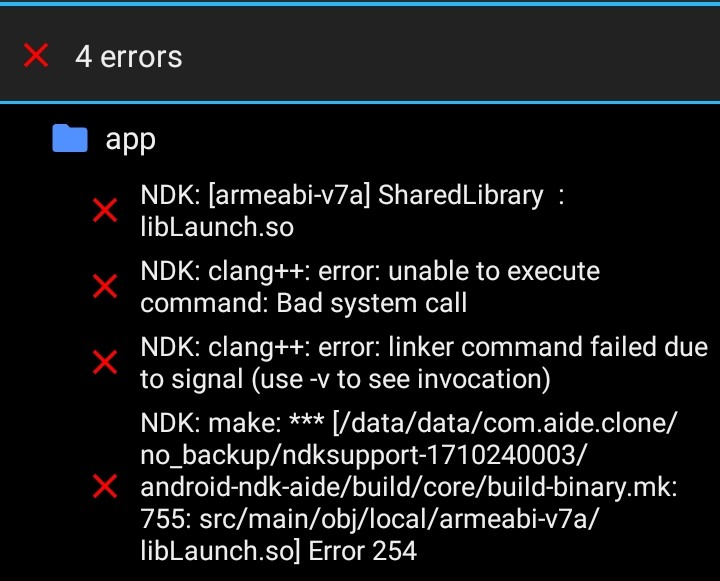
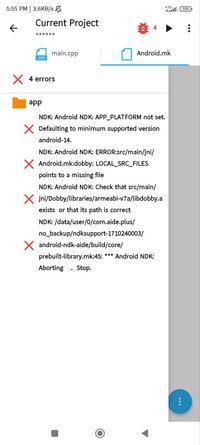
I have a system based on the 32-bit architecture (armv7) I did all the processes correctly, I installed the ndk armv7 (in AIDE) I did the Application.mk settings, but it still gives this error... If it's a newbie error, I'm sorry. I am now entering in this mod world, hope you understand. By the way, thanks for the help!(Application.mk)
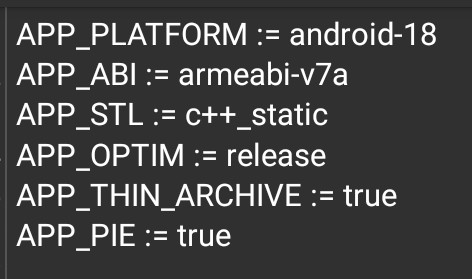
Screenshot_20220120_024029.jpg


(Error)
Screenshot_20220120_024121.jpg
 
You can try to install NDK Aide Support, but the lgl mod menu will not run there, you can try to use the menu that I will give, but this is not an ordinary menu, it is without access to the top of windows and without using android manifes, write to me in discord Re-Code#9102 and I will give you a draft of this menu
 
You can try to install NDK Aide Support, but the lgl mod menu will not run there, you can try to use the menu that I will give, but this is not an ordinary menu, it is without access to the top of windows and without using android manifes, write to me in discord Re-Code#9102 and I will give you a draft of this menu
I have the same problem
 
Try download 3.2. Releases · LGLTeam/Android-Mod-Menu

If you still have problem, your device have a problem. It is working fine on my Android 6 and my friend's Android 11 phone

Troubleshooting
Problem with the project like app crashes: click More... -> Project -> Refresh Build. This will clear the project cache and fix problems

Problem with AIDE: Open System Settings -> Apps and clear data of AIDE app. This will reset everything and you need to install NDK again

AIDE has a lot of compatibility issues, you need to research a lot and do some trial and errors until you fix something.
 
Try download 3.2. Releases · LGLTeam/Android-Mod-Menu

If you still have problem, your device have a problem. It is working fine on my Android 6 and my friend's Android 11 phone

Troubleshooting
Problem with the project like app crashes: click More... -> Project -> Refresh Build. This will clear the project cache and fix problems

Problem with AIDE: Open System Settings -> Apps and clear data of AIDE app. This will reset everything and you need to install NDK again

AIDE has a lot of compatibility issues, you need to research a lot and do some trial and errors until you fix something.
The NDK you give for arm32 really doesn't work
 
I use ndk-32 . I have put the ndk-32 in aide and install it . install has succefull . But when I build lgl mod menu,it says some errors . Can you guys help how can i solve it?
 
Hi please am having problem building my scr and am using 32bit phone can someone help me pls
Bro i have this problem too . May you can solve it by using these tips:
1) first you have to understand why it says error . You should follow the reasons
2) if you have understood the reasons of error,then edit your file what you are using now

You can try this 2 tips .

My idea about errors with ndk-32:
I think that ndk-32 is not a correct file . It can has some wrongs .
We can get helps from chatgpt,lgl team .
 
Back
Top Bottom