Playstore Link :

NoNet: Block Internet for Apps - Apps on Google Play
Boost focus: Block internet for distracting apps and improve your productivity.
NoNet is a simple and secure tool that lets you choose exactly which apps can stay online and which should stay offline.
Why Choose NoNet?
• Block distracting social media and chat apps while working or studying.
• Block internet access for banking, shopping, or work apps when handing your phone to a child.
• Play offline games without pop-ups or background updates.
• Block chat apps while sharing your screen during a presentation.
• Block work-related apps after working hours while keeping streaming and music apps online.
• Prevent data-hungry apps from consuming mobile data while traveling.
Productivity Timer
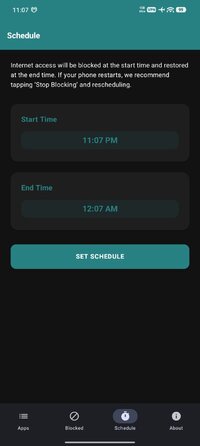
• Schedule focus sessions using the Custom Timer.
• Automatically restore internet access when the timer ends.
How to Use
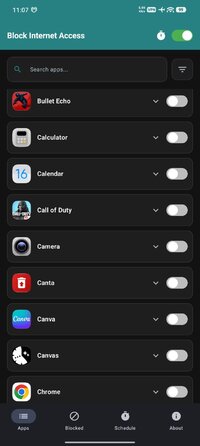
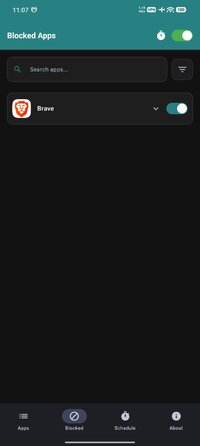
• Select: Open NoNet to see a list of installed apps.
• Toggle: Search for the app you want to block and switch it on.
• Focus: Turn on the master toggle at the top.
• Selected apps stay offline while other apps continue working.
How It Works
NoNet uses the Android VpnService to manage per-app network connectivity. It creates a local tunnel on your device and acts as a gatekeeper for network traffic. If an app is blocked, its traffic is stopped locally.
Privacy & Permissions
• All processing happens locally on your phone.
• No external servers are used to route your traffic.
• Minimal permissions are requested.
• No contact or gallery access is required.
Why Choose NoNet?
• Block distracting social media and chat apps while working or studying.
• Block internet access for banking, shopping, or work apps when handing your phone to a child.
• Play offline games without pop-ups or background updates.
• Block chat apps while sharing your screen during a presentation.
• Block work-related apps after working hours while keeping streaming and music apps online.
• Prevent data-hungry apps from consuming mobile data while traveling.
Productivity Timer
• Schedule focus sessions using the Custom Timer.
• Automatically restore internet access when the timer ends.
How to Use
• Select: Open NoNet to see a list of installed apps.
• Toggle: Search for the app you want to block and switch it on.
• Focus: Turn on the master toggle at the top.
• Selected apps stay offline while other apps continue working.
How It Works
NoNet uses the Android VpnService to manage per-app network connectivity. It creates a local tunnel on your device and acts as a gatekeeper for network traffic. If an app is blocked, its traffic is stopped locally.
Privacy & Permissions
• All processing happens locally on your phone.
• No external servers are used to route your traffic.
• Minimal permissions are requested.
• No contact or gallery access is required.
*Special Features*
✪ Premium / Paid features unlocked;
✪ Removed unnecessary files;
✪ All Debug Codes Removed;
Credit to : TRUMods
Free Download:
! Hidden Content !
You must be registered and either click Like under this post or leave a comment before you can see the hidden links.
You may need to refresh the page after clicking Like. If you’re still having trouble revealing the hidden links, please
read this.
Did you know? VIP Members can see all links instantly, no unlocking required.
Interested? Get VIP here.
Interested? Get VIP here.