Playstore Link :

Overlay Monitor CPU/Battery - Apps on Google Play
Monitor CPU and battery in real time with a floating on-screen overlay.
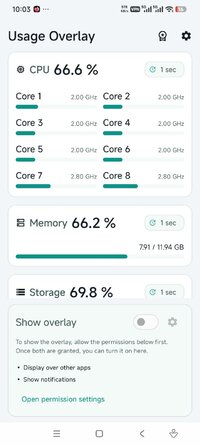
See CPU usage, memory usage, storage usage, and battery information in real time while using games and other apps.
Usage Overlay is a floating monitor that keeps important system info visible on screen. You can check device status without leaving the current app, making it useful for gaming, performance checks, charging checks, and daily device monitoring.
Features
• Floating system monitor overlay over games and apps
• Estimated CPU usage based on current and maximum CPU frequency
• Memory usage percentage
• Internal storage usage percentage
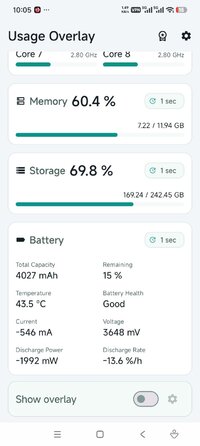
• Battery details including total capacity, remaining capacity, temperature, battery health, current, voltage, charging and discharging power, and charge or drain rate
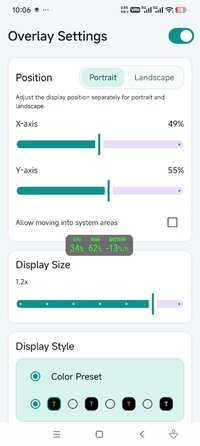
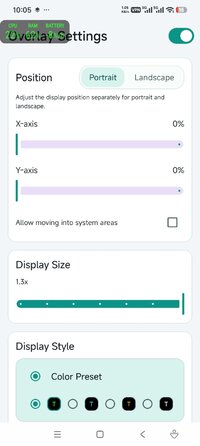
• Adjustable overlay position and size
• Select the items you want to display
• Auto start support
Made for real-time monitoring
Usage Overlay helps you keep the information you need visible at all times. Place the overlay where it is easiest to read, resize it for your screen, and show only the data you care about.
Pro version
• Update interval settings
• Custom overlay colors
• Ad removal
Pro is a one-time purchase. No subscription.
Notes
• Internal storage is supported. External storage is not currently supported.
• Available values may vary depending on device and Android version.
• Overlay permission is required.
If you want a simple and reliable floating CPU monitor, system monitor overlay, or battery overlay, Usage Overlay makes real-time device information easy to see.
Usage Overlay is a floating monitor that keeps important system info visible on screen. You can check device status without leaving the current app, making it useful for gaming, performance checks, charging checks, and daily device monitoring.
Features
• Floating system monitor overlay over games and apps
• Estimated CPU usage based on current and maximum CPU frequency
• Memory usage percentage
• Internal storage usage percentage
• Battery details including total capacity, remaining capacity, temperature, battery health, current, voltage, charging and discharging power, and charge or drain rate
• Adjustable overlay position and size
• Select the items you want to display
• Auto start support
Made for real-time monitoring
Usage Overlay helps you keep the information you need visible at all times. Place the overlay where it is easiest to read, resize it for your screen, and show only the data you care about.
Pro version
• Update interval settings
• Custom overlay colors
• Ad removal
Pro is a one-time purchase. No subscription.
Notes
• Internal storage is supported. External storage is not currently supported.
• Available values may vary depending on device and Android version.
• Overlay permission is required.
If you want a simple and reliable floating CPU monitor, system monitor overlay, or battery overlay, Usage Overlay makes real-time device information easy to see.
*Special Features*
○ Pro / Paid Features Unlocked
○ Google firebase analystics and crashlystics patched
○ No Active Tracker or ads Remaining (0 callouts using Adguard)
○ Graphics & Resources Optimized
○ Debug code removed
○ Removed default .source tags name of the corresponding java files
○ Removed All Trash/Junk Files
Credit to : HeroMods
Free Download:
! Hidden Content !
You must be registered and either click Like under this post or leave a comment before you can see the hidden links.
You may need to refresh the page after clicking Like. If you’re still having trouble revealing the hidden links, please
read this.
Did you know? VIP Members can see all links instantly, no unlocking required.
Interested? Get VIP here.
Interested? Get VIP here.