Playstore Link :

Photo Editor - Apps on Google Play
Photo Editor is a small but powerful photo editing application
Photo Editor is a small but powerful photo editing application
Photo Editor is a simple and easy application for photo manipulation.
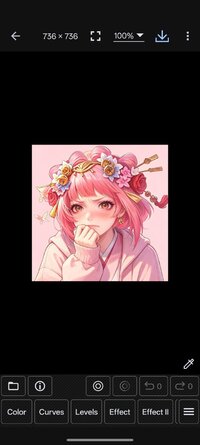
Photo Editor is an advanced editor for pictures allowing a wide range of photo manipulation features for your mobile. You can do easy tasks to enhance your photos like choosing filters on through advanced operations such as modifying curves and more. Adjust color, add effects, rotate, crop, resize, frame, clone, and draw on your photos. Color adjustment options include hue, saturation, contrast, and brightness. Additionally, Photo Editor offers many effects for your photos including gamma correction, auto contrast, auto tone, blur, sharpen, oil paint, sketch, black & white high contrast, sepia, and more.
Features
* Color : exposure, brightness, contrast, saturation, temperature, tint and hue
* Curves & Levels : fine-tuning of colors
* Effects : gamma correction, auto contrast, auto tone, vibrance, blur, sharpen, oil paint, sketch, black & white high contrast, sepia, and more
* Adding text, images or shapes
* Frame, Denoise, Drawing, Pixel, Clone, Cut Out
* Rotation, Straighten, Crop, Resize
* Corrections : perspective, lens, red-eye, white balance and backlight
* Easily edit with the touch and pinch-to-zoom interface
* Save images in JPEG, PNG, GIF, WebP and PDF
* View, edit, or delete Metadata (EXIF, IPTC, XMP)
* Save your final result to your gallery, as wallpaper, or on your SD card
* Share photos via email, social media, and more
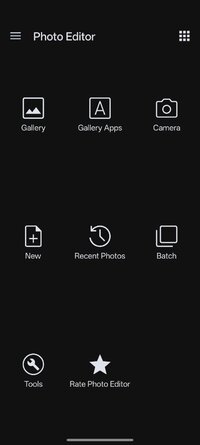
* Batch, Crop(Puzzle), Compress to ZIP, Create PDF, Animated GIF
* Webpage Capture, Video Capture, PDF Capture
* Compare Photos, GIF Frame Extractor, SVG Rasterizer
* Ad-free option is available (Settings > Purchase Items)
*** Links
Website:Photo Editor by dev.macgyver
Tutorials:Tutorial - Photo Editor
*** PHOTO EDITOR IS NOT SPYWARE/VIRUS!!!
Photo Editor does not contain any viruses or malicious code.
_Security Report - Photo Editor
Photo Editor is a simple and easy application for photo manipulation.
Photo Editor is an advanced editor for pictures allowing a wide range of photo manipulation features for your mobile. You can do easy tasks to enhance your photos like choosing filters on through advanced operations such as modifying curves and more. Adjust color, add effects, rotate, crop, resize, frame, clone, and draw on your photos. Color adjustment options include hue, saturation, contrast, and brightness. Additionally, Photo Editor offers many effects for your photos including gamma correction, auto contrast, auto tone, blur, sharpen, oil paint, sketch, black & white high contrast, sepia, and more.
Features
* Color : exposure, brightness, contrast, saturation, temperature, tint and hue
* Curves & Levels : fine-tuning of colors
* Effects : gamma correction, auto contrast, auto tone, vibrance, blur, sharpen, oil paint, sketch, black & white high contrast, sepia, and more
* Adding text, images or shapes
* Frame, Denoise, Drawing, Pixel, Clone, Cut Out
* Rotation, Straighten, Crop, Resize
* Corrections : perspective, lens, red-eye, white balance and backlight
* Easily edit with the touch and pinch-to-zoom interface
* Save images in JPEG, PNG, GIF, WebP and PDF
* View, edit, or delete Metadata (EXIF, IPTC, XMP)
* Save your final result to your gallery, as wallpaper, or on your SD card
* Share photos via email, social media, and more
* Batch, Crop(Puzzle), Compress to ZIP, Create PDF, Animated GIF
* Webpage Capture, Video Capture, PDF Capture
* Compare Photos, GIF Frame Extractor, SVG Rasterizer
* Ad-free option is available (Settings > Purchase Items)
*** Links
Website:Photo Editor by dev.macgyver
Tutorials:Tutorial - Photo Editor
*** PHOTO EDITOR IS NOT SPYWARE/VIRUS!!!
Photo Editor does not contain any viruses or malicious code.
_Security Report - Photo Editor
*Special Features*
◉ Unlocked.
◉ Analytics disabled.
◉ InAppBillingService disabled.
◉ Advertising disabled.
◉ Debug information removed.
◉ Separated by architecture.
◉ Languages: Multi Languages.
◉ Resources optimized.
Credit to : NURIK
Free Download:
! Hidden Content !
You must be registered and either click Like under this post or leave a comment before you can see the hidden links.
You may need to refresh the page after clicking Like. If you’re still having trouble revealing the hidden links, please
read this.
Did you know? VIP Members can see all links instantly, no unlocking required.
Interested? Get VIP here.
Interested? Get VIP here.