Playstore Link :

RayOS: Minimal Calm Launcher - Apps on Google Play
Minimal launcher, dialer & SMS app for a calm phone, with a cute pet cat
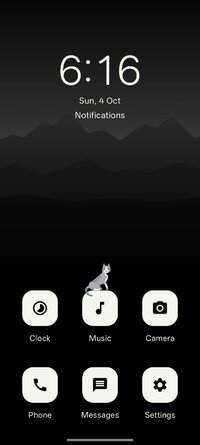
★ A CALM, MINIMAL HOME SCREEN
• Up to six apps on your home screen, and nothing that shouts for attention
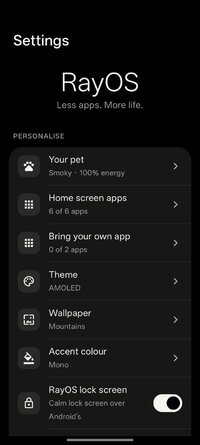
• Bring up to two of your own apps beside them
• The time, the date and your notifications in one calm list
• Focus mode hides the status bar, so the notification shade takes a deliberate swipe
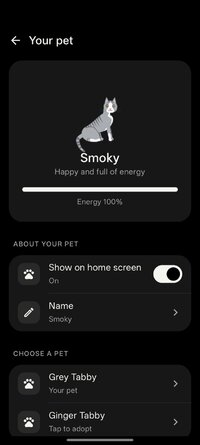
★ MEET YOUR LITTLE CAT
• A grey or ginger tabby walks along your apps and hops from one icon to another
• Tap it and it plays; stroke it and it purrs, grooms or rolls over
• It gets tired through the day and curls up for a nap
• It sleeps on your lock screen, then stretches and looks up when you pick up your phone
• Name it, watch its energy, or turn it off any time
★ PHONE, MADE CALM
Set RayOS as your default phone app to make and answer calls with a clean dialer, a clear call screen, recent calls, contacts and favourites.
★ MESSAGES, SIMPLY
Set RayOS as your default SMS app to read, send and receive text messages as simple conversations, with search, quick replies and dual-SIM support.
★ EVERYTHING ELSE YOU NEED
• Contacts: favourites first, with quick call and message buttons
• Browser: search with Google, DuckDuckGo or Bing, bookmarks, history, several pages and an incognito mode
• Clock: alarms that ring on time, even on the lock screen, plus world clocks and a timer
• Music: play the songs on your phone, with playback that continues in the background
• Camera: point, tap, done
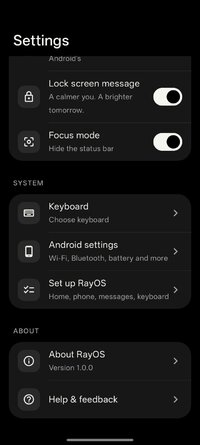
• Keyboard: clean typing with word suggestions and swipe typing
★ MAKE IT YOURS
• Light, Dark or pure-black AMOLED themes
• Calm wallpapers, each in a Light, Dark and AMOLED version
• Accent colours for tiles, buttons and switches
• A gentle lock screen with your own words
★ PRIVATE BY DESIGN
• No account, no ads, no tracking
• Your calls, messages, contacts, photos and music stay on your phone
• RayOS collects nothing. Only its built-in browser uses the internet, to load the pages you open
• Each permission is asked for only when you set up the part of RayOS that needs it, and you can skip any of them
★ EASY TO SET UP, EASY TO LEAVE
Setting up takes a couple of minutes: choose your look, meet your cat, then choose which parts of your phone RayOS looks after. Want your usual phone back? Change your default apps in Android settings, or uninstall RayOS.
• Up to six apps on your home screen, and nothing that shouts for attention
• Bring up to two of your own apps beside them
• The time, the date and your notifications in one calm list
• Focus mode hides the status bar, so the notification shade takes a deliberate swipe
★ MEET YOUR LITTLE CAT
• A grey or ginger tabby walks along your apps and hops from one icon to another
• Tap it and it plays; stroke it and it purrs, grooms or rolls over
• It gets tired through the day and curls up for a nap
• It sleeps on your lock screen, then stretches and looks up when you pick up your phone
• Name it, watch its energy, or turn it off any time
★ PHONE, MADE CALM
Set RayOS as your default phone app to make and answer calls with a clean dialer, a clear call screen, recent calls, contacts and favourites.
★ MESSAGES, SIMPLY
Set RayOS as your default SMS app to read, send and receive text messages as simple conversations, with search, quick replies and dual-SIM support.
★ EVERYTHING ELSE YOU NEED
• Contacts: favourites first, with quick call and message buttons
• Browser: search with Google, DuckDuckGo or Bing, bookmarks, history, several pages and an incognito mode
• Clock: alarms that ring on time, even on the lock screen, plus world clocks and a timer
• Music: play the songs on your phone, with playback that continues in the background
• Camera: point, tap, done
• Keyboard: clean typing with word suggestions and swipe typing
★ MAKE IT YOURS
• Light, Dark or pure-black AMOLED themes
• Calm wallpapers, each in a Light, Dark and AMOLED version
• Accent colours for tiles, buttons and switches
• A gentle lock screen with your own words
★ PRIVATE BY DESIGN
• No account, no ads, no tracking
• Your calls, messages, contacts, photos and music stay on your phone
• RayOS collects nothing. Only its built-in browser uses the internet, to load the pages you open
• Each permission is asked for only when you set up the part of RayOS that needs it, and you can skip any of them
★ EASY TO SET UP, EASY TO LEAVE
Setting up takes a couple of minutes: choose your look, meet your cat, then choose which parts of your phone RayOS looks after. Want your usual phone back? Change your default apps in Android settings, or uninstall RayOS.
*Special Features*
1 . Premium Features Unlocked
Free Download:
! Hidden Content !
You must be registered and either click Like under this post or leave a comment before you can see the hidden links.
You may need to refresh the page after clicking Like. If you’re still having trouble revealing the hidden links, please
read this.
Did you know? VIP Members can see all links instantly, no unlocking required.
Interested? Get VIP here.
Interested? Get VIP here.