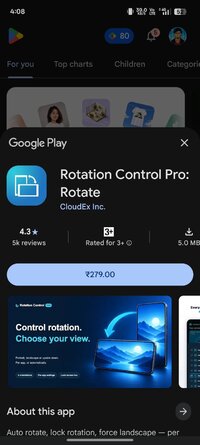
Playstore Link :

Rotation Control Pro: Rotate - Apps on Google Play
Auto rotate, lock rotation, force landscape — per app, lock screen, 4 ways
Can force a particular rotation on apps with fixed screen orientation.
A simple design with functions that are easy to understand and use.
=-=-=-=-=-=-=-=-=-=-=-=-=-=-=-=
Recommended for people who:
- Want to use their smartphone home screen in landscape mode
- Want to use landscape mode games or video apps in portrait mode
- Want to always use their tablet in landscape mode
- Want to switch between fixed orientations with one tap via the status bar
=-=-=-=-=-=-=-=-=-=-=-=-=-=-=-=
Features
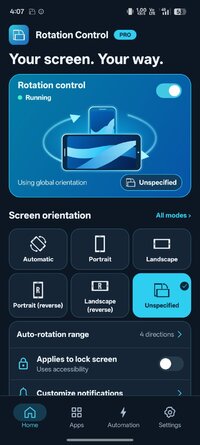
►Rotation settings
Can configure the rotation of the screen.
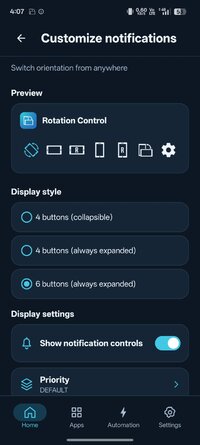
►Notification settings
Control the rotation of the screen easily from the notification bar.
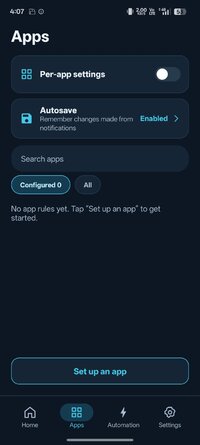
►Per App rotation settings
Can configure different rotations for each apps.
Rotates to your preset screen orientation upon starting the application.
Returns to the original screen orientation on closing the application.
►Special case settings
Detects when chargers or earphones are connected and rotates to your preset screen orientation.
Returns to the original screen orientation when they are removed.
You can check this app's functions and operations with a free trial.
Please check the functions and operations by free trial before you buy.
_Rotation Control: Auto Rotate - Apps on Google Play
Rotation
Automatic : the screen rotates based on a sensor.
Landscape : the screen is fixed to a horizontal orientation.
Landscape (Reverse) : the screen is fixed horizontal upside down.
Landscape (Auto) : rotates automatically to a horizontal orientation based on a sensor.
Portrait : the screen is fixed to a vertical orientation.
Portrait (Reverse) : the screen is fixed vertical upside down.
Portrait (Auto) : rotates automatically to a vertical orientation based on a sensor.
* Some of the direction of rotation may not correspond depending on device specifications. This is not an issue with the app.
This app uses accessibility service.
This is used to detect when an app is launched or closed and allows you to change the rotation actions for each app.
This information is not stored or shared.
【For OPPO users】
This app needs to run a service in the background to detect which app has started.
OPPO devices require special settings to operate app services in the background due to their unique specifications. (If you do not do this, services running in the background will be forcibly terminated, and the app will not operate properly.)
Please drag this app a little down from the recent apps history and lock it.
If you do not know how to set, please search for "OPPO task lock".
A simple design with functions that are easy to understand and use.
=-=-=-=-=-=-=-=-=-=-=-=-=-=-=-=
Recommended for people who:
- Want to use their smartphone home screen in landscape mode
- Want to use landscape mode games or video apps in portrait mode
- Want to always use their tablet in landscape mode
- Want to switch between fixed orientations with one tap via the status bar
=-=-=-=-=-=-=-=-=-=-=-=-=-=-=-=
Features
►Rotation settings
Can configure the rotation of the screen.
►Notification settings
Control the rotation of the screen easily from the notification bar.
►Per App rotation settings
Can configure different rotations for each apps.
Rotates to your preset screen orientation upon starting the application.
Returns to the original screen orientation on closing the application.
►Special case settings
Detects when chargers or earphones are connected and rotates to your preset screen orientation.
Returns to the original screen orientation when they are removed.
You can check this app's functions and operations with a free trial.
Please check the functions and operations by free trial before you buy.
_Rotation Control: Auto Rotate - Apps on Google Play
Rotation
Automatic : the screen rotates based on a sensor.
Landscape : the screen is fixed to a horizontal orientation.
Landscape (Reverse) : the screen is fixed horizontal upside down.
Landscape (Auto) : rotates automatically to a horizontal orientation based on a sensor.
Portrait : the screen is fixed to a vertical orientation.
Portrait (Reverse) : the screen is fixed vertical upside down.
Portrait (Auto) : rotates automatically to a vertical orientation based on a sensor.
* Some of the direction of rotation may not correspond depending on device specifications. This is not an issue with the app.
This app uses accessibility service.
This is used to detect when an app is launched or closed and allows you to change the rotation actions for each app.
This information is not stored or shared.
【For OPPO users】
This app needs to run a service in the background to detect which app has started.
OPPO devices require special settings to operate app services in the background due to their unique specifications. (If you do not do this, services running in the background will be forcibly terminated, and the app will not operate properly.)
Please drag this app a little down from the recent apps history and lock it.
If you do not know how to set, please search for "OPPO task lock".
*Special Features*
 License verification removed English, Russian
Credit to : Number one'
Free Download:
! Hidden Content !
You must be registered and either click Like under this post or leave a comment before you can see the hidden links.
You may need to refresh the page after clicking Like. If you’re still having trouble revealing the hidden links, please
read this.
Did you know? VIP Members can see all links instantly, no unlocking required.
Interested? Get VIP here.
Interested? Get VIP here.