Playstore Link :
Screen Color Filter Lite - Apps on Google Play
This is the lite version of 'Screen Color Filter'
Screen Color Filter Lite Ver. 6.7.3 MOD APK | Pro / Paid Unlocked
Requirements: Android 7.0 and up
Overview: Customize your screen color to reduce eye strain and boost focus with this free and simple app. Easily switch to warm tones for blue light reduction or cool tones for enhanced concentration, all while saving battery life.
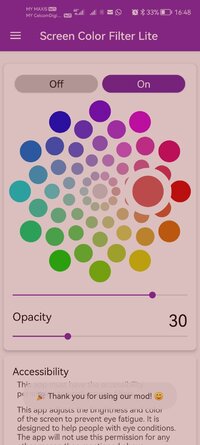
Introducing Screen Color Filter Lite, the Lite version of the popular Screen Color Filter app. With Screen Color Filter Lite, you have the power to change your screen colors to your liking. Whether you want to reduce blue light by changing the screen filter to orange or yellow, or darken the screen to a black color using the system settings, Screen Color Filter Lite gives you the freedom to customize your screen display. Additionally, you can even enhance your concentration by changing the screen filter to blue.
Screen Color Filter Lite is the perfect app for those who spend a lot of time looking at their screens. Whether you're a student, an office worker, or just someone who enjoys browsing the internet on their phone or tablet, Screen Color Filter Lite can help protect your eyes from harmful blue light and reduce eye strain. Best of all, the basic functions of the app are completely free to use.
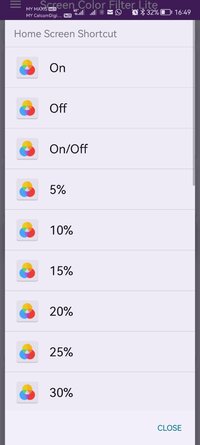
With Screen Color Filter Lite, you can apply the screen filter to your notification area, lock screen, and navigation bar as well. The app is also conveniently accessible from your home screen, making it easy to quickly switch between different color settings.
Using Screen Color Filter Lite is incredibly simple and straightforward. With just a few taps, you can adjust the color settings to your liking. Additionally, the app features a quick settings window, allowing you to quickly adjust the color of your screen with minimal hassle.
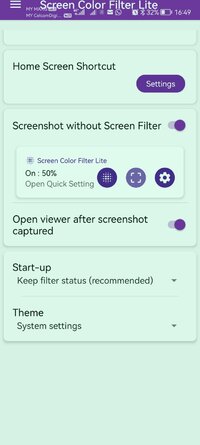
Another great feature of Screen Color Filter Lite is its ability to take screenshots without capturing the screen filter. This means you can easily take and share screenshots without any unwanted color effects.
Finally, Screen Color Filter Lite is designed to be incredibly efficient and conserve your device's battery life. Unlike other screen filter apps that may drain your battery, Screen Color Filter Lite is optimized to use minimal processing power, ensuring that you can use your device for longer periods of time without having to constantly recharge.
In conclusion, if you're looking for a simple, easy-to-use, and efficient app that allows you to customize your screen color settings, then Screen Color Filter Lite is the perfect app for you. Download it today and start experiencing the benefits of reduced blue light and enhanced concentration.
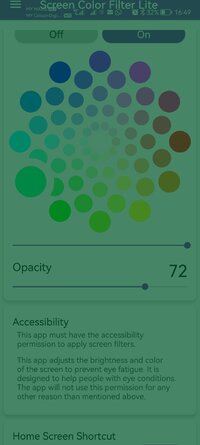
Note: If other screen adjustment apps are already running on your smartphone or tablet, it may affect the screen color making it too dark for your eyes. This app must have the accessibility permission to apply screen filters. This app adjusts the brightness and color of the screen to prevent eye fatigue. It is designed to help people with eye conditions. The app will not use this permission for any other reason than mentioned above.
Modifications:
✪ Pro / Paid features unlocked;
✪ Cleaned all useless files;
✪ All Debug Codes Removed;
✪ CPUs: armeabi-v7a, arm64-v8a;
➥ Modded By TRUMods
What's New:
- Supports Android 16
- Bug fix
Requirements: Android 7.0 and up
Overview: Customize your screen color to reduce eye strain and boost focus with this free and simple app. Easily switch to warm tones for blue light reduction or cool tones for enhanced concentration, all while saving battery life.
Introducing Screen Color Filter Lite, the Lite version of the popular Screen Color Filter app. With Screen Color Filter Lite, you have the power to change your screen colors to your liking. Whether you want to reduce blue light by changing the screen filter to orange or yellow, or darken the screen to a black color using the system settings, Screen Color Filter Lite gives you the freedom to customize your screen display. Additionally, you can even enhance your concentration by changing the screen filter to blue.
Screen Color Filter Lite is the perfect app for those who spend a lot of time looking at their screens. Whether you're a student, an office worker, or just someone who enjoys browsing the internet on their phone or tablet, Screen Color Filter Lite can help protect your eyes from harmful blue light and reduce eye strain. Best of all, the basic functions of the app are completely free to use.
With Screen Color Filter Lite, you can apply the screen filter to your notification area, lock screen, and navigation bar as well. The app is also conveniently accessible from your home screen, making it easy to quickly switch between different color settings.
Using Screen Color Filter Lite is incredibly simple and straightforward. With just a few taps, you can adjust the color settings to your liking. Additionally, the app features a quick settings window, allowing you to quickly adjust the color of your screen with minimal hassle.
Another great feature of Screen Color Filter Lite is its ability to take screenshots without capturing the screen filter. This means you can easily take and share screenshots without any unwanted color effects.
Finally, Screen Color Filter Lite is designed to be incredibly efficient and conserve your device's battery life. Unlike other screen filter apps that may drain your battery, Screen Color Filter Lite is optimized to use minimal processing power, ensuring that you can use your device for longer periods of time without having to constantly recharge.
In conclusion, if you're looking for a simple, easy-to-use, and efficient app that allows you to customize your screen color settings, then Screen Color Filter Lite is the perfect app for you. Download it today and start experiencing the benefits of reduced blue light and enhanced concentration.
Note: If other screen adjustment apps are already running on your smartphone or tablet, it may affect the screen color making it too dark for your eyes. This app must have the accessibility permission to apply screen filters. This app adjusts the brightness and color of the screen to prevent eye fatigue. It is designed to help people with eye conditions. The app will not use this permission for any other reason than mentioned above.
Modifications:
✪ Pro / Paid features unlocked;
✪ Cleaned all useless files;
✪ All Debug Codes Removed;
✪ CPUs: armeabi-v7a, arm64-v8a;
➥ Modded By TRUMods
What's New:
- Supports Android 16
- Bug fix
*Special Features*
1 . Pro / Paid features unlocked
Credit to : TRUMods
Free Download:
! Hidden Content !
You must be registered and either click Like under this post or leave a comment before you can see the hidden links.
You may need to refresh the page after clicking Like. If you’re still having trouble revealing the hidden links, please
read this.
Did you know? VIP Members can see all links instantly, no unlocking required.
Interested? Get VIP here.
Interested? Get VIP here.