Playstore Link:

Screenshot Assistant - Apps on Google Play
Hold the Home or Power button to take screenshots
Take a screenshot by swiping up from a bottom corner or by holding the Home button.
Features:
- Crop screenshot to the desired size
- Draw on screenshot
- Save screenshot to the device
- Share screenshot with your friends
How to configure the app:
- From the Home screen navigate to Settings
- Select Apps
- Press Settings icon in the upper right corner
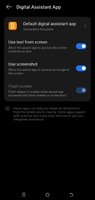
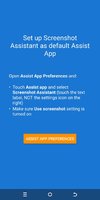
- Select Assist & voice input
- Press Assist app and select Screenshot Assistant
Features:
- Crop screenshot to the desired size
- Draw on screenshot
- Save screenshot to the device
- Share screenshot with your friends
How to configure the app:
- From the Home screen navigate to Settings
- Select Apps
- Press Settings icon in the upper right corner
- Select Assist & voice input
- Press Assist app and select Screenshot Assistant
*Special Features*
● Subscription Feature Activate.
● All Unnecessary Menu Item Remove Like:
- Subscription Status, Privacy Policy.
● Ads Removed / Disabled.
● Ads Related Activity & Code Removed / Disabled.
● Ads Related Layouts Visibility Gone.
● Analytics / Crashlytics Removed / Disabled.
● Receivers, Services And Provider Removed / Disabled.
● Google Play Store Install Package Removed / Disabled.
● In-App Billing Service Removed / Disabled.
● Play Services, Transport, Firebase Properties Removed.
● All Unnecessary Garbage Folder & File Removed.
● Duplicate Dpi Item Remove Like:
- Bar Length, Drawable Size, Gap Between Bars.
● Splits0 File Removed (Resources & AndroidManifest).
● Splits0 Releated Unnecessary Meta-Data Remove Like:
- Stamp Source, Stamp Type Standalone Apk, Android Vending Splits, Android Vending Derived Apk.
● Removed Debug Information (Source, Line, Param, Prologue, Local).
Credit: TryRoom
Free Download:
! Hidden Content !
You must be registered and either click Like under this post or leave a comment before you can see the hidden links.
You may need to refresh the page after clicking Like. If you’re still having trouble revealing the hidden links, please
read this.
Did you know? VIP Members can see all links instantly, no unlocking required.
Interested? Get VIP here.
Interested? Get VIP here.
Last edited by a moderator: