Playstore Link :

NexSnap - Screenshot Editor - Apps on Google Play
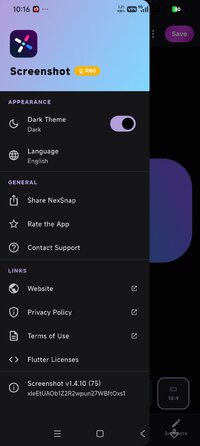
Edit screenshots instantly with powerful tools to beautify in seconds.
Transform your raw images into stunning, professional-grade visuals with NexSnap, the ultimate screenshot maker. Whether you need a simple phone screenshot or a high-end mockup for your portfolio, NexSnap is the all-in-one screenshotter and screenshot editor app that makes your work stand out instantly.
Stop sharing dull, unpolished images. With our screenshot maker pro, you can turn any screen capture into a share-ready masterpiece in seconds.
 ALL-IN-ONE SCREENSHOT EDITOR
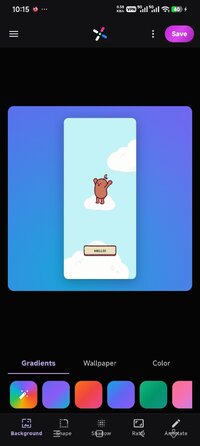
Stunning Backgrounds: Choose from vibrant gradients, 4K wallpapers, or solid colors to frame your screenshot.
1-Click Style Presets: Instantly apply screenshot pro styles like "Stacked," "Clean," or wrap your image in a sleek browser window.
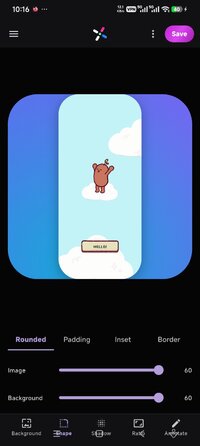
Advanced Customization: Use our screenshot editor tool to adjust padding, round corners, and add 3D shadows for depth.
Professional Snipping Tool: Use our built-in snip tool to add text, arrows, highlight boxes, and step markers for clear communication.
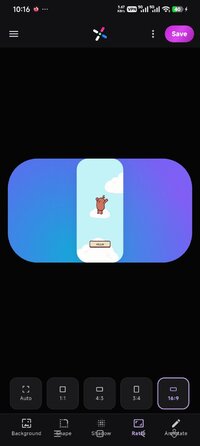
Perfect Proportions: Quickly capture screen and crop to predefined aspect ratios for Instagram, X (Twitter), LinkedIn, and more.
 WHY CHOOSE NEXSNAP?
Save Time: Forget complex software; get snagit-level results with a simple screen shot app.
Elevate Your Brand: Create consistent, beautiful visuals that look like they were made by a designer.
Versatile Tools: Whether you need a page capture tool for web or a snipping tool for apps, we have you covered.
 PRIVATE & SECURE CAPTURE
NexSnap is designed for security. Our private screenshot app features allow you to edit and hide sensitive data before sharing. Whether you are taking a secret screenshot for personal notes or managing private screenshots for work, your privacy is our priority.
 KEY FEATURES AT A GLANCE:
S Capture & Snip: The perfect snip it for android experience for quick annotations.
Auto Screenshot Enhancements: AI-powered tools that automatically polish your screenshoots.
High-Res Export: No more blurry screenshoo or low-quality screenshote; export in crisp HD.
Alternative to the Best: The best mobile alternative to Skitch, Snagit, and Iphone screen capture styles.
WHO IS IT FOR?
Developers: Showcase your UI/UX with professional screencap mockups.
Content Creators: Make your screen shot stop the scroll on social media.
Professionals: Upgrade your presentations with a clean snip it aesthetic.
Download NexSnap today—the most powerful screenshot app and snipping tool on the Play Store!
Learn more: NexSnap – Beautify Screenshots in Seconds
Stop sharing dull, unpolished images. With our screenshot maker pro, you can turn any screen capture into a share-ready masterpiece in seconds.
ALL-IN-ONE SCREENSHOT EDITORStunning Backgrounds: Choose from vibrant gradients, 4K wallpapers, or solid colors to frame your screenshot.
1-Click Style Presets: Instantly apply screenshot pro styles like "Stacked," "Clean," or wrap your image in a sleek browser window.
Advanced Customization: Use our screenshot editor tool to adjust padding, round corners, and add 3D shadows for depth.
Professional Snipping Tool: Use our built-in snip tool to add text, arrows, highlight boxes, and step markers for clear communication.
Perfect Proportions: Quickly capture screen and crop to predefined aspect ratios for Instagram, X (Twitter), LinkedIn, and more.
WHY CHOOSE NEXSNAP?Save Time: Forget complex software; get snagit-level results with a simple screen shot app.
Elevate Your Brand: Create consistent, beautiful visuals that look like they were made by a designer.
Versatile Tools: Whether you need a page capture tool for web or a snipping tool for apps, we have you covered.
PRIVATE & SECURE CAPTURENexSnap is designed for security. Our private screenshot app features allow you to edit and hide sensitive data before sharing. Whether you are taking a secret screenshot for personal notes or managing private screenshots for work, your privacy is our priority.
KEY FEATURES AT A GLANCE:S Capture & Snip: The perfect snip it for android experience for quick annotations.
Auto Screenshot Enhancements: AI-powered tools that automatically polish your screenshoots.
High-Res Export: No more blurry screenshoo or low-quality screenshote; export in crisp HD.
Alternative to the Best: The best mobile alternative to Skitch, Snagit, and Iphone screen capture styles.
WHO IS IT FOR?Developers: Showcase your UI/UX with professional screencap mockups.
Content Creators: Make your screen shot stop the scroll on social media.
Professionals: Upgrade your presentations with a clean snip it aesthetic.
Download NexSnap today—the most powerful screenshot app and snipping tool on the Play Store!
Learn more: NexSnap – Beautify Screenshots in Seconds
*Special Features*
1 . Premium Features Unlocked
Credit to : youarefinished
Free Download:
! Hidden Content !
You must be registered and either click Like under this post or leave a comment before you can see the hidden links.
You may need to refresh the page after clicking Like. If you’re still having trouble revealing the hidden links, please
read this.
Did you know? VIP Members can see all links instantly, no unlocking required.
Interested? Get VIP here.
Interested? Get VIP here.