Playstore Link:

Screenshot Editor Capture Tool - Apps on Google Play
Edit screenshots instantly with powerful tools to beautify in seconds.
Screenshot Snapshot: NexSnap v1.2.4 [Premium]
Requirements: 7.0+
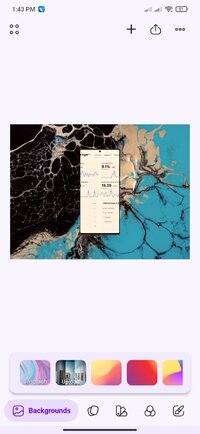
Overview: Instant backgrounds on screenshots in seconds! Superior snapshot editor!
Image
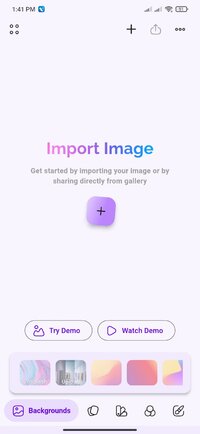
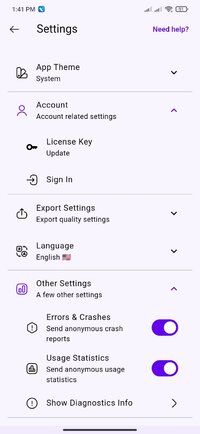
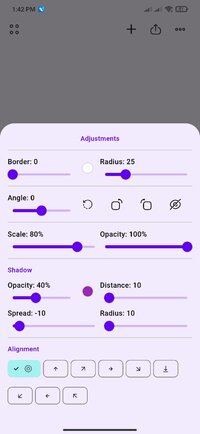
Introducing NexSnap, the revolutionary app that allows users to effortlessly capture stunning screenshots in a matter of seconds. With its sleek and intuitive interface, NexSnap empowers users to create eye-catching screenshots with just a few taps. Whether it's capturing a moment from a video, showcasing a website design, or sharing a memorable conversation, NexSnap ensures that every screenshot is visually appealing and professionally polished. With a wide range of customizable features, users can easily adjust colors, add annotations, and dimension presets, and apply stylish filters to enhance their screenshots. The app's lightning-fast processing speed guarantees instant results, saving users valuable time and effort. Say goodbye to dull and uninspiring screenshots, and elevate your visual content with NexSnap – the ultimate tool for effortless and beautiful screenshot creation.
Features:
◆ Choose from a stunning selection of beautiful backgrounds.
◆ Optimize your screenshots with size and ratio presets for your target medium.
◆ Unleash your creativity with powerful annotation tools.
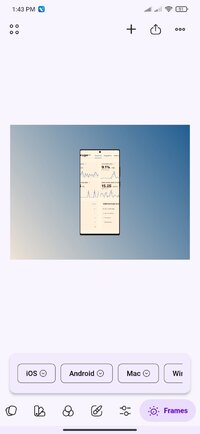
◆ Create impressive app or website mockups effortlessly.
◆ Add depth with the cool 3D Tilt effect.
◆ Enhance your screenshots with photo filter effects.
◆ Customize gradient or solid color backgrounds to your liking.
◆ Access a vast collection of image backgrounds from Unsplash.
◆ Elevate your visuals with captivating colored shadows.
A great alternative to Figma, Canva, Photoshop, ShareX, Xnapper, MonoSnap, Snagit, Lightshot, Greenshot, & Skitch.
Learn more: NexSnap - Make beautiful and engaging screenshots
Privacy Policy: NexSnap Privacy Policy
Terms of Use: NexSnap Terms
What's New:
Fixed google sign in
Requirements: 7.0+
Overview: Instant backgrounds on screenshots in seconds! Superior snapshot editor!
Image
Introducing NexSnap, the revolutionary app that allows users to effortlessly capture stunning screenshots in a matter of seconds. With its sleek and intuitive interface, NexSnap empowers users to create eye-catching screenshots with just a few taps. Whether it's capturing a moment from a video, showcasing a website design, or sharing a memorable conversation, NexSnap ensures that every screenshot is visually appealing and professionally polished. With a wide range of customizable features, users can easily adjust colors, add annotations, and dimension presets, and apply stylish filters to enhance their screenshots. The app's lightning-fast processing speed guarantees instant results, saving users valuable time and effort. Say goodbye to dull and uninspiring screenshots, and elevate your visual content with NexSnap – the ultimate tool for effortless and beautiful screenshot creation.
Features:
◆ Choose from a stunning selection of beautiful backgrounds.
◆ Optimize your screenshots with size and ratio presets for your target medium.
◆ Unleash your creativity with powerful annotation tools.
◆ Create impressive app or website mockups effortlessly.
◆ Add depth with the cool 3D Tilt effect.
◆ Enhance your screenshots with photo filter effects.
◆ Customize gradient or solid color backgrounds to your liking.
◆ Access a vast collection of image backgrounds from Unsplash.
◆ Elevate your visuals with captivating colored shadows.
A great alternative to Figma, Canva, Photoshop, ShareX, Xnapper, MonoSnap, Snagit, Lightshot, Greenshot, & Skitch.
Learn more: NexSnap - Make beautiful and engaging screenshots
Privacy Policy: NexSnap Privacy Policy
Terms of Use: NexSnap Terms
What's New:
Fixed google sign in
*Special Features*
Premium / Paid features Unlocked
All Debug code removed
Languages: Full Multi Languages
CPU architectures: arm64
○ credit : youarefinished
Free Download:
! Hidden Content !
You must be registered and either click Like under this post or leave a comment before you can see the hidden links.
You may need to refresh the page after clicking Like. If you’re still having trouble revealing the hidden links, please
read this.
Did you know? VIP Members can see all links instantly, no unlocking required.
Interested? Get VIP here.
Interested? Get VIP here.