Playstore Link :

Shortcutter 2: Quick Settings - Apps on Google Play
Custom Quick Settings tiles, power toggles, shortcuts, widgets & sidebar & more!
Your phone. Your shortcuts.
Shortcutter is back.
With more than 500,000 downloads, Shortcutter has helped Android users get to the things they use most faster for years. Add shortcuts to Quick Settings, keep apps and tools in a sidebar or floating toolbox, create home screen shortcuts and widgets, and launch system actions, activities, websites, contacts and more.
Quick Settings that work for you
Create custom Quick Settings tiles for apps, shortcuts, activities, web links, contacts, system actions and Shortcutter tools, then add them through Android's Quick Settings editor.
One swipe away
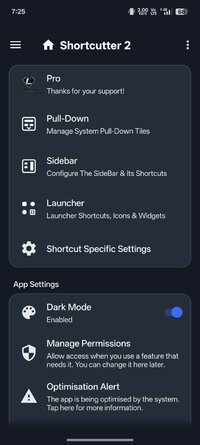
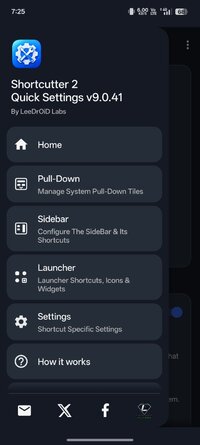
Keep favourite apps, shortcuts and tools in the Sidebar. Open it from the left, right or bottom, or use the movable Floating Toolbox. Arrange it your way and customise how it looks.
Build shortcuts for almost anything
Create shortcuts for:
• Applications and app shortcuts
• Activities exposed by installed apps
• Websites
• Contacts
• Direct dial and direct message
• Android settings and system actions
• Shortcutter tools
• Advanced custom actions
Use them in Quick Settings, the Sidebar, Floating Toolbox, widgets or directly on your home screen.
A proper Android toolbox
Shortcutter includes:
• Quick Settings tiles
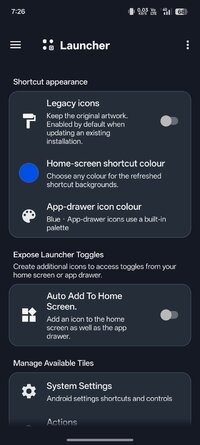
• Home screen shortcuts and widgets
• Floating calculator
• Stopwatch, timer, counter and dice
• Clipboard tools
• Weather and forecasts
• Location tools
• Quick reminders
• File browser shortcuts
• Notification tools
• Brightness, display and font controls
• Flashlight
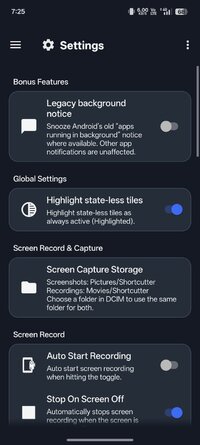
• Screen capture and recording
• Battery and power tools
• Next alarm information
• Device and memory information
• Developer options
• Recent Apps
• Wi-Fi and connectivity tools
• Media and system shortcuts
• And plenty more
For Android tinkerers too
Launch activities exposed by other apps, build custom tiles and create shortcuts to parts of Android that normally take several taps to reach.
Additional controls can use ADB / Secure Settings permissions; some specialist actions require root.
Root is not required for normal Shortcutter features.
Make it yours
Customise the layout, behaviour and appearance of your Sidebar and Floating Toolbox.
Shortcutter 2 adds Theme Studio, live previews, colours, backgrounds, gradients, borders, corners, icon shapes, labels, spacing and layout controls.
Shortcutter 2 open beta
The refreshed Shortcutter experience is available through Google Play open beta.
The standard release remains available, while the beta brings a redesigned interface, refreshed artwork, improved Sidebar tools, Theme Studio, weather and location updates, widgets, an improved floating calculator and more.
Join the beta:
Beta features may change during testing.
Free to get started
Shortcutter is free to use, with an optional Premium unlock for extra features and customisation.
Accessibility Service disclosure
Shortcutter uses Android's AccessibilityService only for features that require it, including supported system actions such as Back, Home, Recent Apps and screen lock, plus functionality needed by some floating tools.
Accessibility access is optional. Shortcutter explains when it is needed before you enable it.
Shortcutter does not use AccessibilityService for advertising or user profiling.
Permissions & privacy
Shortcutter requests Android permissions only when needed by features you choose to use. Location may be required for weather or location tools, contact access for communication shortcuts, and overlay permission for floating tools.
Some actions may need extra Android permissions. Where direct control is restricted, Shortcutter may open the appropriate system panel instead.
Less digging. More doing.
Quick Settings. Shortcuts. Widgets. Sidebar. Floating tools.
Put the things you use most where you can reach them.
Support: [email protected]
Shortcutter is back.
With more than 500,000 downloads, Shortcutter has helped Android users get to the things they use most faster for years. Add shortcuts to Quick Settings, keep apps and tools in a sidebar or floating toolbox, create home screen shortcuts and widgets, and launch system actions, activities, websites, contacts and more.
Quick Settings that work for you
Create custom Quick Settings tiles for apps, shortcuts, activities, web links, contacts, system actions and Shortcutter tools, then add them through Android's Quick Settings editor.
One swipe away
Keep favourite apps, shortcuts and tools in the Sidebar. Open it from the left, right or bottom, or use the movable Floating Toolbox. Arrange it your way and customise how it looks.
Build shortcuts for almost anything
Create shortcuts for:
• Applications and app shortcuts
• Activities exposed by installed apps
• Websites
• Contacts
• Direct dial and direct message
• Android settings and system actions
• Shortcutter tools
• Advanced custom actions
Use them in Quick Settings, the Sidebar, Floating Toolbox, widgets or directly on your home screen.
A proper Android toolbox
Shortcutter includes:
• Quick Settings tiles
• Home screen shortcuts and widgets
• Floating calculator
• Stopwatch, timer, counter and dice
• Clipboard tools
• Weather and forecasts
• Location tools
• Quick reminders
• File browser shortcuts
• Notification tools
• Brightness, display and font controls
• Flashlight
• Screen capture and recording
• Battery and power tools
• Next alarm information
• Device and memory information
• Developer options
• Recent Apps
• Wi-Fi and connectivity tools
• Media and system shortcuts
• And plenty more
For Android tinkerers too
Launch activities exposed by other apps, build custom tiles and create shortcuts to parts of Android that normally take several taps to reach.
Additional controls can use ADB / Secure Settings permissions; some specialist actions require root.
Root is not required for normal Shortcutter features.
Make it yours
Customise the layout, behaviour and appearance of your Sidebar and Floating Toolbox.
Shortcutter 2 adds Theme Studio, live previews, colours, backgrounds, gradients, borders, corners, icon shapes, labels, spacing and layout controls.
Shortcutter 2 open beta
The refreshed Shortcutter experience is available through Google Play open beta.
The standard release remains available, while the beta brings a redesigned interface, refreshed artwork, improved Sidebar tools, Theme Studio, weather and location updates, widgets, an improved floating calculator and more.
Join the beta:
Beta features may change during testing.
Free to get started
Shortcutter is free to use, with an optional Premium unlock for extra features and customisation.
Accessibility Service disclosure
Shortcutter uses Android's AccessibilityService only for features that require it, including supported system actions such as Back, Home, Recent Apps and screen lock, plus functionality needed by some floating tools.
Accessibility access is optional. Shortcutter explains when it is needed before you enable it.
Shortcutter does not use AccessibilityService for advertising or user profiling.
Permissions & privacy
Shortcutter requests Android permissions only when needed by features you choose to use. Location may be required for weather or location tools, contact access for communication shortcuts, and overlay permission for floating tools.
Some actions may need extra Android permissions. Where direct control is restricted, Shortcutter may open the appropriate system panel instead.
Less digging. More doing.
Quick Settings. Shortcuts. Widgets. Sidebar. Floating tools.
Put the things you use most where you can reach them.
Support: [email protected]
*Special Features*
✪ Premium / Paid features unlocked;
✪ Removed unnecessary files;
✪ All Debug Codes Removed;
Credit to : TRUMods
Free Download:
! Hidden Content !
You must be registered and either click Like under this post or leave a comment before you can see the hidden links.
You may need to refresh the page after clicking Like. If you’re still having trouble revealing the hidden links, please
read this.
Did you know? VIP Members can see all links instantly, no unlocking required.
Interested? Get VIP here.
Interested? Get VIP here.