Playstore Link :

Smart AudioBook Player - Apps on Google Play
This application is full of useful features for playing audio books
The app is designed specially for playing audio books.
You have to manually download the books and place them in subfolders under the "My Audiobooks" folder on your phone.
Every book must be in a separate subfolder, even if it consists of only one file.
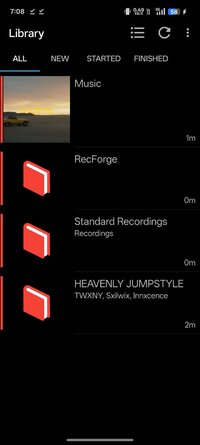
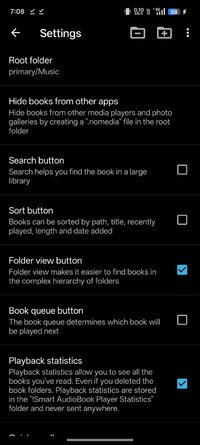
In Library→Settings→Root folder select the "My Audiobooks" folder.
Once finished, don't forget to press the "Update" button at the top of the Library window.
First 30 days Full version. Later - Basic version.
Features:
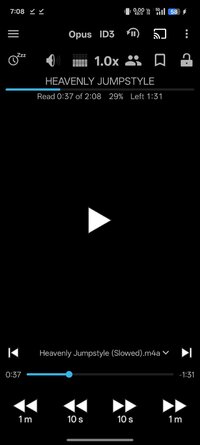
+ Playback speed control. It may be useful if narrator speaks too slow or too fast.
+ Classification of books (new, started and finished) allows you to understand at glance what books have been finished, what you are reading now and what are new).
+ Downloading cover from the Internet brings more life to the book than just blank general cover.
+ Bookmarks allow you to mark interesting moments in the book.
+ List of characters. You can manually create a list of characters to easier follow the story.
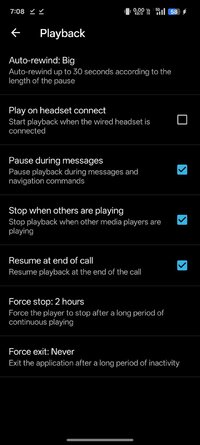
+ Automatic pause in case you fall asleep. To continue playback just shake your phone.
+ Playback history allows to return to the previous playback position in situation when you accidentally hit Next file or other button.
+ Chromecast support allows to listen the book on full size speakers.
+ Application Widget. Allows you to control the player from the home screen.
+ You don't have to finish one book to start another. The progress is saved independently for all books.
+ NO ADS!
To purchase full version press: menu--Help--Version tab.
It is a one time purchase. Not a subscription.
Many thanks to people who left comments and suggestions.
If you have something that doesn't work please write an email instead of leaving a comment.
Version for Android 4.4 - 5.1:
 drive.google.com
Version for Android 4.1 - 4.3:
https://drive.google.com/file/d/1QtMJF6 ... sp=sharing
Version with old icon:
drive.google.com
You have to manually download the books and place them in subfolders under the "My Audiobooks" folder on your phone.
Every book must be in a separate subfolder, even if it consists of only one file.
In Library→Settings→Root folder select the "My Audiobooks" folder.
Once finished, don't forget to press the "Update" button at the top of the Library window.
First 30 days Full version. Later - Basic version.
Features:
+ Playback speed control. It may be useful if narrator speaks too slow or too fast.
+ Classification of books (new, started and finished) allows you to understand at glance what books have been finished, what you are reading now and what are new).
+ Downloading cover from the Internet brings more life to the book than just blank general cover.
+ Bookmarks allow you to mark interesting moments in the book.
+ List of characters. You can manually create a list of characters to easier follow the story.
+ Automatic pause in case you fall asleep. To continue playback just shake your phone.
+ Playback history allows to return to the previous playback position in situation when you accidentally hit Next file or other button.
+ Chromecast support allows to listen the book on full size speakers.
+ Application Widget. Allows you to control the player from the home screen.
+ You don't have to finish one book to start another. The progress is saved independently for all books.
+ NO ADS!
To purchase full version press: menu--Help--Version tab.
It is a one time purchase. Not a subscription.
Many thanks to people who left comments and suggestions.
If you have something that doesn't work please write an email instead of leaving a comment.
Version for Android 4.4 - 5.1:
app-release 4.4.6.apk
drive.google.com
Version for Android 4.1 - 4.3:
https://drive.google.com/file/d/1QtMJF6 ... sp=sharing
Version with old icon:
old-icon.apk
drive.google.com
*Special Features*
1 . Full / Paid features unlocked
Credit to : NURIK
Free Download:
! Hidden Content !
You must be registered and either click Like under this post or leave a comment before you can see the hidden links.
You may need to refresh the page after clicking Like. If you’re still having trouble revealing the hidden links, please
read this.
Did you know? VIP Members can see all links instantly, no unlocking required.
Interested? Get VIP here.
Interested? Get VIP here.