Playstore Link :
SMS Forwarder - Apps on Google Play
Automatically synchronize SMS or Notifications to PC or Phone.
SMS Forwarder Ver. 10.02.12 build 20216 MOD APK | Premium Unlocked
Requirements: Android 7.0+
Overview: Automatically synchronize SMS or Notifications to PC or Phone.
Notification between multiple devices(PC, Phone).
Caution!
If someone else has asked you to install this app, be careful since he/she may be a fraud.
How to use
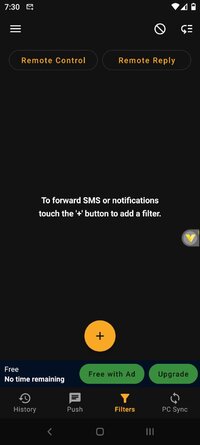
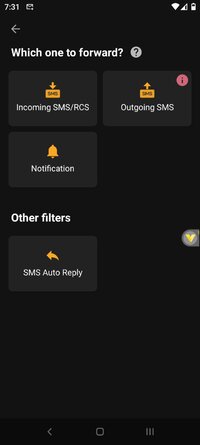
1. First, add a filter to set up recipients.
2. Enter the recipient phone number, email, URL, Telegram, Push Service ID. You can add several.
3. You can set keywords present in the phonenumber or message body as conditions, or leave it blank if you just want to forward everything.
4. You can customize the template for the forwarded message.
Features
- Forward SMS or Notification to Email, Phone, URL, Telegram, Push Service.
- Add filters to various options.
- Supports Gmail and SMTP.
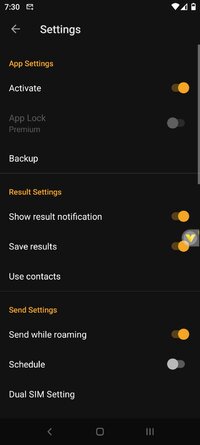
- Supports Dual SIM setting.
- Supports setting of operation time.
- Supports filter backup/restore.
This app does not provide feature to get messages from devices that do not have the app installed.
Requested permissions
All permissions are requested only when using the function.
1.RECEIVE_SMS, RECEIVE_MMS, READ_SMS, SEND_SMS
This is required for reading and sending SMS.
2. READ_CONTACTS
This is required to read your Gmail account and read your contact's name.
Privacy
- This app requires permission to read or send SMS.
- This app does not save SMS or contacts on a server.
- When you delete this app, all data will be deleted unconditionally.
(However, please delete the push service account from the app before deleting this app.)
 Mod info:
× Premium Features Unlocked
× All debug info removed
× APK Fully Cleaned
× CPUs: arm64-v8a
× Languages: Multi
× File size optimized
 Modded by TurboMods
What's New:
Added support for HTTP headers when forwarding via URL.
Enabled remote reply for RCS on single-SIM devices.
General bug fixes and app performance improvements.
Requirements: Android 7.0+
Overview: Automatically synchronize SMS or Notifications to PC or Phone.
Notification between multiple devices(PC, Phone).
Caution!
If someone else has asked you to install this app, be careful since he/she may be a fraud.
How to use
1. First, add a filter to set up recipients.
2. Enter the recipient phone number, email, URL, Telegram, Push Service ID. You can add several.
3. You can set keywords present in the phonenumber or message body as conditions, or leave it blank if you just want to forward everything.
4. You can customize the template for the forwarded message.
Features
- Forward SMS or Notification to Email, Phone, URL, Telegram, Push Service.
- Add filters to various options.
- Supports Gmail and SMTP.
- Supports Dual SIM setting.
- Supports setting of operation time.
- Supports filter backup/restore.
This app does not provide feature to get messages from devices that do not have the app installed.
Requested permissions
All permissions are requested only when using the function.
1.RECEIVE_SMS, RECEIVE_MMS, READ_SMS, SEND_SMS
This is required for reading and sending SMS.
2. READ_CONTACTS
This is required to read your Gmail account and read your contact's name.
Privacy
- This app requires permission to read or send SMS.
- This app does not save SMS or contacts on a server.
- When you delete this app, all data will be deleted unconditionally.
(However, please delete the push service account from the app before deleting this app.)
Mod info:× Premium Features Unlocked
× All debug info removed
× APK Fully Cleaned
× CPUs: arm64-v8a
× Languages: Multi
× File size optimized
Modded by TurboModsWhat's New:
Added support for HTTP headers when forwarding via URL.
Enabled remote reply for RCS on single-SIM devices.
General bug fixes and app performance improvements.
*Special Features*
1 . Premium Features Unlocked
Credit to : TurboMods
Free Download:
! Hidden Content !
You must be registered and either click Like under this post or leave a comment before you can see the hidden links.
You may need to refresh the page after clicking Like. If you’re still having trouble revealing the hidden links, please
read this.
Did you know? VIP Members can see all links instantly, no unlocking required.
Interested? Get VIP here.
Interested? Get VIP here.