Playstore Link :
GitHub - zarzet/SpotiFLAC-Mobile: Mobile music utility built with Flutter and Go. High-quality audio management for your personal library. - open source, no ads, no subscription.
Mobile music utility built with Flutter and Go. High-quality audio management for your personal library. - open source, no ads, no subscription. - zarzet/SpotiFLAC-Mobile
 github.com
Requirements: 7.0+
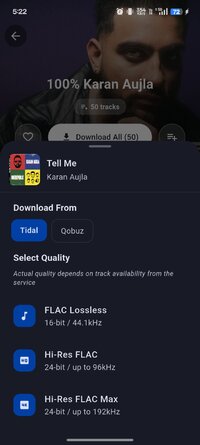
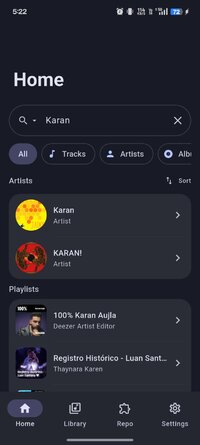
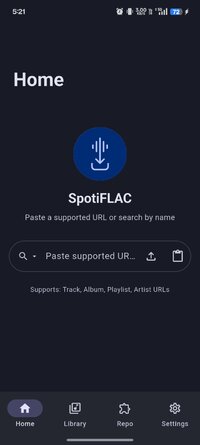
Overview: music in FLAC format without quality loss from Deezer, Tidal, Qobuz, and Amazon Music.
 Features:
✓ High-quality sound selection
✓ Ability to download entire albums
✓ Ability to create playlists
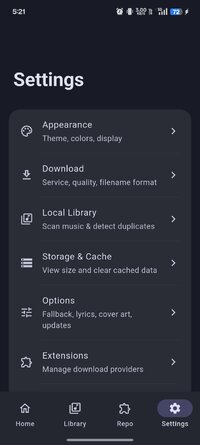
✓ Many settings
✓ Embedding lyrics in FLAC files
Extensions let the community add new music sources and features without waiting for app updates. When a streaming service API changes or a new source becomes available, extensions can be updated independently.
Installing Extensions
Open the Store tab in the app
On first launch, enter an Extension Repository URL when prompted
Browse and install extensions with one tap
Or download a .spotiflac-ext file and install manually via Settings > Extensions
Configure extension settings if needed
Set provider priority under Settings > Extensions > Provider Priority
Developing Extensions
Note
Want to build your own extension? Extension Development Guide has everything you need.
➡ Untouched apk with Original Hash Signature
➡ No changes were applied
➡ CPU architectures: arm64-v8a, armeabi-v7a
➡ Screen DPIs: 160dpi, 240dpi, 320dpi, 480dpi, 640dpi
What's New:
New Features
Add configurable extension download fallback
Bug Fixes
Preserve flat singles output for extension releases
Align re-enrich matching with autofill metadata
Persist downloaded metadata and refine metadata navigation
Preserve composer metadata across qobuz and history
Refactoring
Move deezer to extension
Chores
Bump app to v4.2.2
Overview: music in FLAC format without quality loss from Deezer, Tidal, Qobuz, and Amazon Music.
Features:✓ High-quality sound selection
✓ Ability to download entire albums
✓ Ability to create playlists
✓ Many settings
✓ Embedding lyrics in FLAC files
Extensions let the community add new music sources and features without waiting for app updates. When a streaming service API changes or a new source becomes available, extensions can be updated independently.
Installing Extensions
Open the Store tab in the app
On first launch, enter an Extension Repository URL when prompted
Browse and install extensions with one tap
Or download a .spotiflac-ext file and install manually via Settings > Extensions
Configure extension settings if needed
Set provider priority under Settings > Extensions > Provider Priority
Developing Extensions
Note
Want to build your own extension? Extension Development Guide has everything you need.
➡ Untouched apk with Original Hash Signature
➡ No changes were applied
➡ CPU architectures: arm64-v8a, armeabi-v7a
➡ Screen DPIs: 160dpi, 240dpi, 320dpi, 480dpi, 640dpi
What's New:
New Features
Add configurable extension download fallback
Bug Fixes
Preserve flat singles output for extension releases
Align re-enrich matching with autofill metadata
Persist downloaded metadata and refine metadata navigation
Preserve composer metadata across qobuz and history
Refactoring
Move deezer to extension
Chores
Bump app to v4.2.2
*Special Features*
➡ FREE APK
➡ Untouched apk with Original Hash Signature
➡ No changes were applied
Note
Want to build your own extension? Extension Development Guide has everything you need.
Installing Extensions
Open the Store tab in the app
On first launch, enter an Extension Repository URL when prompted
Browse and install extensions with one tap
Or download a .spotiflac-ext file and install manually via Settings > Extensions
Configure extension settings if needed
Set provider priority under Settings > Extensions > Provider Priority
Developing Extensions
Free Download:
! Hidden Content !
You must be registered and either click Like under this post or leave a comment before you can see the hidden links.
You may need to refresh the page after clicking Like. If you’re still having trouble revealing the hidden links, please
read this.
Did you know? VIP Members can see all links instantly, no unlocking required.
Interested? Get VIP here.
Interested? Get VIP here.