Playstore Link :
GitHub - lyssadev/Spotilol: A android app that wraps Spotify's web player with built-in adblocker
A android app that wraps Spotify's web player with built-in adblocker - lyssadev/Spotilol
 github.com
A lil Android app that wraps Spotify's web player with built-in adblocking.
It's a fork of Spotifuck by deviato, ported from smali to clean Kotlin. all free, all open-source.
● blocks audio ads
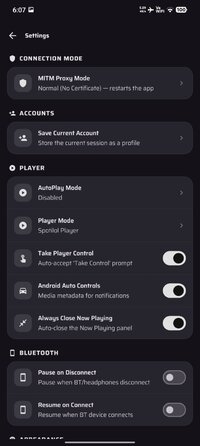
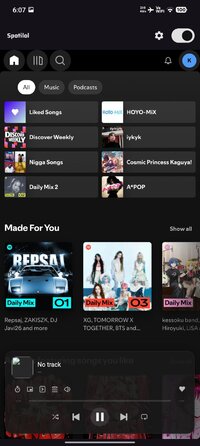
● media notification with play/pause, skip, seek, like/unlike
● works with lock screen, Bluetooth, Wear OS
● autoplay modes: off, once at start, or permanent
● mobile-friendly CSS/JS layout tweaks
● AMOLED dark mode (pure black)
● keeps screen on while you're vibing
● browse your library through Spotify's API
● update checker (auto & manual)
Quick Start: The Certificate Thing
Spotilol generates a local CA cert so Spotify doesn't know you're in a WebView. it lives on your device, stays on your device.
● open Spotilol — you'll see the "Certificate Required" screen
● tap "Export .pem" to save it to your Downloads
● go to Settings > Security > Encryption & Credentials > Install a certificate > CA certificate
● find spotilol_ca.pem in your Downloads and tap it
● it'll warn you about network monitoring — tap "Install anyway"
● come back to Spotilol and tap "Check". if it worked, you're in.
● Note: if you ever clear your device's credential storage (like after a factory reset), you'll have to do this again.
It's a fork of Spotifuck by deviato, ported from smali to clean Kotlin. all free, all open-source.
● blocks audio ads
● media notification with play/pause, skip, seek, like/unlike
● works with lock screen, Bluetooth, Wear OS
● autoplay modes: off, once at start, or permanent
● mobile-friendly CSS/JS layout tweaks
● AMOLED dark mode (pure black)
● keeps screen on while you're vibing
● browse your library through Spotify's API
● update checker (auto & manual)
Quick Start: The Certificate Thing
Spotilol generates a local CA cert so Spotify doesn't know you're in a WebView. it lives on your device, stays on your device.
● open Spotilol — you'll see the "Certificate Required" screen
● tap "Export .pem" to save it to your Downloads
● go to Settings > Security > Encryption & Credentials > Install a certificate > CA certificate
● find spotilol_ca.pem in your Downloads and tap it
● it'll warn you about network monitoring — tap "Install anyway"
● come back to Spotilol and tap "Check". if it worked, you're in.
● Note: if you ever clear your device's credential storage (like after a factory reset), you'll have to do this again.
*Special Features*
★ Untouched apk with Original Hash Signature
★ Certificate MD5 digest: aff55e6183004f4b92c65fdc49889e49
★ No changes were applied
Free Download:
! Hidden Content !
You must be registered and either click Like under this post or leave a comment before you can see the hidden links.
You may need to refresh the page after clicking Like. If you’re still having trouble revealing the hidden links, please
read this.
Did you know? VIP Members can see all links instantly, no unlocking required.
Interested? Get VIP here.
Interested? Get VIP here.