Playstore Link :
GitHub - H4zh4n/Spotui: Spotify clone with deep integration.
Spotify clone with deep integration. Contribute to H4zh4n/Spotui development by creating an account on GitHub.
 github.com
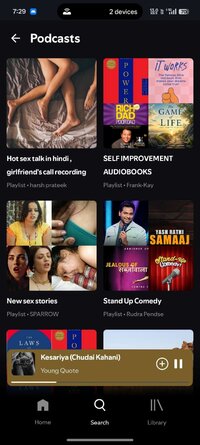
A Spotify clone for Android, built with Jetpack Compose.
It connects to your real Spotify account and mirrors the Spotify experience:
● Playlists — browse, play, add/remove tracks, create new playlists, all synced with your Spotify account
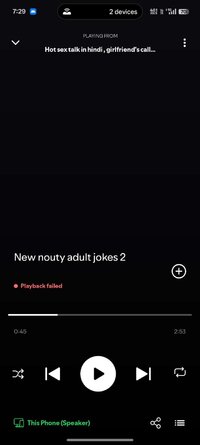
● Lyrics — Spotify's own synced lyrics, with a live preview on the player and a full-screen view
● Spotify recommendations — the queue continues with Spotify's real track radio (autoplay), so "up next" matches what open.spotify.com would play
● Liked songs, followed artists, listening history and downloads (including lossless FLAC)
What's New:
Queue Overlay, Background Playback Fixes & Universal Context Menus
This major update addresses crucial background playback bugs, vastly improves playlist loading, and introduces seamless new UI overlays to keep you immersed in your music.
 Performance & Background Playback
We've overhauled how the app handles system power states to ensure your music never stops unexpectedly.
● Login Fix: Resolved authentication issues to ensure stable, reliable logins and account connectivity across the app.
● Screen-Off Playback Halts Fixed: Solved a major bug where the player would abruptly stop at the end of a track or get stuck repeating a song when the device screen was turned off. The app now properly holds the necessary system wake-locks to transition tracks seamlessly in the background.
● Scrollbar Jump Fix: Opening large playlists sorted by "Newest to Oldest" no longer causes the scrollbar to violently jump around. We implemented smart reverse-offset fetching so your newest tracks load instantly and smoothly.
● Instant Playlist Loading: Playlists are now heavily cached in memory. Once loaded, reopening a massive playlist is absolutely instantaneous with zero network delays.
UI & Navigation Overhaul
Navigating your library and managing your current session is now significantly faster and more intuitive.
● Queue Overlay: Opening the Play Queue no longer closes the player. Tapping the queue button now elegantly slides up a modal bottom sheet directly over the active player, letting you manage what plays next without losing your place.
● Context Menus Everywhere: You can now long-press any track, podcast episode, or search history item across the entire app (Home, Artist, Search, History, etc.) to instantly pull up the song options menu.
● Unified Search Bars: Replaced scattered search UI with a clean, unified dark-themed search bar across Albums, Downloads, History, Liked Songs, and Playlists.
● Smart Multi-Artist Navigation: Tapping a track with multiple artists opens an interactive sheet. If an artist's internal ID is missing, the app dynamically searches and resolves it on the fly so you can easily view their profile.
Player, Bluetooth & Audio
● Bluetooth Repeat Fix: Fixed a frustrating bug where pressing the repeat button via a connected Bluetooth device (like car stereos or headphones) would get the player stuck looping a single track.
● Deezer UI Polish: Deezer streams now feature a dedicated purple source indicator in the player. The app also strictly ensures the "Lossless •" prefix only appears if the resolved stream is genuinely verified as FLAC or Hi-Res audio.
● Accurate Pre-fetching: Fixed a race condition where background pre-fetched tracks could accidentally inherit the artist name of the currently playing song.
It connects to your real Spotify account and mirrors the Spotify experience:
● Playlists — browse, play, add/remove tracks, create new playlists, all synced with your Spotify account
● Lyrics — Spotify's own synced lyrics, with a live preview on the player and a full-screen view
● Spotify recommendations — the queue continues with Spotify's real track radio (autoplay), so "up next" matches what open.spotify.com would play
● Liked songs, followed artists, listening history and downloads (including lossless FLAC)
What's New:
Queue Overlay, Background Playback Fixes & Universal Context Menus
This major update addresses crucial background playback bugs, vastly improves playlist loading, and introduces seamless new UI overlays to keep you immersed in your music.
Performance & Background PlaybackWe've overhauled how the app handles system power states to ensure your music never stops unexpectedly.
● Login Fix: Resolved authentication issues to ensure stable, reliable logins and account connectivity across the app.
● Screen-Off Playback Halts Fixed: Solved a major bug where the player would abruptly stop at the end of a track or get stuck repeating a song when the device screen was turned off. The app now properly holds the necessary system wake-locks to transition tracks seamlessly in the background.
● Scrollbar Jump Fix: Opening large playlists sorted by "Newest to Oldest" no longer causes the scrollbar to violently jump around. We implemented smart reverse-offset fetching so your newest tracks load instantly and smoothly.
● Instant Playlist Loading: Playlists are now heavily cached in memory. Once loaded, reopening a massive playlist is absolutely instantaneous with zero network delays.
UI & Navigation Overhaul
Navigating your library and managing your current session is now significantly faster and more intuitive.
● Queue Overlay: Opening the Play Queue no longer closes the player. Tapping the queue button now elegantly slides up a modal bottom sheet directly over the active player, letting you manage what plays next without losing your place.
● Context Menus Everywhere: You can now long-press any track, podcast episode, or search history item across the entire app (Home, Artist, Search, History, etc.) to instantly pull up the song options menu.
● Unified Search Bars: Replaced scattered search UI with a clean, unified dark-themed search bar across Albums, Downloads, History, Liked Songs, and Playlists.
● Smart Multi-Artist Navigation: Tapping a track with multiple artists opens an interactive sheet. If an artist's internal ID is missing, the app dynamically searches and resolves it on the fly so you can easily view their profile.
Player, Bluetooth & Audio
● Bluetooth Repeat Fix: Fixed a frustrating bug where pressing the repeat button via a connected Bluetooth device (like car stereos or headphones) would get the player stuck looping a single track.
● Deezer UI Polish: Deezer streams now feature a dedicated purple source indicator in the player. The app also strictly ensures the "Lossless •" prefix only appears if the resolved stream is genuinely verified as FLAC or Hi-Res audio.
● Accurate Pre-fetching: Fixed a race condition where background pre-fetched tracks could accidentally inherit the artist name of the currently playing song.
*Special Features*
★ Untouched apk with Original Hash Signature
★ No changes were applied
Free Download:
! Hidden Content !
You must be registered and either click Like under this post or leave a comment before you can see the hidden links.
You may need to refresh the page after clicking Like. If you’re still having trouble revealing the hidden links, please
read this.
Did you know? VIP Members can see all links instantly, no unlocking required.
Interested? Get VIP here.
Interested? Get VIP here.