Playstore Link :

SQL Editor & SQLite Viewer - Apps on Google Play
SQLite viewer, editor & db browser — no-code query builder, charts & search.
SQLVEdit is an all-in-one SQLite editor, viewer, and database manager for Android — a full db browser and SQL query tool in one modern, dark-themed app. Open any SQLite .db file, browse and edit tables, build queries without writing SQL, chart your data, and search your whole database. Whether you're a developer debugging a local database, a student learning SQL, or an analyst exploring data, SQLVEdit brings it all together — no root required.
---
 POWERFUL TOOLS — NO SQL REQUIRED
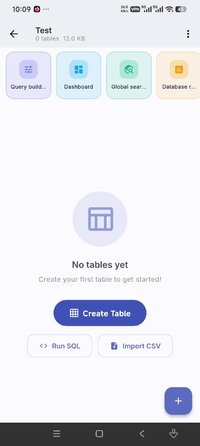
• Visual Query Builder — pick tables, columns and filters; the app writes and runs the SQL for you
• Charts Dashboard — pin bar, line and pie charts from your tables onto one board
• Global Search — find any value across every table and column at once
• Import Excel & JSON — turn a spreadsheet or JSON file into a table in seconds
• Database Report — table sizes, row counts, indexes and more at a glance
---
 SQLITE EDITOR, VIEWER & DB BROWSER
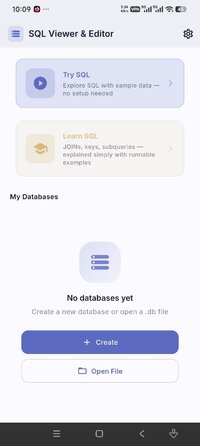
• Open, create and import any SQLite database (.db files) from local storage
• Table browser — scroll, filter, sort and resize columns instantly
• Inline data editor — add, edit and delete rows without writing SQL
• Full SQL query editor with syntax highlighting, autocomplete, formatter and query history
• EXPLAIN query plans and saved queries for power users
• Export as CSV, JSON, SQL dump or Excel; back up and restore your database
• Save your edits back to a file — no root access required
---
 SCHEMA DESIGNER & ER DIAGRAM
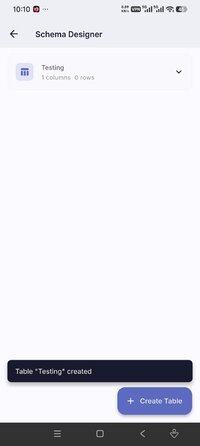
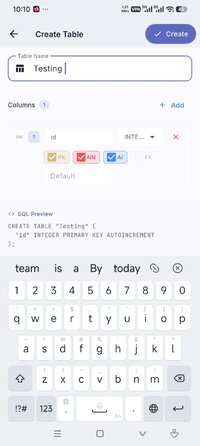
• Visual schema designer — build tables from scratch, add columns, set data types
• Define primary keys, foreign keys, and constraints visually
• ER Diagram viewer — see your entire database structure at a glance and export it as an image
• Perfect for database design, prototyping, and academic projects
---
 DATA VISUALIZATION
• Turn SQL query results into bar, line and pie charts instantly
• Build a dashboard of charts and share it as an image
• Spot trends in your data without exporting to a spreadsheet
---
 LEARN SQL — STRUCTURED LESSONS
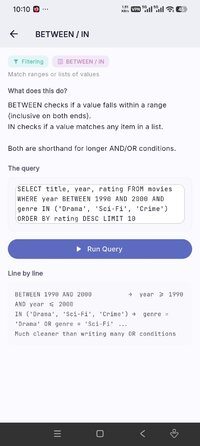
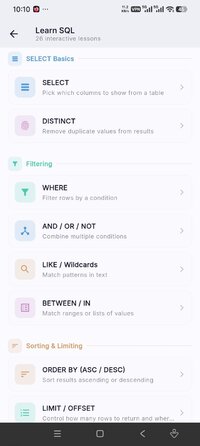
• Built-in SQL course: SELECT, WHERE, JOIN, GROUP BY, aggregates, subqueries, and more
• Beginner-friendly lessons that build from the ground up
• Learn SQL concepts directly inside a real SQLite database editor
• SQL sandbox — run example queries against a real sample database
• One-tap query chips to explore SQL patterns without typing
---
 WHO IS SQLVEDIT FOR?
• Developers who need a portable SQLite viewer, db editor or database manager on Android
• Students learning SQL for school, bootcamp, or interviews
• Data analysts who work with local SQLite databases
• Anyone who wants a lightweight db browser and database viewer on their phone
• Testers and QA engineers inspecting app databases on device
---
 FREE, WITH SQL EDITOR PRO
SQLVEdit is free to use. Upgrade to SQL Editor Pro to unlock advanced export, full database backups, the charts dashboard, premium themes and more — available as a monthly plan or a one-time lifetime purchase. No account required.
Write SQL, run it, see results. Fully offline.
---
POWERFUL TOOLS — NO SQL REQUIRED• Visual Query Builder — pick tables, columns and filters; the app writes and runs the SQL for you
• Charts Dashboard — pin bar, line and pie charts from your tables onto one board
• Global Search — find any value across every table and column at once
• Import Excel & JSON — turn a spreadsheet or JSON file into a table in seconds
• Database Report — table sizes, row counts, indexes and more at a glance
---
SQLITE EDITOR, VIEWER & DB BROWSER• Open, create and import any SQLite database (.db files) from local storage
• Table browser — scroll, filter, sort and resize columns instantly
• Inline data editor — add, edit and delete rows without writing SQL
• Full SQL query editor with syntax highlighting, autocomplete, formatter and query history
• EXPLAIN query plans and saved queries for power users
• Export as CSV, JSON, SQL dump or Excel; back up and restore your database
• Save your edits back to a file — no root access required
---
SCHEMA DESIGNER & ER DIAGRAM• Visual schema designer — build tables from scratch, add columns, set data types
• Define primary keys, foreign keys, and constraints visually
• ER Diagram viewer — see your entire database structure at a glance and export it as an image
• Perfect for database design, prototyping, and academic projects
---
DATA VISUALIZATION• Turn SQL query results into bar, line and pie charts instantly
• Build a dashboard of charts and share it as an image
• Spot trends in your data without exporting to a spreadsheet
---
LEARN SQL — STRUCTURED LESSONS• Built-in SQL course: SELECT, WHERE, JOIN, GROUP BY, aggregates, subqueries, and more
• Beginner-friendly lessons that build from the ground up
• Learn SQL concepts directly inside a real SQLite database editor
• SQL sandbox — run example queries against a real sample database
• One-tap query chips to explore SQL patterns without typing
---
WHO IS SQLVEDIT FOR?• Developers who need a portable SQLite viewer, db editor or database manager on Android
• Students learning SQL for school, bootcamp, or interviews
• Data analysts who work with local SQLite databases
• Anyone who wants a lightweight db browser and database viewer on their phone
• Testers and QA engineers inspecting app databases on device
---
FREE, WITH SQL EDITOR PROSQLVEdit is free to use. Upgrade to SQL Editor Pro to unlock advanced export, full database backups, the charts dashboard, premium themes and more — available as a monthly plan or a one-time lifetime purchase. No account required.
Write SQL, run it, see results. Fully offline.
*Special Features*
This is flutter app, not a regular app
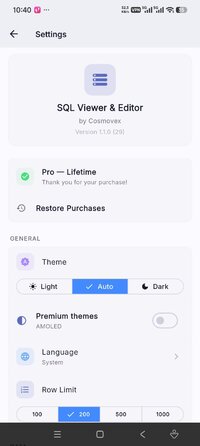
1. Pro lifetime unlocked!
2. Anyway I used my custom stuff, my main goal is to catch as much as feedback, feel free to post android OS version, android brand/os, and working status
Credit to : Jasi2169
Free Download:
! Hidden Content !
You must be registered and either click Like under this post or leave a comment before you can see the hidden links.
You may need to refresh the page after clicking Like. If you’re still having trouble revealing the hidden links, please
read this.
Did you know? VIP Members can see all links instantly, no unlocking required.
Interested? Get VIP here.
Interested? Get VIP here.