Playstore Link :

SVG Vector - Converter - Apps on Google Play
Transform your images into scalable, clean SVG vector graphics and download.
SVG Vector - Converter v1.4 [Premium]
Requirements: 7.0+
Overview: SVG Vectorizer: Your Ultimate Sketch-to-Vector Conversion Tool
SVG Vectorizer: Your Ultimate Sketch-to-Vector Conversion Tool
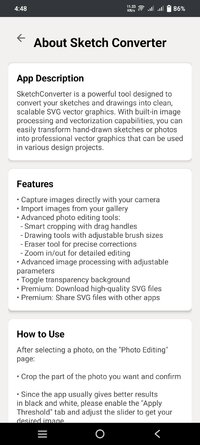
Transform your digital, hand-drawn sketches, artwork, and images into professional-quality vector graphics instantly. Perfect for artists, designers, and creative professionals who need clean, scalable SVG files.
Key Features:
• Instant Vectorization: Convert any image to SVG format in seconds
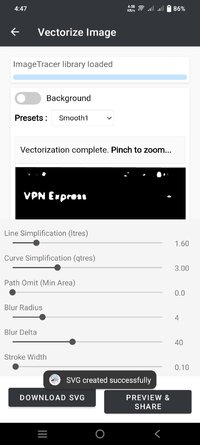
• Multiple Artistic Styles: Choose from various presets including:
• Smooth & Ultra-smooth for clean line art
• Hand-drawn style for natural sketches
• Artistic presets for creative effects
• Posterized options for bold designs
• Color preservation modes (4, 8, or 20 colors)
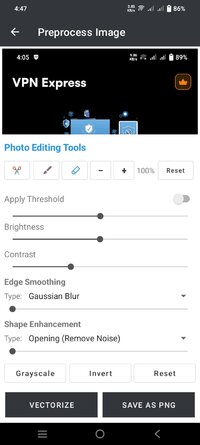
• Advanced Controls:
• Adjustable line smoothness
• Curve precision control
• Path simplification options
• Stroke width customization
• Edge detection sensitivity
• Professional Output:
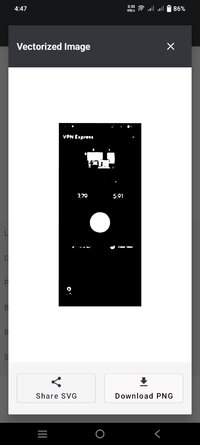
• High-quality SVG files
• Transparent background support
• Maintains aspect ratio
• Optimized file size
• Perfect for logos and illustrations
• User-Friendly Features:
• Real-time preview
• Pinch-to-zoom functionality
• Easy preset selection
• Progress tracking
• Intuitive interface
Perfect for:
• Graphic designers
• Digital artists
• UI/UX designers
• Logo designers
• Illustrators
• Creative professionals
• Anyone working with vector graphics
Use your vectorized images in:
• Logo design
• Digital illustrations
• Web graphics
• Print materials
• Mobile apps
• Scalable icons
• Animation projects
Convert your sketches and images to professional vector graphics today! Download SVG Vectorizer and bring your artwork to the next level.
Note: This app processes all images locally on your device, ensuring your artwork remains private and secure.
What's New:
Fixed app crashes on low-RAM devices
Improved performance on low-RAM devices
Enhanced UI with Material Design 3
Requirements: 7.0+
Overview: SVG Vectorizer: Your Ultimate Sketch-to-Vector Conversion Tool
SVG Vectorizer: Your Ultimate Sketch-to-Vector Conversion Tool
Transform your digital, hand-drawn sketches, artwork, and images into professional-quality vector graphics instantly. Perfect for artists, designers, and creative professionals who need clean, scalable SVG files.
Key Features:
• Instant Vectorization: Convert any image to SVG format in seconds
• Multiple Artistic Styles: Choose from various presets including:
• Smooth & Ultra-smooth for clean line art
• Hand-drawn style for natural sketches
• Artistic presets for creative effects
• Posterized options for bold designs
• Color preservation modes (4, 8, or 20 colors)
• Advanced Controls:
• Adjustable line smoothness
• Curve precision control
• Path simplification options
• Stroke width customization
• Edge detection sensitivity
• Professional Output:
• High-quality SVG files
• Transparent background support
• Maintains aspect ratio
• Optimized file size
• Perfect for logos and illustrations
• User-Friendly Features:
• Real-time preview
• Pinch-to-zoom functionality
• Easy preset selection
• Progress tracking
• Intuitive interface
Perfect for:
• Graphic designers
• Digital artists
• UI/UX designers
• Logo designers
• Illustrators
• Creative professionals
• Anyone working with vector graphics
Use your vectorized images in:
• Logo design
• Digital illustrations
• Web graphics
• Print materials
• Mobile apps
• Scalable icons
• Animation projects
Convert your sketches and images to professional vector graphics today! Download SVG Vectorizer and bring your artwork to the next level.
Note: This app processes all images locally on your device, ensuring your artwork remains private and secure.
What's New:
Fixed app crashes on low-RAM devices
Improved performance on low-RAM devices
Enhanced UI with Material Design 3
*Special Features*
◉ Premium Features Unlocked
◉ CPUs: arm64-v8a
◉ Debug Info Removed
Credit : - @ SurvivalHorror
Free Download:
! Hidden Content !
You must be registered and either click Like under this post or leave a comment before you can see the hidden links.
You may need to refresh the page after clicking Like. If you’re still having trouble revealing the hidden links, please
read this.
Did you know? VIP Members can see all links instantly, no unlocking required.
Interested? Get VIP here.
Interested? Get VIP here.