Playstore Link :

Swift Backup - Apps on Google Play
A simple, fast and smart backup solution for Android smartphones
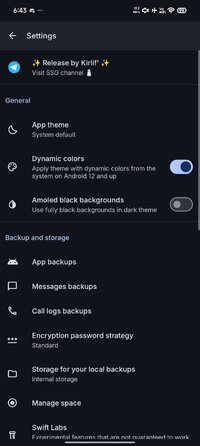
Swift Backup Ver. 5.0.8 MOD APK | Premium Unlocked / Altered
Requirements: Android 6.0 and up
Overview: Swift Backup can backup your important data in minutes! Its quick, efficient and boasts an elegant design for a refreshing backup experience.
Disclaimer: Google Sign-in is required for cloud backups and premium features in the app (Swift Backup - Fast and Secure Android Backup Solution). Browser based sign-in is supported on devices without Google Play services.
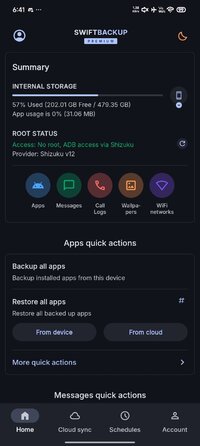
Swift Backup is a one-stop destination to backup your
• Apps (APKs)
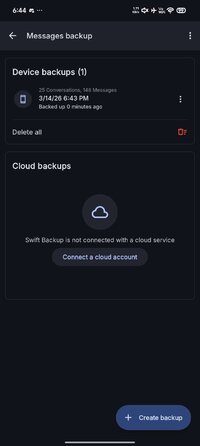
• Messages
• Call Logs
• Applied Wallpapers
On Rooted devices Swift Backup can also backup & restore
• App data: Restore most apps in the same condition as when they were backed up
• Special app data like granted permissions, battery optimization setting*, Magisk Hide state of the app, app SSAIDs, etc.
• WiFi network configurations
Note: Batch restoring apps is only supported if you are rooted or have Shizuku service running.
Cloud services supported
• Google Drive
• Dropbox
• OneDrive
• Box
• Mega.nz
• pCloud
• CloudMail.Ru (Needs paid premium plan in CloudMail.Ru)
• Yandex
• WebDAV servers: Nextcloud, ownCloud, Synology NAS, etc
• S3 (Amazon S3 or any other S3 compatible storage)
• SMB (Samba)
• SFTP
• FTP/S/ES
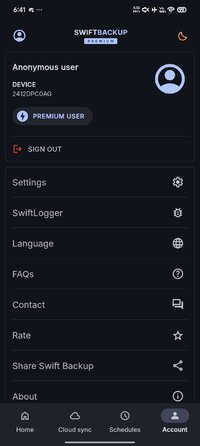
Premium options (Unlocked via in-app purchase plan)
• Cloud backups for apps
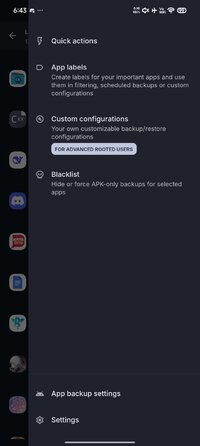
• App Labels
• Custom backup/restore configuration for apps
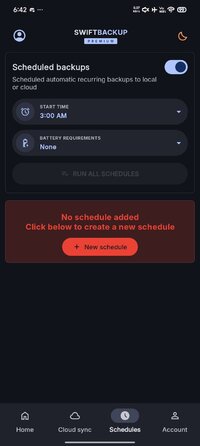
• Scheduled backups
Please report any observed bugs with steps to reproduce via:
• Email: [email protected]
• Support group on Telegram: https://****/swiftbackupsupport
Helpful links:
• FAQs: Swift Backup - Fast and Secure Android Backup Solution
• Common issues: Swift Backup - Fast and Secure Android Backup Solution
What's New:
v5.0.8
- Apps: Fixed a data backup issue on some older Samsung devices
- Billing: Fixed a crash when starting Lifetime plan purchase flow
v5.0.7
- Swift Backup now targets Android 16. Minimum supported version is now Android 8.0 (Oreo).
- Cloud: Fixed broken Dropbox integration
- Other fixes
Short Info:
● Premium Unlocked
● Billing Removed
● DataTransport Removed
● Firebase Analytics/Crashlytics/Installations/Sessions/... Removed
● No Third Party Patch/Hook/...
● No Additional Component
● Compression Flags Untouched
● ~ 31 MB
● Release by Kirlif'
Requirements: Android 6.0 and up
Overview: Swift Backup can backup your important data in minutes! Its quick, efficient and boasts an elegant design for a refreshing backup experience.
Disclaimer: Google Sign-in is required for cloud backups and premium features in the app (Swift Backup - Fast and Secure Android Backup Solution). Browser based sign-in is supported on devices without Google Play services.
Swift Backup is a one-stop destination to backup your
• Apps (APKs)
• Messages
• Call Logs
• Applied Wallpapers
On Rooted devices Swift Backup can also backup & restore
• App data: Restore most apps in the same condition as when they were backed up
• Special app data like granted permissions, battery optimization setting*, Magisk Hide state of the app, app SSAIDs, etc.
• WiFi network configurations
Note: Batch restoring apps is only supported if you are rooted or have Shizuku service running.
Cloud services supported
• Google Drive
• Dropbox
• OneDrive
• Box
• Mega.nz
• pCloud
• CloudMail.Ru (Needs paid premium plan in CloudMail.Ru)
• Yandex
• WebDAV servers: Nextcloud, ownCloud, Synology NAS, etc
• S3 (Amazon S3 or any other S3 compatible storage)
• SMB (Samba)
• SFTP
• FTP/S/ES
Premium options (Unlocked via in-app purchase plan)
• Cloud backups for apps
• App Labels
• Custom backup/restore configuration for apps
• Scheduled backups
Please report any observed bugs with steps to reproduce via:
• Email: [email protected]
• Support group on Telegram: https://****/swiftbackupsupport
Helpful links:
• FAQs: Swift Backup - Fast and Secure Android Backup Solution
• Common issues: Swift Backup - Fast and Secure Android Backup Solution
What's New:
v5.0.8
- Apps: Fixed a data backup issue on some older Samsung devices
- Billing: Fixed a crash when starting Lifetime plan purchase flow
v5.0.7
- Swift Backup now targets Android 16. Minimum supported version is now Android 8.0 (Oreo).
- Cloud: Fixed broken Dropbox integration
- Other fixes
Short Info:
● Premium Unlocked
● Billing Removed
● DataTransport Removed
● Firebase Analytics/Crashlytics/Installations/Sessions/... Removed
● No Third Party Patch/Hook/...
● No Additional Component
● Compression Flags Untouched
● ~ 31 MB
● Release by Kirlif'
*Special Features*
● Premium Unlocked
● Billing Removed
● DataTransport Removed
● Firebase Analytics/Crashlytics/Installations/Sessions/... Removed
● No Third Party Patch/Hook/...
● No Additional Component
Credit to : Kirlif'
Free Download:
! Hidden Content !
You must be registered and either click Like under this post or leave a comment before you can see the hidden links.
You may need to refresh the page after clicking Like. If you’re still having trouble revealing the hidden links, please
read this.
Did you know? VIP Members can see all links instantly, no unlocking required.
Interested? Get VIP here.
Interested? Get VIP here.