Help! Trying to make private server for Arcaea

Kamikaze17-

Platinian
So, im not sure how to do this at all, im not sure if the server can even connect since i made the host set to 0.0.0.0
but it shows this so i am unsure if it works correctly, but whenever i load the game on the phone it does not connect to the server,
do i have to modify arcaea a little bit so the server connects?
Screenshot 2026-11-22 124532.png


or am i just missing alot of steps to this.
 
keep it running on 0.0.0.0 it means all address i don't know much game server but you need to be on the same network like on same wifi 192.168.1.186 this is your ip and port 80 you can try port forwarding or purchase a domain too to make it accessible across network you just need to forward the port
 
Tbh, i dont need much game server to be running, since ill be the only person in the server. The thing is i don't know how to set it up, hell even tried to turn my laptop into the server.
keep it running on 0.0.0.0 it means all address i don't know much game server but you need to be on the same network like on same wifi 192.168.1.186 this is your ip and port 80 you can try port forwarding or purchase a domain too to make it accessible across network you just need to forward the port
 
i don't know much about game server too i know a little bout network if you're laptop and you're phone or other devices are connected on the same wifi you can try opening your browser and goto http://192.168.1.186 since it's running on port 80
not sure if it will take up the wifi in my house, if it does then oh well.
but tbh i'll try it and see if it works. also...the browser kinda opens nothing?
 
Yes, you have to patch the client. The server is fine. Nothing is broken on your side, the game just isn't pointed at you.

The client is hardcoded to arcaea.lowiro.com, auth.lowiro.com and arcapi-v3.lowiro.com over HTTPS, with certificate pinning. Host 0.0.0.0 and port 80 are correct, leave them. The browser showing nothing is normal too, there's no route at /, the admin panel is at /web (admin / admin).

Shortest route: use the existing patcher instead of building one.
Moli13337/Arcaea-6.15.0c does exactly this, URL redirect for all three domains, native + Java pinning bypass, prebuilt .so so no NDK needed.

Code:
cd patch/release
copy config.example.yaml config.yaml
Set in config.yaml:
Code:
api_host: 192.168.1.188     # max 19 bytes
auth_host: 192.168.1.188    # max 14 bytes
build_mode: prebuilt
Then python moli_patch.py, install, done.

Read this before you start:
- Use the IP your own console printed, 192.168.1.188, not the .186 the other guy guessed.
- Windows Firewall blocks inbound 80 by default. Allow it, or the phone will never connect even after patching.
- Version must match. Your folder is server v2.13.0, which is for Arcaea 7.1.0. The Moli patcher is 6.15.0c. Either use Moli's server with Moli's patcher, or patch 7.1.0 yourself. Mixing them fails on version check.
- The hosts are length capped. A long hostname won't fit, use the IP.

Do the patcher route first, get one login working, then worry about the rest.
 
sorry to still be bothersome, but im not sure where to put in cd/patch release,

do i type it somewhere or is that where the directory is supposed to be after patching the files?
cd is a command you type in a terminal. It's not a folder you create and it's not a file you edit. It means "change directory", so it moves the terminal into the folder you name. The path patch/release is relative to the root of the Moli repo you downloaded.

Here's the actual order, nothing skipped:

1. Confirm Python works. Open Command Prompt and run:
Code:
python --version
If it errors, install Python from python.org and tick "Add python.exe to PATH" during setup. Nothing else works until this does.

2. Get the right APK. You need Arcaea 6.15.0c. Take it from the repo's Releases page, the patcher is built for that version. 7.1.0 will not work with it.

3. Open a terminal inside the folder.
Open the repo in Explorer, go into patch\release. Click the address bar, type cmd and hit Enter. A terminal opens already in that folder, so no cd needed.

If you'd rather use cd, it works like this:
Code:
cd C:\path\to\Arcaea-6.15.0c\patch\release

4. Make the config. In the same folder:
Code:
copy config.example.yaml config.yaml

5. Edit it. Open config.yaml with VS Code or Notepad++. Notepad works but watch the indentation, YAML dies on it. Set api_host, auth_host and the APK path, save.

6. Run it.
Code:
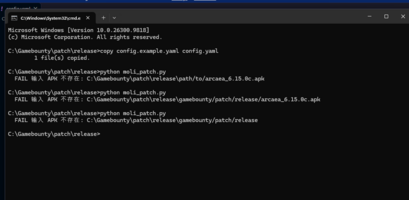
python moli_patch.py

Run it from that folder. If you double click the .py from Explorer instead, the relative paths inside break and it fails.

You also need the game running on the same PC as the server, and the patched APK installed on the phone. Server first, then patch, then install.
 
Two problems, both are your config. The first error is the patcher telling you the file isn't there, which it isn't.

1. Your APK path is wrong. Paths in the yaml resolve from C:\Gamebounty\patch\release, so gamebounty/patch/release/... becomes ...\release\gamebounty\patch\release\... and dies. Use the absolute path, forward slashes are fine on Windows:
Code:
input_apk: "C:/Gamebounty/patch/release/arcaea_6.15.0c.apk"

2. The APK has to actually be there, with the .apk extension. You dropped the extension, so it was looking for a file named arcaea_6.15.0c. Put the real 6.15.0c APK in that folder and rename it to arcaea_6.15.0c.apk.

3. You wiped your edits. You ran copy config.example.yaml config.yaml again at 18:19, which reset everything back to placeholders. Copy once, then edit, then don't copy again.

4. The KeyError is the hosts. They live under server: with two space indentation. Keep them exactly like this:
Code:
server:
  api_host: "192.168.1.188"
  auth_host: "192.168.1.188"

Both are 192.168.1.188, the IP your own console prints. If you deleted those lines, put them back.

Then run python moli_patch.py from that folder again.

Also: your server folder is v2.12.1. Use the server folder that came inside the Moli repo, not the one you had, or the version check will bite you later.
 
gotta set the outputs too?View attachment 1060201
Yes, anything still holding path/to/ has to point at a real file. The keystore is one folder up, in patch\, not in release.

Store password is moli123456, it's in the repo readme.

If there's an alias field too, get the real one instead of guessing:
Code:
keytool -list -v -keystore ..\moli_release.jks -storepass moli123456
It prints the alias, paste that in. Key password is usually the same as the store password.

output_apk is fine as it is. Leave it a bare filename, it writes into the release folder. Only give it a path if you want the output somewhere else.

Rule for this config: every value that says path/to/ or looks like a placeholder is your job to fill. Nothing in it works out of the box.
 
Three things, and one of them is a typo that will bite you next.

1. Fix the keystore path. You typed Gameebounty, double e:
Code:
keystore: "C:/Gamebounty/patch/moli_release.jks"
Alias moli and both passwords are already right, leave those.

2. android.jar is not in the repo. That's why you can't find it. It comes from the Android SDK. Grab just the platform package, no need for Android Studio on a 4GB laptop:
Code:
https://dl.google.com/android/repository/platform-34_r03.zip
Extract it, and point the config at the real file, for example:
Code:
android_jar: "C:/android-sdk/platforms/android-34/android.jar"
The folder layout must be platforms\android-34\android.jar. Don't leave the android-34 level out, the patcher uses it for the build tools.

3. keytool not recognized means no JDK on PATH. The build tools need Java too, so check first:
Code:
java -version
If that also fails, install Temurin JDK 17. Then call keytool by full path:
Code:
"C:\Program Files\Eclipse Adoptium\jdk-17\bin\keytool.exe" -list -v -keystore ..\moli_release.jks -storepass moli123456
not so sure what to do with the https://dl.google.com/android/repository/platform-34_r03.zip pasted it into browser, mightve been a stupid move. but i downloaded eclispe
 
not so sure what to do with the https://dl.google.com/android/repository/platform-34_r03.zip pasted it into browser, mightve been a stupid move. but i downloaded eclispe
My mistake, the filename is wrong. The real one has an ext7 suffix, Google renamed it. Correct link:
Code:
https://dl.google.com/android/repository/platform-34-ext7_r03.zip

Same steps, extract to C:\android-sdk\platforms\ so you get:
Code:
C:\android-sdk\platforms\android-34\android.jar
The zip contains an android-34 folder, keep that level, don't flatten it.

If the link ever dies again, this is the proper way instead of guessing filenames:
Code:
sdkmanager "platforms;android-34"
sdkmanager ships in the Android command line tools, it downloads and places it correctly on its own.

Everything else from before still applies, java -version and the keystore path fix included.
 
Back
Top Bottom