Playstore Link :
Voice Notes (Pro) - Apps on Google Play
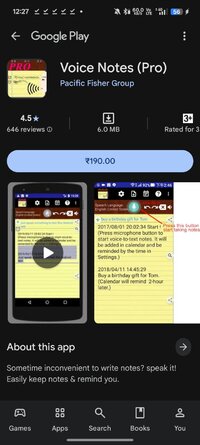
Sometime inconvenient to write notes? speak it! Easily keep notes & remind you.
Voice Notes (Pro) Ver. 5.1.97 pro build 197 | Paid APK
Requirements: 6.0+
Overview: Easily take notes, memos, to-do list and more just by speaking!
Easily keep notes & remind you.
* Just one payment, no additional monthly or subscription fees!
* After this paid version installed, please launch the new app icon with "Pro"
* Paid version premium features:
Remove Ads
Print function
Unlimited to use [Set reminder time when adding notes] and the Alarm button
Features:
- Only one touch needed.
It can keep receiving your speech and convert to text. Note down and remind you later at the date/time you set.
- Easily take notes, memos, to-do list and more just by speaking!
- Integrated with your Android calendars, you need not maintain another one.
- Also easy to share voice-to-text to friends.
- Automatically save your notes in a storage file, and easily back up to cloud.
- Support to create note files by projects or categories.
- It can work when the phone screen is turned off.
With the Recite option, you can make sure the notes are correctly recorded.
- Support headset button to control Start/Stop voice recognition.
- Supported speech recognition 120 languages.
- Supported 20 user interface languages (including English)
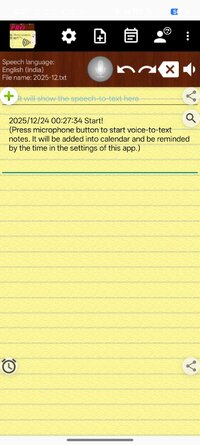
- Simple user interface. Just press the microphone button and speak to take note!
Requirements:
- "Google Speech Recognition & Synthesis" or "Google voice search (Google App)" is required as a speech to text engine. It's used as a voice input or voice typing method. Most devices have it pre-installed. If your devices do not install it, This app will guide you to install.

 play.google.com
https://play.google.com/store/apps/deta ... ksearchbox
play.google.com
https://play.google.com/store/apps/deta ... ksearchbox
Permissions Notice:
This app may ask for permission to access the following features
• Microphone for speech recognition
• Calendar for adding reminder events
If you need, you can try this free version:Voice Notes - Apps on Google Play
★ Untouched Paid apk with Original Hash Signature
★ Certificate MD5 digest: 5340c550e6caf14a8ad5c091f4f82f72
★ No changes were applied
➡ CPU architectures: Universal
➡ Screen DPIs: 120dpi, 160dpi, 240dpi, 320dpi, 480dpi, 640dpi
What's New:
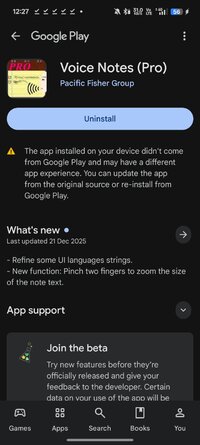
- Refine some UI languages strings.
- New function: Pinch two fingers to zoom the size of the note text.
- Fixed issue: When the keyboard shows up, the cursor position might be hidden under the keyboard.
- Recognition session improved: For Android 12 and above support, one session can now last many minutes without restart and beep, instead of only a few seconds.
- Fix minor issues
Requirements: 6.0+
Overview: Easily take notes, memos, to-do list and more just by speaking!
Easily keep notes & remind you.
* Just one payment, no additional monthly or subscription fees!
* After this paid version installed, please launch the new app icon with "Pro"
* Paid version premium features:
Remove Ads
Print function
Unlimited to use [Set reminder time when adding notes] and the Alarm button
Features:
- Only one touch needed.
It can keep receiving your speech and convert to text. Note down and remind you later at the date/time you set.
- Easily take notes, memos, to-do list and more just by speaking!
- Integrated with your Android calendars, you need not maintain another one.
- Also easy to share voice-to-text to friends.
- Automatically save your notes in a storage file, and easily back up to cloud.
- Support to create note files by projects or categories.
- It can work when the phone screen is turned off.
With the Recite option, you can make sure the notes are correctly recorded.
- Support headset button to control Start/Stop voice recognition.
- Supported speech recognition 120 languages.
- Supported 20 user interface languages (including English)
- Simple user interface. Just press the microphone button and speak to take note!
Requirements:
- "Google Speech Recognition & Synthesis" or "Google voice search (Google App)" is required as a speech to text engine. It's used as a voice input or voice typing method. Most devices have it pre-installed. If your devices do not install it, This app will guide you to install.
Speech Recognition & Synthesis - Apps on Google Play
Speech recognition and synthesis for your device.
Permissions Notice:
This app may ask for permission to access the following features
• Microphone for speech recognition
• Calendar for adding reminder events
If you need, you can try this free version:Voice Notes - Apps on Google Play
★ Untouched Paid apk with Original Hash Signature
★ Certificate MD5 digest: 5340c550e6caf14a8ad5c091f4f82f72
★ No changes were applied
➡ CPU architectures: Universal
➡ Screen DPIs: 120dpi, 160dpi, 240dpi, 320dpi, 480dpi, 640dpi
What's New:
- Refine some UI languages strings.
- New function: Pinch two fingers to zoom the size of the note text.
- Fixed issue: When the keyboard shows up, the cursor position might be hidden under the keyboard.
- Recognition session improved: For Android 12 and above support, one session can now last many minutes without restart and beep, instead of only a few seconds.
- Fix minor issues
*Special Features*
1 . Paid APK
2 . Untouched Paid apk with Original Hash Signature
3 . No changes were applied
Free Download:
! Hidden Content !
You must be registered and either click Like under this post or leave a comment before you can see the hidden links.
You may need to refresh the page after clicking Like. If you’re still having trouble revealing the hidden links, please
read this.
Did you know? VIP Members can see all links instantly, no unlocking required.
Interested? Get VIP here.
Interested? Get VIP here.