Playstore Link :

X Icon Changer - Change Icons - Apps on Google Play
App Icon Changer & Shortcut Creator. Customize your icons without any watermarks
☆ HOW TO USE ☆
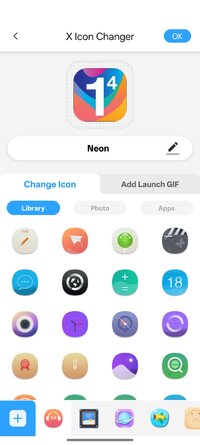
1. Enter X Icon Changer.
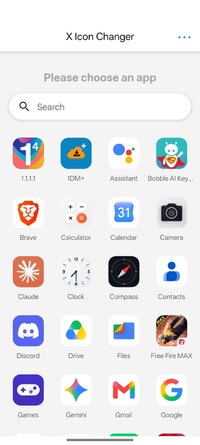
2. Choose an app.
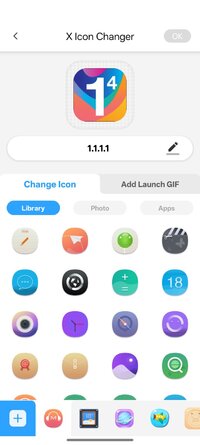
3. Select a new icon from the built-in icon packs, your gallery, other app icons or personalized third-party icon packs.
4. Edit a new name (can be null) for the app.
5. Go to the home screen / desktop to see the new shortcut icon.
6. Add a GIF to play an interesting GIF animation when the new app icon launches.
☆ ABOUT THE WATERMARK ☆
On Android 8.0 and above, the system will automatically add a watermark to the shortcut icon. We provide a way for you to perfectly change app icons without any watermarks using widget technology:
1. Go to the home screen / desktop, long press a blank space and then click “Widgets” in the pop-up menu.
2. Find “X Icon Changer” on the widget page, long press it and drag it to your desktop.
3. The X Icon Changer widget will open automatically. After that, you can change your app icons without any watermarks.
There are lots of selected personalized icon packs built into X Icon Changer. The app and those icon packs are all free to get. Just download X Icon Changer now to decorate your android phone.
1. Enter X Icon Changer.
2. Choose an app.
3. Select a new icon from the built-in icon packs, your gallery, other app icons or personalized third-party icon packs.
4. Edit a new name (can be null) for the app.
5. Go to the home screen / desktop to see the new shortcut icon.
6. Add a GIF to play an interesting GIF animation when the new app icon launches.
☆ ABOUT THE WATERMARK ☆
On Android 8.0 and above, the system will automatically add a watermark to the shortcut icon. We provide a way for you to perfectly change app icons without any watermarks using widget technology:
1. Go to the home screen / desktop, long press a blank space and then click “Widgets” in the pop-up menu.
2. Find “X Icon Changer” on the widget page, long press it and drag it to your desktop.
3. The X Icon Changer widget will open automatically. After that, you can change your app icons without any watermarks.
There are lots of selected personalized icon packs built into X Icon Changer. The app and those icon packs are all free to get. Just download X Icon Changer now to decorate your android phone.
*Special Features*
1 . Pro Features Unlocked
Credit to : NURIK
Free Download:
! Hidden Content !
You must be registered and either click Like under this post or leave a comment before you can see the hidden links.
You may need to refresh the page after clicking Like. If you’re still having trouble revealing the hidden links, please
read this.
Did you know? VIP Members can see all links instantly, no unlocking required.
Interested? Get VIP here.
Interested? Get VIP here.