Playstore Link :

xNotes: Task Notes & Reminders - Apps on Google Play
Notes, tasks, reminders, to-do lists, diary, journal & checklists all in one app
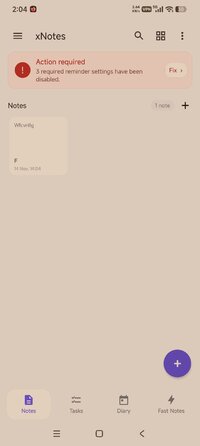
xNotes Notes, Notepad, To-Do Lists, Tasks & Diary
Stay organised with xNotes, a simple and powerful notes app for Android. Write notes, create to-do lists, manage tasks, keep a personal diary, make checklists and capture quick notes - all in one place.
Whether you need a daily notepad, task manager, journal, shopping list, study notebook or a place to quickly save ideas, xNotes helps keep everything organised and easy to find.
Notes & Notepad
Create and organise notes for work, study and everyday life.
• Create beautiful notes
• Organise notes into folders
• Rich text formatting
• Search your notes quickly
• Pin important notes
• Fast and responsive
• Clean Material Design
Use xNotes as your everyday notepad for ideas, meeting notes, study notes, plans, lists and anything you want to remember.
• Tasks, To-Do Lists & Checklists
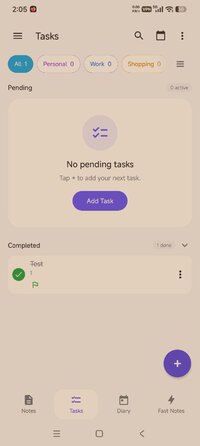
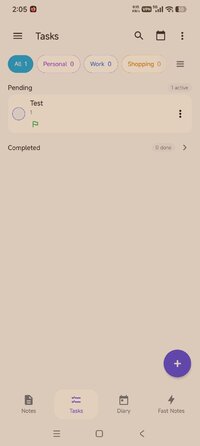
Turn xNotes into your personal task manager and to-do list.
• Create tasks and to-do lists
• Organise tasks into categories
• Set priorities
• Track progress
• Create checklists
• View completed task history
From everyday things to important plans, keep your tasks and to-dos organised in one app.
Diary & Journal
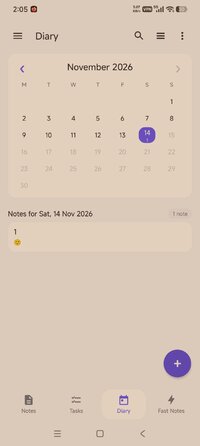
Keep a personal diary and record your thoughts, memories and everyday experiences.
• Calendar view
• Daily journal
• Save personal memories
• Search diary entries
• Beautiful timeline
Use xNotes as a diary, journal or daily notebook and easily find previous entries whenever you need them.
Quick Notes
Need to save something immediately? Quick Notes lets you capture information in seconds.
Perfect for:
• Quick ideas
• Shopping lists
• Phone numbers
• Reminders
• Brainstorming
• Temporary notes
When a quick note becomes important, move it into your permanent notes.
Search Everything
Quickly find what you're looking for across:
Notes
• Tasks
• Diary
• Quick Notes
Your notes and important ideas stay organised and easy to find.
Stay organised with xNotes, a simple and powerful notes app for Android. Write notes, create to-do lists, manage tasks, keep a personal diary, make checklists and capture quick notes - all in one place.
Whether you need a daily notepad, task manager, journal, shopping list, study notebook or a place to quickly save ideas, xNotes helps keep everything organised and easy to find.
Notes & Notepad
Create and organise notes for work, study and everyday life.
• Create beautiful notes
• Organise notes into folders
• Rich text formatting
• Search your notes quickly
• Pin important notes
• Fast and responsive
• Clean Material Design
Use xNotes as your everyday notepad for ideas, meeting notes, study notes, plans, lists and anything you want to remember.
• Tasks, To-Do Lists & Checklists
Turn xNotes into your personal task manager and to-do list.
• Create tasks and to-do lists
• Organise tasks into categories
• Set priorities
• Track progress
• Create checklists
• View completed task history
From everyday things to important plans, keep your tasks and to-dos organised in one app.
Diary & Journal
Keep a personal diary and record your thoughts, memories and everyday experiences.
• Calendar view
• Daily journal
• Save personal memories
• Search diary entries
• Beautiful timeline
Use xNotes as a diary, journal or daily notebook and easily find previous entries whenever you need them.
Quick Notes
Need to save something immediately? Quick Notes lets you capture information in seconds.
Perfect for:
• Quick ideas
• Shopping lists
• Phone numbers
• Reminders
• Brainstorming
• Temporary notes
When a quick note becomes important, move it into your permanent notes.
Search Everything
Quickly find what you're looking for across:
Notes
• Tasks
• Diary
• Quick Notes
Your notes and important ideas stay organised and easy to find.
*Special Features*
✪ Premium features unlocked;
✪ Removed unnecessary files;
✪ All Debug Codes Removed;
Credit to : TRUMods
Free Download:
! Hidden Content !
You must be registered and either click Like under this post or leave a comment before you can see the hidden links.
You may need to refresh the page after clicking Like. If you’re still having trouble revealing the hidden links, please
read this.
Did you know? VIP Members can see all links instantly, no unlocking required.
Interested? Get VIP here.
Interested? Get VIP here.