Playstore Link :

Your Calendar Widget Ver. 1.70.2 build 502 MOD APK | Pro / Paid Unlocked
Requirements: 5.0+
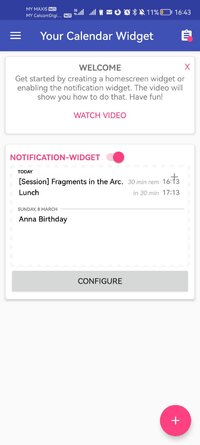
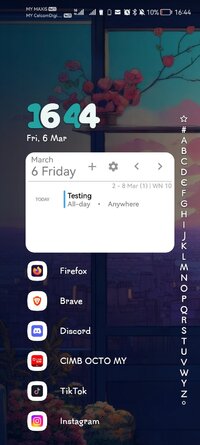
Overview: Your Calendar Widget is a widget, that can be used on the homescreen, lockscreen and your notification bar.
Your Calendar Widget is a widget, that can be used on the homescreen, lockscreen and your notification bar to show your upcoming Google Calendar events. You can easily configure and adapt the widget to your needs. Each widget has its own configuration. This allows you to have several widgets with different calendar- and display-settings.
Features
• The widget can be used on the homescreen, the lockscreen and in the notification bar
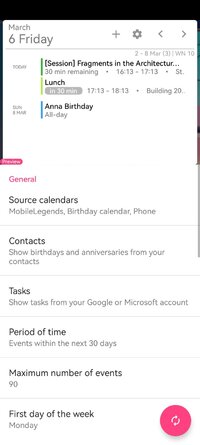
• Almost every element can be adapted to your personal preferences
• Agenda, inline-agenda and simple display mode. There is a variety of different event display options
• Various options for event-visualization in order to identify upcoming events more easily (timeline, badges, notifications, font and background settings)
• The month-calendar provides full access to the entire calendar right from the homescreen
• View birthdays and anniversaries of your contacts
• With the Task Integration tasks can be viewed and edited (Google Tasks, Microsoft To Dos)
• Countless predefined themes provided by the system and the community
• Events can be filtered using the event title
• Any number of widgets can be created, each with its own configuration
Permissions
• Read Calendar: This permission is required to show your calendar events in the widget
• Access your device Storage: This permission is required to read and write widget-backups. On Android P and higher this permission is also required to be able to show your wallpaper in the preview of the widget settings
• Contacts: This permission is required if you like to see birthday and anniversary information from you contacts. Further its required to to read your account information to show your tasks.
Task Integration
With the Task Integration you are able to show your Google Tasks and Microsoft To Dos in the widget. Further you can create new tasks or complete existing tasks. The widget will also consider your subtasks.
Google Reminders
Google Reminders can't be displayed in the widget. Unfortunately Google does not provide an API to access Google Reminders.
Microsoft Outlook
In order to show your Outlook calendar in the widget, enable the Outlook calendar synchronization:
1) Open the Outlook App
2) Open the settings (click the top left Outlook-icon then select the settings-icon on the bottom)
3) In the General section, select Calendar and then enable Sync Calendars
4) In the Google Calendar app - Settings - Manage accounts - Enable the Outlook Calendar
Widget is not updating or events are not appearing in the widget
Following things can help if the widget is not showing the correct events:
1) Disable powersaving options and restart the device
2) Check that the calendar is synced (Google Calendar App)
3) Synchronize calendar data: open Google Calendar App - menuentry Refresh (repeat multiple times)
Further help on synchronization problems can be found here: Fix sync problems with the Google Calendar app - Android - Google Calendar Help
PRO Edition Not Detected
If your purchase is not detected (i.e. after switching to a new phone), try this:
 support.google.com
Usually a restart of the device solves the problem.
support.google.com
Usually a restart of the device solves the problem.
Change the color of source calendars
Changing the source calendar color can be done with any calendar app
Translation
If you like to contribute a translation into your language, please contact me via e-mail.
How to create a widget
Open Your Calendar Widget - Press bottom right button (+) - Choose 'Add Automatically'
Wallpapers
sunset and the stars by paulgilmore
Mountain by MRusta
Night hill by Yupnguyen
Mountains Sunset from Parallax Live Wallpaper App
What's New:
New setting: Transform the event title by replacing parts of it (Adv. Settings - Event Transformer)
When removing duplicate events, the events from contacts will be favored to be kept
Detection of duplicate events improved: When identifying duplicates of birthdays, the age is ignored
Mod Info:
Pro / Paid features unlocked;
Disabled / Removed unwanted Permissions + Receivers + Providers + Services;
Optimized and zipaligned graphics and cleaned resources for fast load;
Ads Permissions / Services / Providers removed from AndroidManifest;
Ads links removed and invokes methods nullified;
Ads layouts visibility disabled;
Google Play Store install package check disabled;
Debug code removed;
Remove default .source tags name of the corresponding java files;
Analytics / Crashlytics / Firebase disabled;
Languages: Full Multi Languages;
CPUs: universal architecture;
Screen DPIs: 120dpi, 160dpi, 240dpi, 320dpi, 480dpi, 640dpi;
Original package signature changed;
Release by Balatan.
Requirements: 5.0+
Overview: Your Calendar Widget is a widget, that can be used on the homescreen, lockscreen and your notification bar.
Your Calendar Widget is a widget, that can be used on the homescreen, lockscreen and your notification bar to show your upcoming Google Calendar events. You can easily configure and adapt the widget to your needs. Each widget has its own configuration. This allows you to have several widgets with different calendar- and display-settings.
Features
• The widget can be used on the homescreen, the lockscreen and in the notification bar
• Almost every element can be adapted to your personal preferences
• Agenda, inline-agenda and simple display mode. There is a variety of different event display options
• Various options for event-visualization in order to identify upcoming events more easily (timeline, badges, notifications, font and background settings)
• The month-calendar provides full access to the entire calendar right from the homescreen
• View birthdays and anniversaries of your contacts
• With the Task Integration tasks can be viewed and edited (Google Tasks, Microsoft To Dos)
• Countless predefined themes provided by the system and the community
• Events can be filtered using the event title
• Any number of widgets can be created, each with its own configuration
Permissions
• Read Calendar: This permission is required to show your calendar events in the widget
• Access your device Storage: This permission is required to read and write widget-backups. On Android P and higher this permission is also required to be able to show your wallpaper in the preview of the widget settings
• Contacts: This permission is required if you like to see birthday and anniversary information from you contacts. Further its required to to read your account information to show your tasks.
Task Integration
With the Task Integration you are able to show your Google Tasks and Microsoft To Dos in the widget. Further you can create new tasks or complete existing tasks. The widget will also consider your subtasks.
Google Reminders
Google Reminders can't be displayed in the widget. Unfortunately Google does not provide an API to access Google Reminders.
Microsoft Outlook
In order to show your Outlook calendar in the widget, enable the Outlook calendar synchronization:
1) Open the Outlook App
2) Open the settings (click the top left Outlook-icon then select the settings-icon on the bottom)
3) In the General section, select Calendar and then enable Sync Calendars
4) In the Google Calendar app - Settings - Manage accounts - Enable the Outlook Calendar
Widget is not updating or events are not appearing in the widget
Following things can help if the widget is not showing the correct events:
1) Disable powersaving options and restart the device
2) Check that the calendar is synced (Google Calendar App)
3) Synchronize calendar data: open Google Calendar App - menuentry Refresh (repeat multiple times)
Further help on synchronization problems can be found here: Fix sync problems with the Google Calendar app - Android - Google Calendar Help
PRO Edition Not Detected
If your purchase is not detected (i.e. after switching to a new phone), try this:
Problems with in-app purchases - Google Play Help
With some apps, you can buy additional content or serv
support.google.com
Change the color of source calendars
Changing the source calendar color can be done with any calendar app
Translation
If you like to contribute a translation into your language, please contact me via e-mail.
How to create a widget
Open Your Calendar Widget - Press bottom right button (+) - Choose 'Add Automatically'
Wallpapers
sunset and the stars by paulgilmore
Mountain by MRusta
Night hill by Yupnguyen
Mountains Sunset from Parallax Live Wallpaper App
What's New:
New setting: Transform the event title by replacing parts of it (Adv. Settings - Event Transformer)
When removing duplicate events, the events from contacts will be favored to be kept
Detection of duplicate events improved: When identifying duplicates of birthdays, the age is ignored
Mod Info:
Pro / Paid features unlocked;
Disabled / Removed unwanted Permissions + Receivers + Providers + Services;
Optimized and zipaligned graphics and cleaned resources for fast load;
Ads Permissions / Services / Providers removed from AndroidManifest;
Ads links removed and invokes methods nullified;
Ads layouts visibility disabled;
Google Play Store install package check disabled;
Debug code removed;
Remove default .source tags name of the corresponding java files;
Analytics / Crashlytics / Firebase disabled;
Languages: Full Multi Languages;
CPUs: universal architecture;
Screen DPIs: 120dpi, 160dpi, 240dpi, 320dpi, 480dpi, 640dpi;
Original package signature changed;
Release by Balatan.
*Special Features*
1 . Pro / Paid features unlocked
Credit to : Balatan
Free Download:
! Hidden Content !
You must be registered and either click Like under this post or leave a comment before you can see the hidden links.
You may need to refresh the page after clicking Like. If you’re still having trouble revealing the hidden links, please
read this.
Did you know? VIP Members can see all links instantly, no unlocking required.
Interested? Get VIP here.
Interested? Get VIP here.