
You are using an out of date browser. It may not display this or other websites correctly.
You should upgrade or use an alternative browser.
You should upgrade or use an alternative browser.
PMT FREE MOD Zenless Zone Zero Ver. 2.6.0 LSPosed Module [Damage & Defense Multipliers]
- Thread starter Yaskashije
- Start date
- App-Architecture
- ARM64 (arm64-v8a | 64-Bit)
Gonna try that lets see.Here's the full tutorial for those who can't use it on LsPatch or any non rooted device:
1= Download NPatch (GitHub - 7723mod/NPatch: NPatch是一个复刻自LSPatch,以LSPosed为基础的免root的Xposed框架) and Shizuku on your phone, set up Shizuku (just look up a tutorial online), and authorize NPatch in the "Authorized Application".
Open NPatch, and if in the main screen you find "Shizuku service available" on top of all, that means it's working.
Download YasKashije's module from PLATINMODS, install the APK, then go to the play store, install ZZZ.
2=Go to the developers options on your phone, go down until you find "Reset to default values" tap it multiple times until the option "Turn on system optimization" can be seen, turn it off. I highly suggest you turn it on after installing the patched game.
3= Use Zarchiver or any other file opener, create a new folder and name it NPatch, copy the module in it. Open NPatch, go to setting and change the storage directory to the one you created (this will make sure that the module will show up), then go to the "manage" section, press the + button, and then "select an installed app", select ZZZ, press start patch, and that's it, its installed.
Long press on ZZZ in the manage section, press "module scope", and make sure that the module is selected.
And then just play the game I guess.
Work?Gonna try that lets see.
Let us know if it works on your end.Gonna try that lets see.

zzdrakahzz
Rookie
I dont know cus i didn't do anything special. Just follow the instruction and it runs smoothYo, how do I fix this? My ZZZ keeps crashing on LDPlayer. I'm playing legit, no mods or anything. What are the best settings to make it run smooth?
Thank you you're a hero to me can't thank you enoughHere's the full tutorial for those who can't use it on LsPatch or any non rooted device:
1= Download NPatch (GitHub - 7723mod/NPatch: NPatch是一个复刻自LSPatch,以LSPosed为基础的免root的Xposed框架) and Shizuku on your phone, set up Shizuku (just look up a tutorial online), and authorize NPatch in the "Authorized Application".
Open NPatch, and if in the main screen you find "Shizuku service available" on top of all, that means it's working.
Download YasKashije's module from PLATINMODS, install the APK, then go to the play store, install ZZZ.
2=Go to the developers options on your phone, go down until you find "Reset to default values" tap it multiple times until the option "Turn on system optimization" can be seen, turn it off. I highly suggest you turn it on after installing the patched game.
3= Use Zarchiver or any other file opener, create a new folder and name it NPatch, copy the module in it. Open NPatch, go to setting and change the storage directory to the one you created (this will make sure that the module will show up), then go to the "manage" section, press the + button, and then "select an installed app", select ZZZ, press start patch, and that's it, its installed.
Long press on ZZZ in the manage section, press "module scope", and make sure that the module is selected.
And then just play the game I guess.

I can confirm that this works. Thank you.Here's the full tutorial for those who can't use it on LsPatch or any non rooted device:
1= Download NPatch (GitHub - 7723mod/NPatch: NPatch是一个复刻自LSPatch,以LSPosed为基础的免root的Xposed框架) and Shizuku on your phone, set up Shizuku (just look up a tutorial online), and authorize NPatch in the "Authorized Application".
Open NPatch, and if in the main screen you find "Shizuku service available" on top of all, that means it's working.
Download YasKashije's module from PLATINMODS, install the APK, then go to the play store, install ZZZ.
2=Go to the developers options on your phone, go down until you find "Reset to default values" tap it multiple times until the option "Turn on system optimization" can be seen, turn it off. I highly suggest you turn it on after installing the patched game.
3= Use Zarchiver or any other file opener, create a new folder and name it NPatch, copy the module in it. Open NPatch, go to setting and change the storage directory to the one you created (this will make sure that the module will show up), then go to the "manage" section, press the + button, and then "select an installed app", select ZZZ, press start patch, and that's it, its installed.
Long press on ZZZ in the manage section, press "module scope", and make sure that the module is selected.
And then just play the game I guess.
When there's a new update, there's no need to uninstall and reinstall the application. Do the following.
1. Download the ZZZ application from the APKmirror. https://www.apkmirror.com/apk/cognosphere-pte-ltd/zenless-zone-zero-2/
2. Download MT manager.
3. Convert the downloaded ZZZ file, from .apks to .apk. Uncheck the `auto sign`.
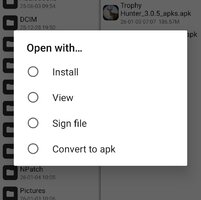
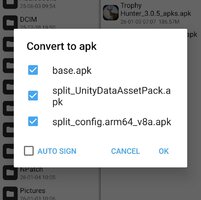
4. Install the ZZZ module, if outdated, install a new one.
5. In NPatch application, select APKs from storage.
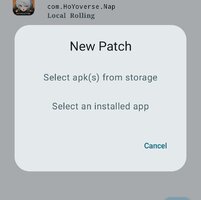
6. Select the converted APK and start the patch.
7. Lastly, simply install the app.
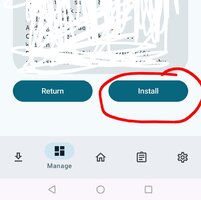
NOTE: No need to uninstall/reinstall the app, as the converted APK has the same APK signature to the installed one.
woelrks without crash, thanks!Here's the full tutorial for those who can't use it on LsPatch or any non rooted device:
1= Download NPatch (GitHub - 7723mod/NPatch: NPatch是一个复刻自LSPatch,以LSPosed为基础的免root的Xposed框架) and Shizuku on your phone, set up Shizuku (just look up a tutorial online), and authorize NPatch in the "Authorized Application".
Open NPatch, and if in the main screen you find "Shizuku service available" on top of all, that means it's working.
Download YasKashije's module from PLATINMODS, install the APK, then go to the play store, install ZZZ.
2=Go to the developers options on your phone, go down until you find "Reset to default values" tap it multiple times until the option "Turn on system optimization" can be seen, turn it off. I highly suggest you turn it on after installing the patched game.
3= Use Zarchiver or any other file opener, create a new folder and name it NPatch, copy the module in it. Open NPatch, go to setting and change the storage directory to the one you created (this will make sure that the module will show up), then go to the "manage" section, press the + button, and then "select an installed app", select ZZZ, press start patch, and that's it, its installed.
Long press on ZZZ in the manage section, press "module scope", and make sure that the module is selected.
And then just play the game I guess.
Huawei, non root. LSPatch was crashing

Asta321
Platinian
not sure what's wrong within my end, but i can't seem to make it working, did all the stuff and just to open the game to run normally without mod, but still congrats to anyone who did manage to do itHere's the full tutorial for those who can't use it on LsPatch or any non rooted device:
1= Download NPatch (GitHub - 7723mod/NPatch: NPatch是一个复刻自LSPatch,以LSPosed为基础的免root的Xposed框架) and Shizuku on your phone, set up Shizuku (just look up a tutorial online), and authorize NPatch in the "Authorized Application".
Open NPatch, and if in the main screen you find "Shizuku service available" on top of all, that means it's working.
Download YasKashije's module from PLATINMODS, install the APK, then go to the play store, install ZZZ.
2=Go to the developers options on your phone, go down until you find "Reset to default values" tap it multiple times until the option "Turn on system optimization" can be seen, turn it off. I highly suggest you turn it on after installing the patched game.
3= Use Zarchiver or any other file opener, create a new folder and name it NPatch, copy the module in it. Open NPatch, go to setting and change the storage directory to the one you created (this will make sure that the module will show up), then go to the "manage" section, press the + button, and then "select an installed app", select ZZZ, press start patch, and that's it, its installed.
Long press on ZZZ in the manage section, press "module scope", and make sure that the module is selected.
And then just play the game I guess.


MeyMan
Platinian
No problem man, enjoy the gameThank you you're a hero to me can't thank you enough

MeyMan
Platinian
It's my pleasure helping y'all, enjoy the game and thanks for the extra tutorial on how to update It.I can confirm that this works. Thank you.
When there's a new update, there's no need to uninstall and reinstall the application. Do the following.
1. Download the ZZZ application from the APKmirror. https://www.apkmirror.com/apk/cognosphere-pte-ltd/zenless-zone-zero-2/
2. Download MT manager.
3. Convert the downloaded ZZZ file, from .apks to .apk. Uncheck the `auto sign`.
View attachment 882621View attachment 882622
4. Install the ZZZ module, if outdated, install a new one.
5. In NPatch application, select APKs from storage.
View attachment 882623
6. Select the converted APK and start the patch.
7. Lastly, simply install the app.
View attachment 882624
NOTE: No need to uninstall/reinstall the app, as the converted APK has the same APK signature to the installed one.
MeyMan
Platinian
Np bro, enjoy the gamewoelrks without crash, thanks!
Huawei, non root. LSPatch was crashing
MeyMan
Platinian
Enjoy the gameWork well, non Root device
Before using LS Patch is Crashed.
Now change into N Patch and works Fine. Thanks.
Android 13 not workingI can confirm that this works. Thank you.
When there's a new update, there's no need to uninstall and reinstall the application. Do the following.
1. Download the ZZZ application from the APKmirror. https://www.apkmirror.com/apk/cognosphere-pte-ltd/zenless-zone-zero-2/
2. Download MT manager.
3. Convert the downloaded ZZZ file, from .apks to .apk. Uncheck the `auto sign`.
View attachment 882621View attachment 882622
4. Install the ZZZ module, if outdated, install a new one.
5. In NPatch application, select APKs from storage.
View attachment 882623
6. Select the converted APK and start the patch.
7. Lastly, simply install the app.
View attachment 882624
NOTE: No need to uninstall/reinstall the app, as the converted APK has the same APK signature to the installed one.


Quebraset
Awesome Active Platinian
Aqui também não funciona android 13 aquiAndroid 13 not working

EdGeinX
Awesome Active Platinian
followed everystep.but mine not working too. start as normal with out mod menunot sure what's wrong within my end, but i can't seem to make it working, did all the stuff and just to open the game to run normally without mod, but still congrats to anyone who did manage to do it