Playstore Link:
AIO Launcher - Apps on Google Play
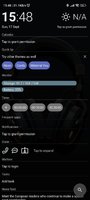
AIO Launcher can display the following information on the screen:
* Weather - current weather and forecast for 10 days;
* Notifications - standard android notifications;
* Player - when you turn on the music, playback control buttons appear;
* Frequent apps - frequently used applications buttons;
* Your apps - the icons of the selected applications;
* Contacts - quick contacts;
* Dialer - numpad for quick calls;
* Timer - timer start buttons;
* Mail - list of received emails;
* Notes - list of your notes;
* Telegram - last messages (paid);
* RSS - latest news;
* Twitter - all tweets or a single user tweets;
* Calendar - upcoming events in the calendar;
* Exchange rates - currency exchange rates;
* Bitcoin - the bitcoin price;
* Finance - stocks, precious metals, cryptocurrencies etc (paid);
* Calculator - simple calculator;
* Audio Recorder - record, play and share audio;
* System monitor - RAM and NAND usage, percentage of battery power;
* Control panel - toggles for WiFi/BT/GPS etc;
* Traffic - shows current download/upload rates and connection type;
* Android widget - standard app widgets (paid).
Other features:
* Several different themes;
* Icon packs support;
* Multiple icon shapes;
* Ability to change the font size;
* Advanced search system for applications, contacts, files and information on the Internet;
* Ability to rename applications;
* Gestures.
Usage:
* Swipe on search button opens quick menu with phone, camera and market;
* To add the Android widget, long press search button and select the "+" icon;
* To resize the widget, hold the finger on the widget, then use the up and down buttons;
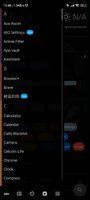
* To access the list of all applications, drag from the left edge of the screen;
* Hold finger on various elements of the screen to open menu;
* To open settings, hold your finger on the search button, and then click the gear icon;
* Hold the title of the widget to move it around;
* Any widget can be disabled in settings;
* You can minimize the widget by clicking on its name;
* To remove an application, open the application menu, hold your finger on the desired application, and drag it to the recycle bin icon.
How to connect to Gmail:
Go to the gmail settings, then "POP / IMAP Forwarding", then "Enable IMAP".
How to connect to Outlook:
https://support.microsoft.com/en-hk/hel ... rification
How to set as default launcher on a Huawei smartphone:
Settings - Applications - Settings - Default applications - Settings - Manager - AIO Launcher
If notification widget don't work on MIUI:
Settings - Battery & performance - Manage apps' battery usage - Choose apps - AIO Launcher - No restrictions
This app uses the Device Administrator permission.
What's New:
* Android 14 support
* Calls and SMS plugin was updated to support search and new options
* Notifications widget now can snooze notifications temporary
* Fixed search window jerking
Make love, not war.
* Weather - current weather and forecast for 10 days;
* Notifications - standard android notifications;
* Player - when you turn on the music, playback control buttons appear;
* Frequent apps - frequently used applications buttons;
* Your apps - the icons of the selected applications;
* Contacts - quick contacts;
* Dialer - numpad for quick calls;
* Timer - timer start buttons;
* Mail - list of received emails;
* Notes - list of your notes;
* Telegram - last messages (paid);
* RSS - latest news;
* Twitter - all tweets or a single user tweets;
* Calendar - upcoming events in the calendar;
* Exchange rates - currency exchange rates;
* Bitcoin - the bitcoin price;
* Finance - stocks, precious metals, cryptocurrencies etc (paid);
* Calculator - simple calculator;
* Audio Recorder - record, play and share audio;
* System monitor - RAM and NAND usage, percentage of battery power;
* Control panel - toggles for WiFi/BT/GPS etc;
* Traffic - shows current download/upload rates and connection type;
* Android widget - standard app widgets (paid).
Other features:
* Several different themes;
* Icon packs support;
* Multiple icon shapes;
* Ability to change the font size;
* Advanced search system for applications, contacts, files and information on the Internet;
* Ability to rename applications;
* Gestures.
Usage:
* Swipe on search button opens quick menu with phone, camera and market;
* To add the Android widget, long press search button and select the "+" icon;
* To resize the widget, hold the finger on the widget, then use the up and down buttons;
* To access the list of all applications, drag from the left edge of the screen;
* Hold finger on various elements of the screen to open menu;
* To open settings, hold your finger on the search button, and then click the gear icon;
* Hold the title of the widget to move it around;
* Any widget can be disabled in settings;
* You can minimize the widget by clicking on its name;
* To remove an application, open the application menu, hold your finger on the desired application, and drag it to the recycle bin icon.
How to connect to Gmail:
Go to the gmail settings, then "POP / IMAP Forwarding", then "Enable IMAP".
How to connect to Outlook:
https://support.microsoft.com/en-hk/hel ... rification
How to set as default launcher on a Huawei smartphone:
Settings - Applications - Settings - Default applications - Settings - Manager - AIO Launcher
If notification widget don't work on MIUI:
Settings - Battery & performance - Manage apps' battery usage - Choose apps - AIO Launcher - No restrictions
This app uses the Device Administrator permission.
What's New:
* Android 14 support
* Calls and SMS plugin was updated to support search and new options
* Notifications widget now can snooze notifications temporary
* Fixed search window jerking
Make love, not war.
*Special Features*
❏ Premium Unlocked
❏ Debug info removed & Multi Language
❏ For - Universal
Free Download:
! Hidden Content !
You must be registered and either click Like under this post or leave a comment before you can see the hidden links.
You may need to refresh the page after clicking Like. If you’re still having trouble revealing the hidden links, please
read this.
Did you know? VIP Members can see all links instantly, no unlocking required.
Interested? Get VIP here.
Interested? Get VIP here.