Open Request Post Apo Tycoon - Idle Builder

black fase

Platinian
X6ejiAVpG5YQbnf_3tk0lf8r2rGthN-2Lsazxcgzw9JoQ=s280.png


Game Name: Post Apo Tycoon - Idle Builder

Google Play Store Link:

APK Link:

Cheat Requested:
  • Unlimited money
  • Unlimited gems
Have you tried any cheat engines?:
No -> My device isn't rooted
 
Upvote 17
For some reason I can't seem to find the right files for clickers and gems. I would appreciate a little more detail, or even screenshots (or a video - I know I'm pushing my luck - lol)
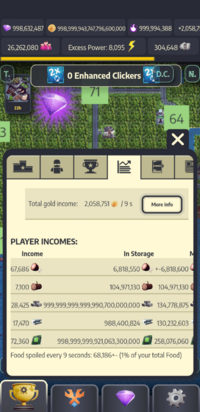
Worse yet, I did the coins, it changed the value. I spent some. I changed it again and now it's in the negative. I don't know how to change it back. Looool
 

Attachments

  • IMG_20260103_232654_167.jpg
    IMG_20260103_232654_167.jpg
    194.2 KB · Views: 45
Worse yet, I did the coins, it changed the value. I spent some. I changed it again and now it's in the negative. I don't know how to change it back. Looool
It goes negative when you try to edit the value above 2 billion. A relaunch should rectify that.
 
Worse yet, I did the coins, it changed the value. I spent some. I changed it again and now it's in the negative. I don't know how to change it back. Looool
tell me what you chose, what processes, I think I did everything as shown in the post, but I get several thousand processes and hundreds of red ones. Please help me.
 
tell me what you chose, what processes, I think I did everything as shown in the post, but I get several thousand processes and hundreds of red ones. Please help me.
I am not proficient at explaining, so please excuse the AI-simplified explanation. Let me know if it helps.

I’ve figured out a reliable way to do this, and the key step is pausing the game using Advanced Settings (bottom-left corner in Cheat Engine).

Step-by-step method​

  1. Pause the game
    • Use Advanced Settings in CE (bottom-left) to pause the game.
  2. Enter the current in-game value.
    • In the search field, type your current in-game value followed by *2.
    • Example:
      • If you have 57,862 coins, enter:
        57862*2
  3. Run First Scan
    • Click First Scan.
    • You will see thousands of results — this is normal.
  4. Unpause briefly, then pause again.
    • Unpause the game for a few seconds so the value changes naturally.
    • Pause the game again.
  5. Update the search with the new value.
    • Check the new in-game value.
    • Enter the new value again with *2.
    • Example:
      • Coins increased to 59,862, enter:
        59862*2
  6. Run Next Scan
    • Click Next Scan.
    • This should narrow it down to one result.
  7. Edit the value
    • Double-click the result so it appears in the bottom panel.
    • Click on the Value field and edit it to whatever amount you want.

Important notes​

  • Increase values gradually.
    Don’t go too big too fast — large values can cause the resource to go negative.
  • If the value becomes negative
    • Use a minus sign in front of the value and still include *2.
    • Example:
      • In-game coins show –78,890
      • Enter:
        -78890*2
    • Run First Scan, unpause briefly, pause again, then update with the new negative value (e.g., -76890*2) and run Next Scan.
I’m still testing the limits, but going small and adjusting gradually works best.
Hope this is clear and helps 👍
 
I am not proficient at explaining, so please excuse the AI-simplified explanation. Let me know if it helps.

I’ve figured out a reliable way to do this, and the key step is pausing the game using Advanced Settings (bottom-left corner in Cheat Engine).

Step-by-step method​

  1. Pause the game
    • Use Advanced Settings in CE (bottom-left) to pause the game.
  2. Enter the current in-game value.
    • In the search field, type your current in-game value followed by *2.
    • Example:
      • If you have 57,862 coins, enter:
        57862*2
  3. Run First Scan
    • Click First Scan.
    • You will see thousands of results — this is normal.
  4. Unpause briefly, then pause again.
    • Unpause the game for a few seconds so the value changes naturally.
    • Pause the game again.
  5. Update the search with the new value.
    • Check the new in-game value.
    • Enter the new value again with *2.
    • Example:
      • Coins increased to 59,862, enter:
        59862*2
  6. Run Next Scan
    • Click Next Scan.
    • This should narrow it down to one result.
  7. Edit the value
    • Double-click the result so it appears in the bottom panel.
    • Click on the Value field and edit it to whatever amount you want.

Important notes​

  • Increase values gradually.
    Don’t go too big too fast — large values can cause the resource to go negative.
  • If the value becomes negative
    • Use a minus sign in front of the value and still include *2.
    • Example:
      • In-game coins show –78,890
      • Enter:
        -78890*2
    • Run First Scan, unpause briefly, pause again, then update with the new negative value (e.g., -76890*2) and run Next Scan.
I’m still testing the limits, but going small and adjusting gradually works best.
Hope this is clear and helps 👍

Thank you very much, I'll try this method when I get home.
 
Hello - since all the information how to use Cheat Engine on this game on Nox emulator is a bit scatterd I wanted to sum it up here with all cheatable resources.

Step 1. Open the game on Nox with your profile logged in.

Step 2. Open Cheat Engine + "Process List" and switch from "Applications" Tab to "Process" Tab to be able to choose "NoxVMHandle".

Step 3. Click in CE in the very left corner on "Advanced Options" to Pause the game.

Step 4. Now change the "Value type" from 4 Bytes to "All"

Step 5. Now search for the current value of any resource you want to change - some resources you have to calculate the value x2 to find it - here is a list:

Resources findable by their exact on-screen value (1x):
- Coins
- Micro-Chips
- Stone

Resources findable by double their on-screen value (2x)
- Gems
- Power Clicks
- Food
- Lumber
- Steel
- Oil
- U-Batteries

Step 6. Hit "First scan" with the value of the choosen resource and unpause the game - Now at least one of the codes should increase a bit in value and is red coloured, if you are unsure just wait and check which one is changing in the same time rythem as the 9 secounds ingame counter (the yellow bar lol) - choose this code and change the value to the amount you want - BUT:

With resources try to stay under 1.000.000.000 (Doubled Resource values 2.000.000.000) since I recoginzed that it can crash the game because somehow it changes the value ingame to a negative value - but you can experiment on your own if you want.

With Coins I prefer to stay under: 10.000.000.000.000

With Gems and Power Clickers I prefer to stay under:
10.000.000 (20.000.000 because doubled value)

Step 7. Play some secounds so the game autosaves at least onece - now you can load the game on your mobile device again and the changed values are safed.

Be aware that everytime you reopen the game on NOX to change the values again or after the game crashed on NOX you have to search all the values again - you can't save the cheat sheet since somehow the codeline itself changes everytime the game restarts.

Hope this little guide can help even people who never used Cheat Engine before and thanks to all the others who found out that Cheat Engine works on this game ! :)
Hi, I'm curious to know how you manage to get your coun value that high. As soon as I go above 1 billion (2 billion because of doubling), it reflects in-game into the negative. I'd really appreciate the help.
 
I'd like to report my new discovery. Not all resource data in this game uses double precision. Even the same data may switch data types during the game. As shown in my screenshot, I modified chips and stones using double precision, but steel is 4-byte. In addition, you don't need to search for 'all types' and 'ranges', you only need to specify the data type and the exact value. But you may need to try double precision - original data and 4 bytes - double data respectively.
View attachment 767058
How did you manage to get your coun value so high? I used Cheat Engine. If I go above 2 billion, the coin value goes into the negative.
 
If you're using bluestacks, then the values change each time you open the game and the hunt is on to find the correct ones again. It's quite the pain in the ass. And I was never able to figure out how to edit gems.
Mostly everything is Dword few exceptions gold, stones, & microchips which are eDouble I search it personally in Auto (value is encrypted) .. After about 3-5 searches it's usually the top Dword result most I've been able to get is 1 billion but have to make value 2 billion in GG.. But if you do all of them in one gameplay session you can freeze the value and zoom through leveling up your settlements. But once you restart the game the freezes will be off so your values will start decreasing again.. But you an edit everything this way eco gold Mines, swapper, Sequoias, gems, super clickers, food, wood, steel, oil. Just takes time and patience
 

Attachments

  • Screenshot_20260121-055243.png
    Screenshot_20260121-055243.png
    975.2 KB · Views: 41
Mostly everything is Dword few exceptions gold, stones, & microchips which are eDouble I search it personally in Auto (value is encrypted) .. After about 3-5 searches it's usually the top Dword result most I've been able to get is 1 billion but have to make value 2 billion in GG.. But if you do all of them in one gameplay session you can freeze the value and zoom through leveling up your settlements. But once you restart the game the freezes will be off so your values will start decreasing again.. But you an edit everything this way eco gold Mines, swapper, Sequoias, gems, super clickers, food, wood, steel, oil. Just takes time and patience
I've tried GG as well. I am not able to get my coins as high as yours. How did you manage to get it so high? I also struggle to search for the coins. I've used auto.
 
I've tried GG as well. I am not able to get my coins as high as yours. How did you manage to get it so high? I also struggle to search for the coins. I've used auto.
Update! Everything is dword until you have maxed amount possible for dword (2,147,483,648) in GG (1,073,741,824) in the game... after that it converts to edouble which is unlimited... search using dword just have to calculate x2 on whatever you're searching
Example if you're searching 10,230 in game then it would be 20,460 in GG . the key is to get your total over the max amount of dword in the game so you have to boost your storage capacity so therefore you can boost your total amount you have.. gold is easiest because there is no storage capacity once you have your amount in game over the ingame dword total you will be able to search for the amount directly using edouble and modify to any amount you want
 
Hi, I'm very far from all this, it took me a whole day to install "nox").
I tried to do everything according to your guide, but I ran into a number of problems due to my lack of knowledge about working with CE.
Tell me please:
How did you manage to pause the game?
What values should I enter in "value", (and no matter which ones I enter, it outputs from 10,000 to 100,000 or more results)?
Thank you very much for the guide and thank you very much in advance for your reply.
Cheat engine is nice.. But everything can be done with game guardian. Easier in my opinion
 
Update! Everything is dword until you have maxed amount possible for dword (2,147,483,648) in GG (1,073,741,824) in the game... after that it converts to edouble which is unlimited... search using dword just have to calculate x2 on whatever you're searching
Example if you're searching 10,230 in game then it would be 20,460 in GG . the key is to get your total over the max amount of dword in the game so you have to boost your storage capacity so therefore you can boost your total amount you have.. gold is easiest because there is no storage capacity once you have your amount in game over the ingame dword total you will be able to search for the amount directly using edouble and modify to any amount you want
Do you have an example of how these values end up looking in GG/Cheat engine? i can find gold easily as 4 byte but once it moves above i don't really see any related values anymore, even if they continue to increase when gold does it's not in a direct relationship to the gold value.
Thanks!
 

Similar threads

Back
Top Bottom