Playstore Link:

Attack on Tank : World Warfare - Apps on Google Play
A role-playing, ultra-realistic combat game recreates tank tactics of the time!
Game Name: Attack on Tank : World Warfare
Game Version: 5.0.1
Needs OBB: No
Needs Root: No
The lost hardcore and immersive experience is here!
Why don't you experience some real, forgotten combat, too?
This game has been downloaded more than 1 million times in total, thanks to you.
As a member of a tank platoon, you'll take on a variety of missions!
A fierce battle between tanks in an immersive battlefield!
Cooperation with allies is essential to advance the battle to your advantage.
Use your tactics to overturn the power gap between you and the mighty enemy forces!
Can you survive and become a hero on this ferocious battlefield?
It's free to download and play right now!
Features :
- You can play against players from all over the world in online multiplayer (PvP match).
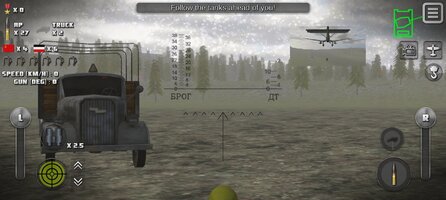
- 3D action & simulator tank game free app to fight with real tanks.
- You can move freely on the vast open world battlefield.
- On the island field, battleships and cruisers will be supporting the ground combat!
- Indirect fire from heavy gun-howitzers adds to the tension of the battle.
- There is a wide variety of missions including reconnaissance, ambushes, raids and blitz.
- The realistic staging and sounds allow you to experience a sense of urgency on the battlefield that is more than just a tank game.
- Realistic damage system with complex physics calculations.
- AI tank units fight with precise movements and sophisticated tactics.
- It is also possible to change the battle situation by calling for air attacks and support fire.
- A powerful air battle by the famous reciprocating fighter is recreated.
- It is possible to set anti-tank mines and destroy the caterpillar of enemy tank.
- A coaxial machine gun can be used as a sighting device.
- Realistic tank behavior is achieved by simple touch operation.
- You can switch between first-person (FPS) and third-person (TPS) viewpoints.
- We recommend this game for those who like classic tank games because it faithfully reproduces the tank battles.
- Famous tanks from major countries appear one after another (e.g., Soviet Union, Germany, United States of America, Empire of Japan, British Empire, Kingdom of Italy)
- When hit by an anti-tank mine, the tank cannot move until the track damage is automatically repaired.
How to play :
- Click the Help button on the Start screen to check the basic operation.
- The number of tanks that can be played increases as you progress through the missions.
- During the mission, instructions will appear in the message box at the top of the screen.
- Playable tanks in online mode will be unlocked as the campaign mode progresses.
FAQ :
Q. How do I get coins in the game?
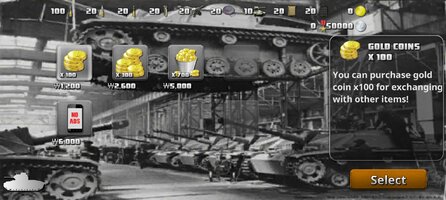
A. Gold Coins can be obtained through in-app purchases. Silver Coins can be earned by watching reward ads.
Q. How do I unlock tanks?
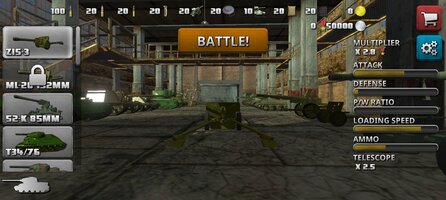
A. Free tanks can be unlocked by advancing the missions. Other tanks can be purchased using Gold Coins.
Q. I want to operate an aircraft.
A. First, call out a friendly aircraft with the subweapon button, then press the aircraft button in the upper right corner.
Q. Where is the "Tiger II" tank?
A. "Tiger II" tanks are temporarily unavailable, but will be reintroduced in the future.
Q. Do enemy and friendly A.I. have different abilities?
A. If it is the same tank or aircraft, the capabilities are exactly the same for friend and foe.
Caution :
- This app requires an Internet connection.
- It is recommended that purchased coins and items be restored using OS functionality or other backup applications. Data restoration is at your own risk.
- Depending on the performance of the device, it may take a little time to load at the first startup.
- If another app notification occurs, the game's audio may be paused. In that case, please restart the app.
Official Twitter :
Game content will continue to be updated in the future!
Have fun!!
Why don't you experience some real, forgotten combat, too?
This game has been downloaded more than 1 million times in total, thanks to you.
As a member of a tank platoon, you'll take on a variety of missions!
A fierce battle between tanks in an immersive battlefield!
Cooperation with allies is essential to advance the battle to your advantage.
Use your tactics to overturn the power gap between you and the mighty enemy forces!
Can you survive and become a hero on this ferocious battlefield?
It's free to download and play right now!
Features :
- You can play against players from all over the world in online multiplayer (PvP match).
- 3D action & simulator tank game free app to fight with real tanks.
- You can move freely on the vast open world battlefield.
- On the island field, battleships and cruisers will be supporting the ground combat!
- Indirect fire from heavy gun-howitzers adds to the tension of the battle.
- There is a wide variety of missions including reconnaissance, ambushes, raids and blitz.
- The realistic staging and sounds allow you to experience a sense of urgency on the battlefield that is more than just a tank game.
- Realistic damage system with complex physics calculations.
- AI tank units fight with precise movements and sophisticated tactics.
- It is also possible to change the battle situation by calling for air attacks and support fire.
- A powerful air battle by the famous reciprocating fighter is recreated.
- It is possible to set anti-tank mines and destroy the caterpillar of enemy tank.
- A coaxial machine gun can be used as a sighting device.
- Realistic tank behavior is achieved by simple touch operation.
- You can switch between first-person (FPS) and third-person (TPS) viewpoints.
- We recommend this game for those who like classic tank games because it faithfully reproduces the tank battles.
- Famous tanks from major countries appear one after another (e.g., Soviet Union, Germany, United States of America, Empire of Japan, British Empire, Kingdom of Italy)
- When hit by an anti-tank mine, the tank cannot move until the track damage is automatically repaired.
How to play :
- Click the Help button on the Start screen to check the basic operation.
- The number of tanks that can be played increases as you progress through the missions.
- During the mission, instructions will appear in the message box at the top of the screen.
- Playable tanks in online mode will be unlocked as the campaign mode progresses.
FAQ :
Q. How do I get coins in the game?
A. Gold Coins can be obtained through in-app purchases. Silver Coins can be earned by watching reward ads.
Q. How do I unlock tanks?
A. Free tanks can be unlocked by advancing the missions. Other tanks can be purchased using Gold Coins.
Q. I want to operate an aircraft.
A. First, call out a friendly aircraft with the subweapon button, then press the aircraft button in the upper right corner.
Q. Where is the "Tiger II" tank?
A. "Tiger II" tanks are temporarily unavailable, but will be reintroduced in the future.
Q. Do enemy and friendly A.I. have different abilities?
A. If it is the same tank or aircraft, the capabilities are exactly the same for friend and foe.
Caution :
- This app requires an Internet connection.
- It is recommended that purchased coins and items be restored using OS functionality or other backup applications. Data restoration is at your own risk.
- Depending on the performance of the device, it may take a little time to load at the first startup.
- If another app notification occurs, the game's audio may be paused. In that case, please restart the app.
Official Twitter :
Game content will continue to be updated in the future!
Have fun!!
*MOD Features*
Large amounts of silver coins
Free Download:
! Hidden Content !
You must be registered and either click Like under this post or leave a comment before you can see the hidden links.
You may need to refresh the page after clicking Like. If you’re still having trouble revealing the hidden links, please
read this.
Did you know? VIP Members can see all links instantly, no unlocking required.
Interested? Get VIP here.
Interested? Get VIP here.
______________________________________
If credits are unknown or incorrect and you are the modder you are free to message @G-Bo and the credits will be corrected asap!
What you need to know about Shared-MODs
*How to install (click the spoilers to read)*
Signed APKs do work on all Android devices (rooted + non-rooted).
Signed APKs are in the most cases the only provided files by the mod publisher as they work for everyone.
1.) Remove the original game/app.
2.) Download the MOD APK.
3.) Install the downloaded MOD APK.
4.) Enjoy.
Regarding login methods, please note that logging in with Google will not be possible when using signed MODs. Facebook login (if available) is possible, but it requires you to remove the Facebook application from your device. Other game-specific login methods (if available), such as email, transfer code or guest login usually work fine.
Notes:
- If you used our MOD APK before and just want to update, you can install the new MOD APK on top of the old without removing the game/app first.
- In-App purchases are not possible on signed APKs as they require Google services similar to the Google login process.
Signed APKs are in the most cases the only provided files by the mod publisher as they work for everyone.
1.) Remove the original game/app.
2.) Download the MOD APK.
3.) Install the downloaded MOD APK.
4.) Enjoy.
Regarding login methods, please note that logging in with Google will not be possible when using signed MODs. Facebook login (if available) is possible, but it requires you to remove the Facebook application from your device. Other game-specific login methods (if available), such as email, transfer code or guest login usually work fine.
Notes:
- If you used our MOD APK before and just want to update, you can install the new MOD APK on top of the old without removing the game/app first.
- In-App purchases are not possible on signed APKs as they require Google services similar to the Google login process.
Unsigned APKs do only work on rooted and patched devices/environments.
These are not always provided by the mod publisher as they do only work under certain circumstances.
1.) Your device must be rooted.
2.) Your device must be patched to ignore app signatures. This can be done with the help of tools such as Luckypatcher or Xposed.
Once you fill that requirements the process is the same as with signed APKs with the difference that you can overwrite the original game/app with the MOD APK without removing it first.
1.) Download the unsigned MOD APK.
2.) Install the unsigned MOD APK.
3.) Enjoy.
Note:
For the case the unsigned APK does fail to install: Your device patch is not done correctly!
Login methods and In-App purchases on unsigned MODs function the same as in the original game. Logging in with Google works without issues. Keeping the Facebook application installed is also no problem.
You are rooted and want to know how to patch your device? Please check this for more information:
[Videotutorial] How To Login With Google+ Or Facebook App On Modded Games
These are not always provided by the mod publisher as they do only work under certain circumstances.
1.) Your device must be rooted.
2.) Your device must be patched to ignore app signatures. This can be done with the help of tools such as Luckypatcher or Xposed.
Once you fill that requirements the process is the same as with signed APKs with the difference that you can overwrite the original game/app with the MOD APK without removing it first.
1.) Download the unsigned MOD APK.
2.) Install the unsigned MOD APK.
3.) Enjoy.
Note:
For the case the unsigned APK does fail to install: Your device patch is not done correctly!
Login methods and In-App purchases on unsigned MODs function the same as in the original game. Logging in with Google works without issues. Keeping the Facebook application installed is also no problem.
You are rooted and want to know how to patch your device? Please check this for more information:
[Videotutorial] How To Login With Google+ Or Facebook App On Modded Games
OBB files are not required by every game/app. If necessary, the mod publisher will usually provide them and tell you that they are needed.
1.) Download the OBB file/files.
2.) Download the MOD APK.
3.) Move the OBB files with the help of a filemanager to Android/obb/<packagecode> on your device.
4.) Install the downloaded MOD APK.
5.) Enjoy.
The OBB files are either provided as ".obb" files or as ".zip" files. ZIP files do require to be extracted first.
Still facing issues? Please check here for more details:
How to install OBB files [as detailed as possible]
1.) Download the OBB file/files.
2.) Download the MOD APK.
3.) Move the OBB files with the help of a filemanager to Android/obb/<packagecode> on your device.
4.) Install the downloaded MOD APK.
5.) Enjoy.
The OBB files are either provided as ".obb" files or as ".zip" files. ZIP files do require to be extracted first.
Still facing issues? Please check here for more details:
How to install OBB files [as detailed as possible]
Tutorials:
How to sign up and download on Platinmods.com
List of useful tutorials about how to use this website and its content