Playstore Link:

Find It Out® - Hidden Object - Apps on Google Play
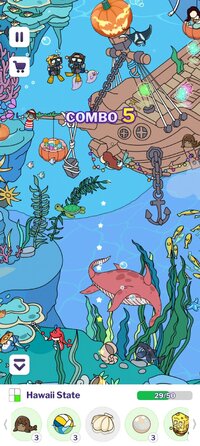
Find hidden objects in this scavenger hunt game. Seek, find & unlock maps!
Game Name: Find It Out - Hidden Object
Game Version: 3.68.0
Needs OBB: No
Needs Root: No
The best FREE and most addictive hidden object game for you in 2026! Find all hidden objects in challenging levels and relax your mind in this scavenger hunt casual game. Play it and FIND now!
In this free scavenger hunt picture puzzle, all you need to do is focus on the items listed below, tap on the hidden objects, and complete the beautiful scenes that you are investigating. Take the challenge and solve the hidden objects puzzles as quickly as possible!
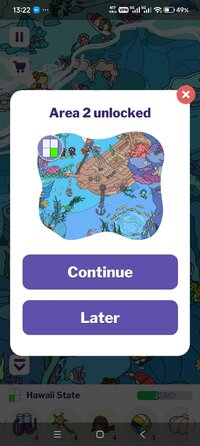
As a new kind of search and find hidden object game, Find It Out allows you to find all missing objects with multiple lively maps and engaging game scenes. Step inside tons of mystery locations to find all hidden objects and unlock new maps for free in this Find It and scavenger hunt puzzle game!
Search, seek, and find in awesome graphics, you will have hundreds of hidden objects to collect for more scavenger hunt fun. If you love playing find hidden objects games, Find It or Spot It games, and other scavenger hunt puzzles, this free brain teaser will be the BEST choice for you!
 Latest Updates in Find It Out
- Gold Pass: Find hidden objects, level up, and unlock a variety of rewards in this brand-new event!
- Premium Coins: Earn premium coins in the Gold Pass and Weekly Contest to unlock exclusive premium maps.
Key Features of Our Hidden Object Games
 Free to play. Fully enjoy the pleasure of hidden object games for free!
 Simple rules and gameplay. Take a look at the scene, find all the hidden objects and finish the scene!
 Suitable for groups of all ages. Play the picture puzzle game with your family members and friends together!
 Various difficulties. The more hidden objects you find, the harder maps you can challenge.
 Intentionally designed hidden objects. Use your search skills to find all the unique items on the map!
 Powerful tools. Use helpful hints to find the last hidden object when you get stuck.
 Zoom feature. Zoom in and out at any moment to spot the well-hidden objects!
 Multiple levels and scenes. Animal park, ocean world, children's playground and more destinations are waiting for you!
 Different gaming modes. Play with Classic and Match modes as you like!
How to Play Our Hidden Object Games
 Observe, seek, and find the required hidden objects
 Use hints to locate the target and find it
 Zoom in, out, and swipe through every corner of maps
 Collect all hidden objects to complete a scene
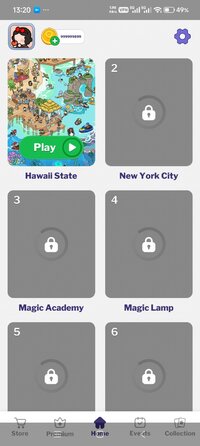
Enjoy the thrill of finding hidden treasures by exploring our weekly updated maps! Immerse yourself in a diverse collection of captivating maps, including Sky City, Magic Academy, Fantasy Forest, Pumpkin Kingdom, Mushroom Realm, Kyoto City, London City, African Jungle, Central Mall, and many more.
Get ready for an unforgettable journey into a realm filled with wonder and excitement in our hidden object games. Come and join us today!
Find It Out - Hidden Objects is the perfect "seek and find game" to improve your observation skills! Keep alert and be patient! Take a good look at the map, detect all the hidden objects and find it out!
Privacy Policy: Privacy Policy
Terms of Service: Terms of Service
*MOD Features*
Large amount of gold coins
Free Download:
! Hidden Content !
You must be registered and either click Like under this post or leave a comment before you can see the hidden links.
You may need to refresh the page after clicking Like. If you’re still having trouble revealing the hidden links, please
read this.
Did you know? VIP Members can see all links instantly, no unlocking required.
Interested? Get VIP here.
Interested? Get VIP here.
______________________________________
If credits are unknown or incorrect and you are the modder you are free to message @G-Bo and the credits will be corrected asap!
What you need to know about Shared-MODs
*How to install (click the spoilers to read)*
Signed APKs do work on all Android devices (rooted + non-rooted).
Signed APKs are in the most cases the only provided files by the mod publisher as they work for everyone.
1.) Remove the original game/app.
2.) Download the MOD APK.
3.) Install the downloaded MOD APK.
4.) Enjoy.
Regarding login methods, please note that logging in with Google will not be possible when using signed MODs. Facebook login (if available) is possible, but it requires you to remove the Facebook application from your device. Other game-specific login methods (if available), such as email, transfer code or guest login usually work fine.
Notes:
- If you used our MOD APK before and just want to update, you can install the new MOD APK on top of the old without removing the game/app first.
- In-App purchases are not possible on signed APKs as they require Google services similar to the Google login process.
Signed APKs are in the most cases the only provided files by the mod publisher as they work for everyone.
1.) Remove the original game/app.
2.) Download the MOD APK.
3.) Install the downloaded MOD APK.
4.) Enjoy.
Regarding login methods, please note that logging in with Google will not be possible when using signed MODs. Facebook login (if available) is possible, but it requires you to remove the Facebook application from your device. Other game-specific login methods (if available), such as email, transfer code or guest login usually work fine.
Notes:
- If you used our MOD APK before and just want to update, you can install the new MOD APK on top of the old without removing the game/app first.
- In-App purchases are not possible on signed APKs as they require Google services similar to the Google login process.
Unsigned APKs do only work on rooted and patched devices/environments.
These are not always provided by the mod publisher as they do only work under certain circumstances.
1.) Your device must be rooted.
2.) Your device must be patched to ignore app signatures. This can be done with the help of tools such as Luckypatcher or Xposed.
Once you fill that requirements the process is the same as with signed APKs with the difference that you can overwrite the original game/app with the MOD APK without removing it first.
1.) Download the unsigned MOD APK.
2.) Install the unsigned MOD APK.
3.) Enjoy.
Note:
For the case the unsigned APK does fail to install: Your device patch is not done correctly!
Login methods and In-App purchases on unsigned MODs function the same as in the original game. Logging in with Google works without issues. Keeping the Facebook application installed is also no problem.
You are rooted and want to know how to patch your device? Please check this for more information:
[Videotutorial] How To Login With Google+ Or Facebook App On Modded Games
These are not always provided by the mod publisher as they do only work under certain circumstances.
1.) Your device must be rooted.
2.) Your device must be patched to ignore app signatures. This can be done with the help of tools such as Luckypatcher or Xposed.
Once you fill that requirements the process is the same as with signed APKs with the difference that you can overwrite the original game/app with the MOD APK without removing it first.
1.) Download the unsigned MOD APK.
2.) Install the unsigned MOD APK.
3.) Enjoy.
Note:
For the case the unsigned APK does fail to install: Your device patch is not done correctly!
Login methods and In-App purchases on unsigned MODs function the same as in the original game. Logging in with Google works without issues. Keeping the Facebook application installed is also no problem.
You are rooted and want to know how to patch your device? Please check this for more information:
[Videotutorial] How To Login With Google+ Or Facebook App On Modded Games
OBB files are not required by every game/app. If necessary, the mod publisher will usually provide them and tell you that they are needed.
1.) Download the OBB file/files.
2.) Download the MOD APK.
3.) Move the OBB files with the help of a filemanager to Android/obb/<packagecode> on your device.
4.) Install the downloaded MOD APK.
5.) Enjoy.
The OBB files are either provided as ".obb" files or as ".zip" files. ZIP files do require to be extracted first.
Still facing issues? Please check here for more details:
How to install OBB files [as detailed as possible]
1.) Download the OBB file/files.
2.) Download the MOD APK.
3.) Move the OBB files with the help of a filemanager to Android/obb/<packagecode> on your device.
4.) Install the downloaded MOD APK.
5.) Enjoy.
The OBB files are either provided as ".obb" files or as ".zip" files. ZIP files do require to be extracted first.
Still facing issues? Please check here for more details:
How to install OBB files [as detailed as possible]
Tutorials:
How to sign up and download on Platinmods.com
List of useful tutorials about how to use this website and its content