Playstore Link:

Life Sim 3D: Family Simulator - Apps on Google Play
Play a real life simulator with family life & home design in a 3D virtual world!
Game Name: Life Sim 3D: Family Simulator
Game Version: 2.4.0
Needs OBB: No
Needs Root: No
 Welcome to Life Sim: 3D Virtual World – your ultimate virtual adventure!
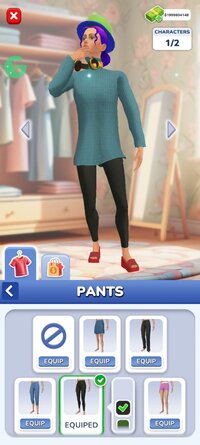
Dive into this life simulator and enjoy a thrilling story game! Build your virtual family and design a cozy family home in a realistic simulator game. Experience a sim life simulator where every choice shapes your virtual sim story. Explore a world simulator, from casual simulation fun to the challenges of a city simulator. Create your dream life in this home sim and start your sim adventure now!
 Step into a world where anything is possible!
Create the life you’ve always dreamed of: design your dream home, make friends, and explore endless opportunities. Life Sim: 3D Virtual World gives you complete freedom to live your story, with exciting surprises at every turn. Whether you enjoy detailed simulator games or casual simulation experiences, this life simulator has everything you need.
 Shape Your Own Story
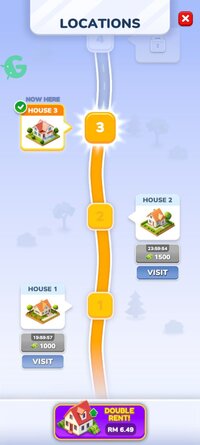
Build your virtual town, grow families, and guide your Sims through their unique journeys. Expand your world by unlocking new locations, achieve goals, and open up exciting new opportunities through the Trophy Road system. Life Sim: 3D Virtual World isn’t just a story game — it’s a full life game that mirrors real-world ups and downs.
 Live Life in Real-Time
Experience life as it happens. From playful toddlers to successful adults, follow your Sims’ paths filled with love, friendships, careers, and a bit of drama. Every choice matters in this real life simulator. Now you can interact with characters more deeply: tap on a Sim to select them, send them around the house, fulfill their needs, and explore interactive objects like TVs and furniture. Sims have personal desires and needs — it’s up to you to guide them through their home life effectively.
 Deal with Real-Life Challenges
Life isn’t always perfect, and now your virtual world reflects that! Face unexpected home events like broken appliances and household mishaps, adding a new layer of simulation and realism. Manage your household wisely and keep your Sims happy!
 Why Play Life Sim: 3D Virtual World?
It’s more than just a game — it’s your personal lifestyle journey. With stunning graphics and immersive gameplay, you’ll dive into a vibrant virtual 3D world where every decision shapes your story. Whether you're creating a happy family or managing your town’s growth, Life Sim: 3D Virtual World offers endless possibilities and authentic life simulation.
 Key Features of Life Sim: 3D Virtual World:
- Create Their Story: Watch your Sims navigate life’s milestones, making decisions that define their future in a rich simulator game world.
- Build and Expand: Unlock new areas, grow your dream town, and build strong community connections in an immersive house simulator.
- Interactive Home Life: Tap to control Sims, guide their actions, fulfill their evolving needs, and interact with home objects for a deeper simulation experience.
- Exciting Trophy Road Progression: Progress through the game by completing tasks, unlocking new features, and expanding your world.
- Live Every Moment: From romance to career triumphs, guide your Sims through real-time adventures, challenges, and successes in a lively 3D world.
- Pets Included: Adopt a dog or cat and enjoy their companionship as part of your virtual family. Take care of them, play, and watch them grow with your Sims!
Start Your Adventure Today!Download Life Sim: 3D Virtual World for free and make your dreams come true! Explore a colorful, exciting world full of life, creativity, and unforgettable stories. Whether you seek a cozy family simulator or an energetic city life adventure, Life Sim: 3D Virtual World has it all.
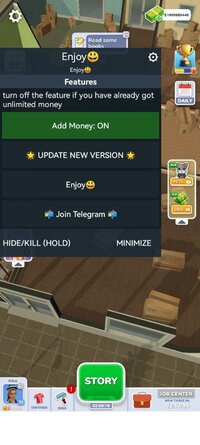
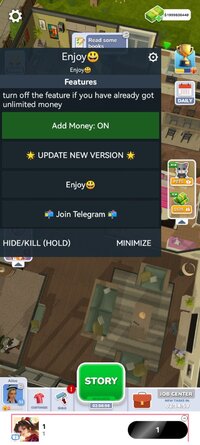
*MOD Features*
Mod Menu:
1. Large amounts of currency
Note : Turn off the mod after character creation once money appears to avoid bankruptcy. It is ON by default every restart.
Free Download:
! Hidden Content !
You must be registered and either click Like under this post or leave a comment before you can see the hidden links.
You may need to refresh the page after clicking Like. If you’re still having trouble revealing the hidden links, please
read this.
Did you know? VIP Members can see all links instantly, no unlocking required.
Interested? Get VIP here.
Interested? Get VIP here.
______________________________________
If credits are unknown or incorrect and you are the modder you are free to message @G-Bo and the credits will be corrected asap!
What you need to know about Shared-MODs
*How to install (click the spoilers to read)*
Signed APKs do work on all Android devices (rooted + non-rooted).
Signed APKs are in the most cases the only provided files by the mod publisher as they work for everyone.
1.) Remove the original game/app.
2.) Download the MOD APK.
3.) Install the downloaded MOD APK.
4.) Enjoy.
Regarding login methods, please note that logging in with Google will not be possible when using signed MODs. Facebook login (if available) is possible, but it requires you to remove the Facebook application from your device. Other game-specific login methods (if available), such as email, transfer code or guest login usually work fine.
Notes:
- If you used our MOD APK before and just want to update, you can install the new MOD APK on top of the old without removing the game/app first.
- In-App purchases are not possible on signed APKs as they require Google services similar to the Google login process.
Signed APKs are in the most cases the only provided files by the mod publisher as they work for everyone.
1.) Remove the original game/app.
2.) Download the MOD APK.
3.) Install the downloaded MOD APK.
4.) Enjoy.
Regarding login methods, please note that logging in with Google will not be possible when using signed MODs. Facebook login (if available) is possible, but it requires you to remove the Facebook application from your device. Other game-specific login methods (if available), such as email, transfer code or guest login usually work fine.
Notes:
- If you used our MOD APK before and just want to update, you can install the new MOD APK on top of the old without removing the game/app first.
- In-App purchases are not possible on signed APKs as they require Google services similar to the Google login process.
Unsigned APKs do only work on rooted and patched devices/environments.
These are not always provided by the mod publisher as they do only work under certain circumstances.
1.) Your device must be rooted.
2.) Your device must be patched to ignore app signatures. This can be done with the help of tools such as Luckypatcher or Xposed.
Once you fill that requirements the process is the same as with signed APKs with the difference that you can overwrite the original game/app with the MOD APK without removing it first.
1.) Download the unsigned MOD APK.
2.) Install the unsigned MOD APK.
3.) Enjoy.
Note:
For the case the unsigned APK does fail to install: Your device patch is not done correctly!
Login methods and In-App purchases on unsigned MODs function the same as in the original game. Logging in with Google works without issues. Keeping the Facebook application installed is also no problem.
You are rooted and want to know how to patch your device? Please check this for more information:
[Videotutorial] How To Login With Google+ Or Facebook App On Modded Games
These are not always provided by the mod publisher as they do only work under certain circumstances.
1.) Your device must be rooted.
2.) Your device must be patched to ignore app signatures. This can be done with the help of tools such as Luckypatcher or Xposed.
Once you fill that requirements the process is the same as with signed APKs with the difference that you can overwrite the original game/app with the MOD APK without removing it first.
1.) Download the unsigned MOD APK.
2.) Install the unsigned MOD APK.
3.) Enjoy.
Note:
For the case the unsigned APK does fail to install: Your device patch is not done correctly!
Login methods and In-App purchases on unsigned MODs function the same as in the original game. Logging in with Google works without issues. Keeping the Facebook application installed is also no problem.
You are rooted and want to know how to patch your device? Please check this for more information:
[Videotutorial] How To Login With Google+ Or Facebook App On Modded Games
OBB files are not required by every game/app. If necessary, the mod publisher will usually provide them and tell you that they are needed.
1.) Download the OBB file/files.
2.) Download the MOD APK.
3.) Move the OBB files with the help of a filemanager to Android/obb/<packagecode> on your device.
4.) Install the downloaded MOD APK.
5.) Enjoy.
The OBB files are either provided as ".obb" files or as ".zip" files. ZIP files do require to be extracted first.
Still facing issues? Please check here for more details:
How to install OBB files [as detailed as possible]
1.) Download the OBB file/files.
2.) Download the MOD APK.
3.) Move the OBB files with the help of a filemanager to Android/obb/<packagecode> on your device.
4.) Install the downloaded MOD APK.
5.) Enjoy.
The OBB files are either provided as ".obb" files or as ".zip" files. ZIP files do require to be extracted first.
Still facing issues? Please check here for more details:
How to install OBB files [as detailed as possible]
Tutorials:
How to sign up and download on Platinmods.com
List of useful tutorials about how to use this website and its content
Last edited by a moderator: