Playstore Link:

Lord Defence - Apps on Google Play
A fantasy tower defense RPG with heroes, spells, strategy, and endless upgrades.
Game Name: Lord Defence
Game Version: 0.0.6
Needs OBB: No
Needs Root: No
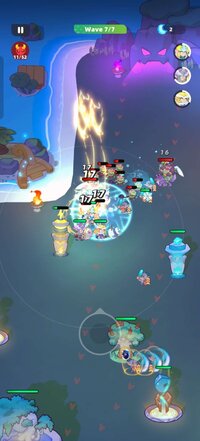
 Lord Defence – The Ultimate Fantasy Tower Defense RPG
Welcome to Lord Defense, a next-generation tower defense game combining strategy, RPG hero progression, and real-time tactical combat.
Build towers, upgrade heroes, cast powerful spells, and defend your kingdom from massive waves of enemies.
If you enjoy tower defense games, strategy RPGs, or castle defense, this is the game you’ve been searching for.
 DAYTIME STRATEGY – BUILD YOUR DEFENSES
Plan your strategy before the monster attacks begin:
Build and upgrade tower defense structures
Archer Towers, Magic Towers, Ice Towers, Lightning Towers — each with unique effects.
Train powerful RPG heroes
Warriors, Mages, Rangers, Assassins, Guardians, and more.
Each hero has unlockable skills, talent trees, and ultimate abilities.
Research spells and abilities
Freeze enemies, summon meteors, unleash chain lightning, and control the battlefield.
 NIGHTTIME BATTLES – DEFEND YOUR CASTLE
When night falls, the real tower defense survival begins:
Fight hundreds of enemies in wave-based combat
Use active skills and hero ultimates to turn the tide
Combine tower effects for maximum DPS and crowd control
Strategize tower placement for the best defense
Perfect for players who enjoy challenging tower defense gameplay with tactical depth.
 COLLECT & UPGRADE HEROES
Build your dream RPG team:
Frontline tanks
High-damage mages
Long-range rangers
Support and crowd-control specialists
Heroes level up, gain gear, unlock new skills, and let you create unique combat strategies.
 EXPLORE A FANTASY WORLD
Play through diverse maps across forests, caves, deserts, ruins, frozen lands, and corrupted zones.
Every level introduces new mechanics, new enemy types, and new tower defense challenges.
 REWARDS, PROGRESSION & UPGRADES
Daily quests & missions
Login rewards
Weekly events & boss raids
Tower upgrades & hero equipment
Offline progression support
Always something new to earn or upgrade — ideal for fans of idle progression and long-term strategy games.
 Perfect For Fans Of:
✔ Tower Defense Games (TD games)
✔ Castle Defense & Base Defense
✔ RPG Games with Heroes & Skills
✔ Fantasy Strategy Games
✔ Offline Tower Defense
✔ Free-to-play tactical combat games
 Become the Lord of this kingdom.
Build your towers. Command your heroes. Stop the invasion.
Download Lord Defense and defend your realm today.
*MOD Features*
Skills have no cooldown during combat
Free Download:
______________________________________
If credits are unknown or incorrect and you are the modder you are free to message @G-Bo and the credits will be corrected asap!
What you need to know about Shared-MODs
*How to install (click the spoilers to read)*
Signed APKs do work on all Android devices (rooted + non-rooted).
Signed APKs are in the most cases the only provided files by the mod publisher as they work for everyone.
1.) Remove the original game/app.
2.) Download the MOD APK.
3.) Install the downloaded MOD APK.
4.) Enjoy.
Regarding login methods, please note that logging in with Google will not be possible when using signed MODs. Facebook login (if available) is possible, but it requires you to remove the Facebook application from your device. Other game-specific login methods (if available), such as email, transfer code or guest login usually work fine.
Notes:
- If you used our MOD APK before and just want to update, you can install the new MOD APK on top of the old without removing the game/app first.
- In-App purchases are not possible on signed APKs as they require Google services similar to the Google login process.
Signed APKs are in the most cases the only provided files by the mod publisher as they work for everyone.
1.) Remove the original game/app.
2.) Download the MOD APK.
3.) Install the downloaded MOD APK.
4.) Enjoy.
Regarding login methods, please note that logging in with Google will not be possible when using signed MODs. Facebook login (if available) is possible, but it requires you to remove the Facebook application from your device. Other game-specific login methods (if available), such as email, transfer code or guest login usually work fine.
Notes:
- If you used our MOD APK before and just want to update, you can install the new MOD APK on top of the old without removing the game/app first.
- In-App purchases are not possible on signed APKs as they require Google services similar to the Google login process.
Unsigned APKs do only work on rooted and patched devices/environments.
These are not always provided by the mod publisher as they do only work under certain circumstances.
1.) Your device must be rooted.
2.) Your device must be patched to ignore app signatures. This can be done with the help of tools such as Luckypatcher or Xposed.
Once you fill that requirements the process is the same as with signed APKs with the difference that you can overwrite the original game/app with the MOD APK without removing it first.
1.) Download the unsigned MOD APK.
2.) Install the unsigned MOD APK.
3.) Enjoy.
Note:
For the case the unsigned APK does fail to install: Your device patch is not done correctly!
Login methods and In-App purchases on unsigned MODs function the same as in the original game. Logging in with Google works without issues. Keeping the Facebook application installed is also no problem.
You are rooted and want to know how to patch your device? Please check this for more information:
[Videotutorial] How To Login With Google+ Or Facebook App On Modded Games
These are not always provided by the mod publisher as they do only work under certain circumstances.
1.) Your device must be rooted.
2.) Your device must be patched to ignore app signatures. This can be done with the help of tools such as Luckypatcher or Xposed.
Once you fill that requirements the process is the same as with signed APKs with the difference that you can overwrite the original game/app with the MOD APK without removing it first.
1.) Download the unsigned MOD APK.
2.) Install the unsigned MOD APK.
3.) Enjoy.
Note:
For the case the unsigned APK does fail to install: Your device patch is not done correctly!
Login methods and In-App purchases on unsigned MODs function the same as in the original game. Logging in with Google works without issues. Keeping the Facebook application installed is also no problem.
You are rooted and want to know how to patch your device? Please check this for more information:
[Videotutorial] How To Login With Google+ Or Facebook App On Modded Games
OBB files are not required by every game/app. If necessary, the mod publisher will usually provide them and tell you that they are needed.
1.) Download the OBB file/files.
2.) Download the MOD APK.
3.) Move the OBB files with the help of a filemanager to Android/obb/<packagecode> on your device.
4.) Install the downloaded MOD APK.
5.) Enjoy.
The OBB files are either provided as ".obb" files or as ".zip" files. ZIP files do require to be extracted first.
Still facing issues? Please check here for more details:
How to install OBB files [as detailed as possible]
1.) Download the OBB file/files.
2.) Download the MOD APK.
3.) Move the OBB files with the help of a filemanager to Android/obb/<packagecode> on your device.
4.) Install the downloaded MOD APK.
5.) Enjoy.
The OBB files are either provided as ".obb" files or as ".zip" files. ZIP files do require to be extracted first.
Still facing issues? Please check here for more details:
How to install OBB files [as detailed as possible]
Tutorials:
How to sign up and download on Platinmods.com
List of useful tutorials about how to use this website and its content