Playstore Link:
My Cafe — Restaurant Game - Apps on Google Play
Serve cakes, coffee & more in the city in this cooking adventure simulator
Game Name: My Cafe — Restaurant Game
Game Version: 2026.3.1.0
Needs OBB: No
Needs Root: No
Decision on the approval of online script content No. 28/GXN-PTTH&TTDT, issued by the Ministry of Information and Communications on 05/04/2022
Love coffee and fun? You’re in the right place. Step into My Cafe and embark on your very own restaurant story game.
Build your cafe from the ground up and transform it into a 5* restaurant that will be the talk of city. Expand your MyCafe empire and show the cooking game world what success really looks like. Ready? Let’s go!
What’s inside this exciting cooking games adventure?
PLAY A REALISTIC CAFE SIMULATOR
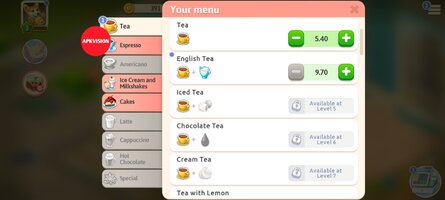
• In this coffee game simulator, use your entrepreneurial skills to grow your cafe business. Fill the fridge with goodies, make coffee, expand the menu and level up your kitchen game.
• Manage your restaurant and team to dominate the cooking simulator game universe. Pour delicious coffee, add new items, and cook unbelievable meals to satisfy your customers.
• Become the cooking master, and turn a simple cafeteria into an award-winning restaurant with crazy-good cooking.
• Waiter games are GO! In this cooking adventure, you’ll need to hire the professionals. From waiting staff to baristas to a cooking organizer, with a team like this, there’s no way you can’t win the restaurant games challenge.
STYLE YOUR CAFE WITH DECOR
• Unlock your inner restaurant games designer and turn that cooking mama cafe into a chic cafe.
• In this restaurant game, there are no limits to your creativity. Choose from tons of decor styles, position furniture, and make that humble little coffee shop your own.
• Whether you’re leveling up your burger game or rocking your street food to restaurant adventure—there’s something for everyone here.
DISCOVER INTERACTIVE CAFE GAME STORYLINES
• It’s never boring in this cooking simulator adventure. From playing kitchen games to staying on top of big cooking trends to serving games and more, you’ll be rushed off your feet and have lots of fun, too!
• Learn all about coffee town’s characters and your potential customers. Find out their favorite orders and level up your drinks and snacks menu with tasty treats and unique coffee recipes. Serve coffee and desserts to all members of the community, from the local librarian to a grade-school teacher and even a police officer. Get their orders right and you’ll have happy customers for life.
• Drama? Romance? MyCafe has it all. In the cafe world, you’ll go on a cooking voyage like no other. Who knows, you might even meet your cooking crush.
• The choice is yours. This is your cooking story. Choose your path through the My Cafe simulation game and unlock an unmissable diner games adventure.
GO SOCIAL AND PLAY COFFEE GAMES WITH FRIENDS
• Like to go it alone? That’s cool. But if you like your coffee social, this coffee shop game has something special for you. Play the My Cafe restaurant game with new friends and old ones to have even more fun. Compete against owners of other coffee shops in cooking mania challenges to take the prize of top barista in the food game planet.
• Visit festivals, complete tasks, expand your coffee empire, and have fun together!
Calling all coffee lovers!
It’s time to unlock your barista superpowers and create custom coffee in this cafe story adventure game.
So, go ahead and make yourself a cup of coffee and let’s play My Cafe together!
Follow My Cafe on Facebook and Instagram for exclusive offers and bonuses!
Facebook: Facebook
Instagram: Instagram
Terms of Service: Terms and Conditions - Moonactive
Privacy Notice: Privacy Policy - Moonactive
Questions about the game? Our support is ready and waiting at: Contact Us — My Cafe: Recipes & Stories - World Restaurant Game Help Center
Love coffee and fun? You’re in the right place. Step into My Cafe and embark on your very own restaurant story game.
Build your cafe from the ground up and transform it into a 5* restaurant that will be the talk of city. Expand your MyCafe empire and show the cooking game world what success really looks like. Ready? Let’s go!
What’s inside this exciting cooking games adventure?
PLAY A REALISTIC CAFE SIMULATOR
• In this coffee game simulator, use your entrepreneurial skills to grow your cafe business. Fill the fridge with goodies, make coffee, expand the menu and level up your kitchen game.
• Manage your restaurant and team to dominate the cooking simulator game universe. Pour delicious coffee, add new items, and cook unbelievable meals to satisfy your customers.
• Become the cooking master, and turn a simple cafeteria into an award-winning restaurant with crazy-good cooking.
• Waiter games are GO! In this cooking adventure, you’ll need to hire the professionals. From waiting staff to baristas to a cooking organizer, with a team like this, there’s no way you can’t win the restaurant games challenge.
STYLE YOUR CAFE WITH DECOR
• Unlock your inner restaurant games designer and turn that cooking mama cafe into a chic cafe.
• In this restaurant game, there are no limits to your creativity. Choose from tons of decor styles, position furniture, and make that humble little coffee shop your own.
• Whether you’re leveling up your burger game or rocking your street food to restaurant adventure—there’s something for everyone here.
DISCOVER INTERACTIVE CAFE GAME STORYLINES
• It’s never boring in this cooking simulator adventure. From playing kitchen games to staying on top of big cooking trends to serving games and more, you’ll be rushed off your feet and have lots of fun, too!
• Learn all about coffee town’s characters and your potential customers. Find out their favorite orders and level up your drinks and snacks menu with tasty treats and unique coffee recipes. Serve coffee and desserts to all members of the community, from the local librarian to a grade-school teacher and even a police officer. Get their orders right and you’ll have happy customers for life.
• Drama? Romance? MyCafe has it all. In the cafe world, you’ll go on a cooking voyage like no other. Who knows, you might even meet your cooking crush.
• The choice is yours. This is your cooking story. Choose your path through the My Cafe simulation game and unlock an unmissable diner games adventure.
GO SOCIAL AND PLAY COFFEE GAMES WITH FRIENDS
• Like to go it alone? That’s cool. But if you like your coffee social, this coffee shop game has something special for you. Play the My Cafe restaurant game with new friends and old ones to have even more fun. Compete against owners of other coffee shops in cooking mania challenges to take the prize of top barista in the food game planet.
• Visit festivals, complete tasks, expand your coffee empire, and have fun together!
Calling all coffee lovers!
It’s time to unlock your barista superpowers and create custom coffee in this cafe story adventure game.
So, go ahead and make yourself a cup of coffee and let’s play My Cafe together!
Follow My Cafe on Facebook and Instagram for exclusive offers and bonuses!
Facebook: Facebook
Instagram: Instagram
Terms of Service: Terms and Conditions - Moonactive
Privacy Notice: Privacy Policy - Moonactive
Questions about the game? Our support is ready and waiting at: Contact Us — My Cafe: Recipes & Stories - World Restaurant Game Help Center
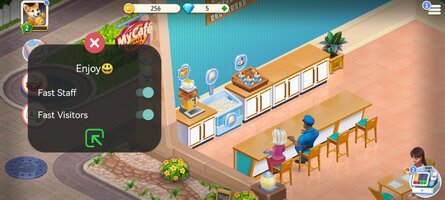
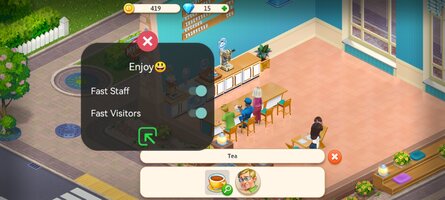
*MOD Features*
Mod Menu:
1. Quick movement (already enabled automatically)
2. Customer rapid relocation (already in effect)
Free Download:
! Hidden Content !
You must be registered and either click Like under this post or leave a comment before you can see the hidden links.
You may need to refresh the page after clicking Like. If you’re still having trouble revealing the hidden links, please
read this.
Did you know? VIP Members can see all links instantly, no unlocking required.
Interested? Get VIP here.
Interested? Get VIP here.
______________________________________
If credits are unknown or incorrect and you are the modder you are free to message @G-Bo and the credits will be corrected asap!
What you need to know about Shared-MODs
*How to install (click the spoilers to read)*
Signed APKs do work on all Android devices (rooted + non-rooted).
Signed APKs are in the most cases the only provided files by the mod publisher as they work for everyone.
1.) Remove the original game/app.
2.) Download the MOD APK.
3.) Install the downloaded MOD APK.
4.) Enjoy.
Regarding login methods, please note that logging in with Google will not be possible when using signed MODs. Facebook login (if available) is possible, but it requires you to remove the Facebook application from your device. Other game-specific login methods (if available), such as email, transfer code or guest login usually work fine.
Notes:
- If you used our MOD APK before and just want to update, you can install the new MOD APK on top of the old without removing the game/app first.
- In-App purchases are not possible on signed APKs as they require Google services similar to the Google login process.
Signed APKs are in the most cases the only provided files by the mod publisher as they work for everyone.
1.) Remove the original game/app.
2.) Download the MOD APK.
3.) Install the downloaded MOD APK.
4.) Enjoy.
Regarding login methods, please note that logging in with Google will not be possible when using signed MODs. Facebook login (if available) is possible, but it requires you to remove the Facebook application from your device. Other game-specific login methods (if available), such as email, transfer code or guest login usually work fine.
Notes:
- If you used our MOD APK before and just want to update, you can install the new MOD APK on top of the old without removing the game/app first.
- In-App purchases are not possible on signed APKs as they require Google services similar to the Google login process.
Unsigned APKs do only work on rooted and patched devices/environments.
These are not always provided by the mod publisher as they do only work under certain circumstances.
1.) Your device must be rooted.
2.) Your device must be patched to ignore app signatures. This can be done with the help of tools such as Luckypatcher or Xposed.
Once you fill that requirements the process is the same as with signed APKs with the difference that you can overwrite the original game/app with the MOD APK without removing it first.
1.) Download the unsigned MOD APK.
2.) Install the unsigned MOD APK.
3.) Enjoy.
Note:
For the case the unsigned APK does fail to install: Your device patch is not done correctly!
Login methods and In-App purchases on unsigned MODs function the same as in the original game. Logging in with Google works without issues. Keeping the Facebook application installed is also no problem.
You are rooted and want to know how to patch your device? Please check this for more information:
[Videotutorial] How To Login With Google+ Or Facebook App On Modded Games
These are not always provided by the mod publisher as they do only work under certain circumstances.
1.) Your device must be rooted.
2.) Your device must be patched to ignore app signatures. This can be done with the help of tools such as Luckypatcher or Xposed.
Once you fill that requirements the process is the same as with signed APKs with the difference that you can overwrite the original game/app with the MOD APK without removing it first.
1.) Download the unsigned MOD APK.
2.) Install the unsigned MOD APK.
3.) Enjoy.
Note:
For the case the unsigned APK does fail to install: Your device patch is not done correctly!
Login methods and In-App purchases on unsigned MODs function the same as in the original game. Logging in with Google works without issues. Keeping the Facebook application installed is also no problem.
You are rooted and want to know how to patch your device? Please check this for more information:
[Videotutorial] How To Login With Google+ Or Facebook App On Modded Games
OBB files are not required by every game/app. If necessary, the mod publisher will usually provide them and tell you that they are needed.
1.) Download the OBB file/files.
2.) Download the MOD APK.
3.) Move the OBB files with the help of a filemanager to Android/obb/<packagecode> on your device.
4.) Install the downloaded MOD APK.
5.) Enjoy.
The OBB files are either provided as ".obb" files or as ".zip" files. ZIP files do require to be extracted first.
Still facing issues? Please check here for more details:
How to install OBB files [as detailed as possible]
1.) Download the OBB file/files.
2.) Download the MOD APK.
3.) Move the OBB files with the help of a filemanager to Android/obb/<packagecode> on your device.
4.) Install the downloaded MOD APK.
5.) Enjoy.
The OBB files are either provided as ".obb" files or as ".zip" files. ZIP files do require to be extracted first.
Still facing issues? Please check here for more details:
How to install OBB files [as detailed as possible]
Tutorials:
How to sign up and download on Platinmods.com
List of useful tutorials about how to use this website and its content