Playstore Link:

My Dressy Doll: Dressup, Decor - Apps on Google Play
Dress up anime dolls, design rooms, and enjoy a cute chibi doll world!
Game Name: My Dressy Doll: Dressup, Decor
Game Version: 1.0.2
Needs OBB: No
Needs Root: No
My Dressy Doll: Dressup, Decor is an ultimate anime chibi doll dress up game and home design simulation game that brings a fun and charming experience. Whether you want to express your fashion style, decorate a room, or simply relax after a long day, your tiny dolls are waiting for you to bring their world to life. Create, decorate, and nurture your dolls in a fun, relaxing, and interactive casual simulation.
With My Dressy Doll: Dressup, Decor, You Can:
 Doll Dress Up & Style
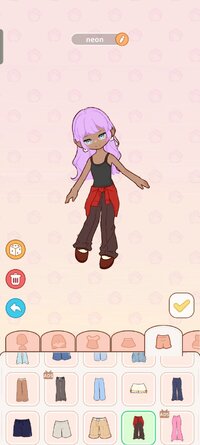
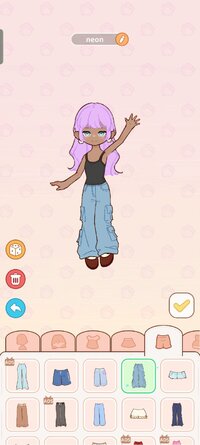
Enter a magical anime dress-up world and make a cute anime character! Mix and match hundreds of outfits, hairstyles, and accessories — from sparkling magical costumes to cozy pajamas and trendy streetwear. Each doll has its own style! Create your own dressy dolls, capture cute moments, and explore a kawaii world full of chibi dolls and anime fashion fun.
 Room Decor & Home Design
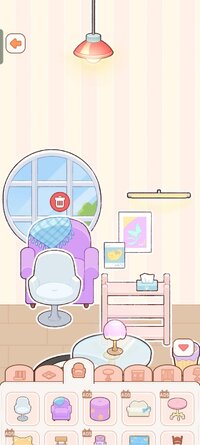
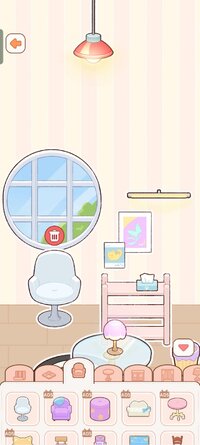
Transform empty rooms into your dream dollhouse! Decorate each doll’s room your way — kawaii, cozy, luxurious, or fantastical. Arrange furniture, choose wallpapers, and watch your cute dolls sit, sleep, eat, and play. Every corner of your interactive home-design paradise can be customized to reflect your unique style.
 Care & Connect
Feed your dolls, watch them giggle and react, and keep them happy, full, and loved. Every little action strengthens your bond and makes your interactive simulation more heartwarming.
 Talk to Them
Your lovely chibi dolls can mimic your voice! Speak, sing, and hear them repeat it back in the most adorable way. Share your day and secrets to make your tiny anime world feel truly alive.
 Nurture & Bond
This isn’t just a dress-up or home decor game — it’s about love, care, and connection. Care for your dolls like family, decorate their rooms, share meals, and capture heartwarming memories. Watch them grow, laugh, and explore their tiny world in this interactive life simulator for anime fans.
 Why You’ll Love It:
- Relaxing Gameplay: A heartwarming anime life simulation to help you de-stress.
- Endless Customization: Give your dolls makeovers with kawaii outfits and accessories.
- Home Decor: Design a cute dollhouse with interactive furniture.
- Building Bonds: Mini-games and daily care that reward you with love.
 If you love anime dress up games, cute chibi doll makers, and cozy home decor simulators, My Dressy Doll: Dressup, Decor will steal your heart. Create your dream world where your dolls can live, laugh, and dream with you.
Get a makeover with My Dressy Doll: Dressup, Decor and start your journey of creativity, fashion, and friendship in the cutest pocket world imaginable.
With My Dressy Doll: Dressup, Decor, You Can:
Doll Dress Up & StyleEnter a magical anime dress-up world and make a cute anime character! Mix and match hundreds of outfits, hairstyles, and accessories — from sparkling magical costumes to cozy pajamas and trendy streetwear. Each doll has its own style! Create your own dressy dolls, capture cute moments, and explore a kawaii world full of chibi dolls and anime fashion fun.
Room Decor & Home DesignTransform empty rooms into your dream dollhouse! Decorate each doll’s room your way — kawaii, cozy, luxurious, or fantastical. Arrange furniture, choose wallpapers, and watch your cute dolls sit, sleep, eat, and play. Every corner of your interactive home-design paradise can be customized to reflect your unique style.
Care & ConnectFeed your dolls, watch them giggle and react, and keep them happy, full, and loved. Every little action strengthens your bond and makes your interactive simulation more heartwarming.
Talk to ThemYour lovely chibi dolls can mimic your voice! Speak, sing, and hear them repeat it back in the most adorable way. Share your day and secrets to make your tiny anime world feel truly alive.
Nurture & BondThis isn’t just a dress-up or home decor game — it’s about love, care, and connection. Care for your dolls like family, decorate their rooms, share meals, and capture heartwarming memories. Watch them grow, laugh, and explore their tiny world in this interactive life simulator for anime fans.
Why You’ll Love It:- Relaxing Gameplay: A heartwarming anime life simulation to help you de-stress.
- Endless Customization: Give your dolls makeovers with kawaii outfits and accessories.
- Home Decor: Design a cute dollhouse with interactive furniture.
- Building Bonds: Mini-games and daily care that reward you with love.
If you love anime dress up games, cute chibi doll makers, and cozy home decor simulators, My Dressy Doll: Dressup, Decor will steal your heart. Create your dream world where your dolls can live, laugh, and dream with you.Get a makeover with My Dressy Doll: Dressup, Decor and start your journey of creativity, fashion, and friendship in the cutest pocket world imaginable.
*MOD Features*
Play the game without Google Play and earn rewards without ads.
Free Download:
! Hidden Content !
You must be registered and either click Like under this post or leave a comment before you can see the hidden links.
You may need to refresh the page after clicking Like. If you’re still having trouble revealing the hidden links, please
read this.
Did you know? VIP Members can see all links instantly, no unlocking required.
Interested? Get VIP here.
Interested? Get VIP here.
______________________________________
If credits are unknown or incorrect and you are the modder you are free to message @G-Bo and the credits will be corrected asap!
What you need to know about Shared-MODs
*How to install (click the spoilers to read)*
Signed APKs do work on all Android devices (rooted + non-rooted).
Signed APKs are in the most cases the only provided files by the mod publisher as they work for everyone.
1.) Remove the original game/app.
2.) Download the MOD APK.
3.) Install the downloaded MOD APK.
4.) Enjoy.
Regarding login methods, please note that logging in with Google will not be possible when using signed MODs. Facebook login (if available) is possible, but it requires you to remove the Facebook application from your device. Other game-specific login methods (if available), such as email, transfer code or guest login usually work fine.
Notes:
- If you used our MOD APK before and just want to update, you can install the new MOD APK on top of the old without removing the game/app first.
- In-App purchases are not possible on signed APKs as they require Google services similar to the Google login process.
Signed APKs are in the most cases the only provided files by the mod publisher as they work for everyone.
1.) Remove the original game/app.
2.) Download the MOD APK.
3.) Install the downloaded MOD APK.
4.) Enjoy.
Regarding login methods, please note that logging in with Google will not be possible when using signed MODs. Facebook login (if available) is possible, but it requires you to remove the Facebook application from your device. Other game-specific login methods (if available), such as email, transfer code or guest login usually work fine.
Notes:
- If you used our MOD APK before and just want to update, you can install the new MOD APK on top of the old without removing the game/app first.
- In-App purchases are not possible on signed APKs as they require Google services similar to the Google login process.
Unsigned APKs do only work on rooted and patched devices/environments.
These are not always provided by the mod publisher as they do only work under certain circumstances.
1.) Your device must be rooted.
2.) Your device must be patched to ignore app signatures. This can be done with the help of tools such as Luckypatcher or Xposed.
Once you fill that requirements the process is the same as with signed APKs with the difference that you can overwrite the original game/app with the MOD APK without removing it first.
1.) Download the unsigned MOD APK.
2.) Install the unsigned MOD APK.
3.) Enjoy.
Note:
For the case the unsigned APK does fail to install: Your device patch is not done correctly!
Login methods and In-App purchases on unsigned MODs function the same as in the original game. Logging in with Google works without issues. Keeping the Facebook application installed is also no problem.
You are rooted and want to know how to patch your device? Please check this for more information:
[Videotutorial] How To Login With Google+ Or Facebook App On Modded Games
These are not always provided by the mod publisher as they do only work under certain circumstances.
1.) Your device must be rooted.
2.) Your device must be patched to ignore app signatures. This can be done with the help of tools such as Luckypatcher or Xposed.
Once you fill that requirements the process is the same as with signed APKs with the difference that you can overwrite the original game/app with the MOD APK without removing it first.
1.) Download the unsigned MOD APK.
2.) Install the unsigned MOD APK.
3.) Enjoy.
Note:
For the case the unsigned APK does fail to install: Your device patch is not done correctly!
Login methods and In-App purchases on unsigned MODs function the same as in the original game. Logging in with Google works without issues. Keeping the Facebook application installed is also no problem.
You are rooted and want to know how to patch your device? Please check this for more information:
[Videotutorial] How To Login With Google+ Or Facebook App On Modded Games
OBB files are not required by every game/app. If necessary, the mod publisher will usually provide them and tell you that they are needed.
1.) Download the OBB file/files.
2.) Download the MOD APK.
3.) Move the OBB files with the help of a filemanager to Android/obb/<packagecode> on your device.
4.) Install the downloaded MOD APK.
5.) Enjoy.
The OBB files are either provided as ".obb" files or as ".zip" files. ZIP files do require to be extracted first.
Still facing issues? Please check here for more details:
How to install OBB files [as detailed as possible]
1.) Download the OBB file/files.
2.) Download the MOD APK.
3.) Move the OBB files with the help of a filemanager to Android/obb/<packagecode> on your device.
4.) Install the downloaded MOD APK.
5.) Enjoy.
The OBB files are either provided as ".obb" files or as ".zip" files. ZIP files do require to be extracted first.
Still facing issues? Please check here for more details:
How to install OBB files [as detailed as possible]
Tutorials:
How to sign up and download on Platinmods.com
List of useful tutorials about how to use this website and its content