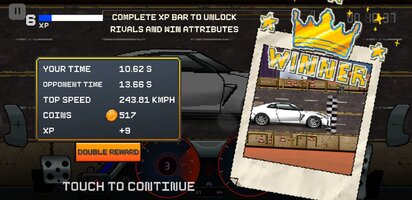
Playstore Link:
Pixel X Racer : Drag Racing - Apps on Google Play
Retro Style Pixel Car Tuning Game With Extensive Realistic Car Tuning & Upgrades
Game Name: Pixel X Racer : Drag Racing
Game Version: 3.4.46
Needs OBB: No
Needs Root: No
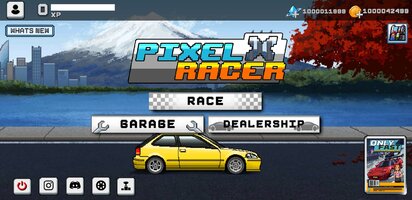
 The Ultimate Retro Pixel Car Racing - Drag Racing - Experience the real thrill of Pixel car tuning Game with complete vehicle customization, intense drag battles, and high-speed street racing modes. Build your dream pixel cars garage with iconic JDM cars, powerful muscle cars, and refined German performance machines.
Get behind the wheel in one of the most feature-packed, no-limit pixel racing simulators on mobile.
 Game Highlights & Features
 Fully Customizable Cars
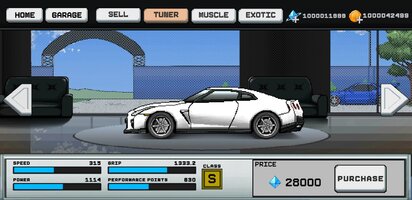
Build your car collection with a wide variety of JDM, tuner, muscle, and Euro cars.
 Realistic Car Tuning Simulator
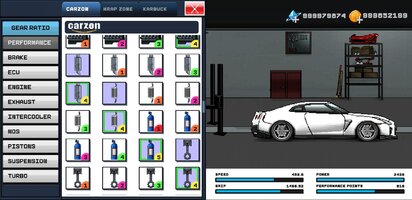
Upgrade and fine-tune every component: engine, gearbox, turbo, suspension, nitro boost, and more.
 Multiple Racing Modes
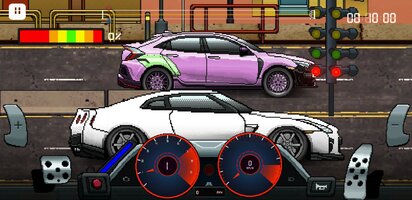
Compete in drag racing, street racing, free cruising, and rival challenge modes.
 Real Driving Mechanics
Manual gear shifting, clutch control, force feedback vibrations, burnout meter, and perfect launch system.
 Authentic Sound Effects
Realistic audio from engine revs, turbo spools, nitrous purge, and gear changes.
 Visual Customization
Design your ride with custom body kits, paint jobs, decals, and wheels using a detailed pixel car customizer.
 Pixel Dyno Run
Test your builds with a realistic dyno simulator that measures power and torque output.
 Online Leaderboards
Compete globally to rank among the top racers in the world.
 Cloud Save & Full Backup
Secure your progress across devices with gameplay backup.
 Advanced Control Settings
Customize controls with support for racing pedals, shifters, speedometers, and RPM meters.
 All Automotive Segments
Unlock and build cars from various segments — sports, classics, tuners, supercars, and more.
 Frequent Content Updates
New cars, tracks, features, and tuning parts added regularly.
 Designed for True Car Enthusiasts
Whether you're into pixel car racing tuning games, pixel racing simulators, or manual transmission racing, this game delivers a complete retro racing experience with modern performance tuning.
Build it. Tune it. Race it. Own the Streets.
*MOD Features*
Unlimited Currency
Free Download:
______________________________________
If credits are unknown or incorrect and you are the modder you are free to message @G-Bo and the credits will be corrected asap!
What you need to know about Shared-MODs
*How to install (click the spoilers to read)*
Signed APKs do work on all Android devices (rooted + non-rooted).
Signed APKs are in the most cases the only provided files by the mod publisher as they work for everyone.
1.) Remove the original game/app.
2.) Download the MOD APK.
3.) Install the downloaded MOD APK.
4.) Enjoy.
Regarding login methods, please note that logging in with Google will not be possible when using signed MODs. Facebook login (if available) is possible, but it requires you to remove the Facebook application from your device. Other game-specific login methods (if available), such as email, transfer code or guest login usually work fine.
Notes:
- If you used our MOD APK before and just want to update, you can install the new MOD APK on top of the old without removing the game/app first.
- In-App purchases are not possible on signed APKs as they require Google services similar to the Google login process.
Signed APKs are in the most cases the only provided files by the mod publisher as they work for everyone.
1.) Remove the original game/app.
2.) Download the MOD APK.
3.) Install the downloaded MOD APK.
4.) Enjoy.
Regarding login methods, please note that logging in with Google will not be possible when using signed MODs. Facebook login (if available) is possible, but it requires you to remove the Facebook application from your device. Other game-specific login methods (if available), such as email, transfer code or guest login usually work fine.
Notes:
- If you used our MOD APK before and just want to update, you can install the new MOD APK on top of the old without removing the game/app first.
- In-App purchases are not possible on signed APKs as they require Google services similar to the Google login process.
Unsigned APKs do only work on rooted and patched devices/environments.
These are not always provided by the mod publisher as they do only work under certain circumstances.
1.) Your device must be rooted.
2.) Your device must be patched to ignore app signatures. This can be done with the help of tools such as Luckypatcher or Xposed.
Once you fill that requirements the process is the same as with signed APKs with the difference that you can overwrite the original game/app with the MOD APK without removing it first.
1.) Download the unsigned MOD APK.
2.) Install the unsigned MOD APK.
3.) Enjoy.
Note:
For the case the unsigned APK does fail to install: Your device patch is not done correctly!
Login methods and In-App purchases on unsigned MODs function the same as in the original game. Logging in with Google works without issues. Keeping the Facebook application installed is also no problem.
You are rooted and want to know how to patch your device? Please check this for more information:
[Videotutorial] How To Login With Google+ Or Facebook App On Modded Games
These are not always provided by the mod publisher as they do only work under certain circumstances.
1.) Your device must be rooted.
2.) Your device must be patched to ignore app signatures. This can be done with the help of tools such as Luckypatcher or Xposed.
Once you fill that requirements the process is the same as with signed APKs with the difference that you can overwrite the original game/app with the MOD APK without removing it first.
1.) Download the unsigned MOD APK.
2.) Install the unsigned MOD APK.
3.) Enjoy.
Note:
For the case the unsigned APK does fail to install: Your device patch is not done correctly!
Login methods and In-App purchases on unsigned MODs function the same as in the original game. Logging in with Google works without issues. Keeping the Facebook application installed is also no problem.
You are rooted and want to know how to patch your device? Please check this for more information:
[Videotutorial] How To Login With Google+ Or Facebook App On Modded Games
OBB files are not required by every game/app. If necessary, the mod publisher will usually provide them and tell you that they are needed.
1.) Download the OBB file/files.
2.) Download the MOD APK.
3.) Move the OBB files with the help of a filemanager to Android/obb/<packagecode> on your device.
4.) Install the downloaded MOD APK.
5.) Enjoy.
The OBB files are either provided as ".obb" files or as ".zip" files. ZIP files do require to be extracted first.
Still facing issues? Please check here for more details:
How to install OBB files [as detailed as possible]
1.) Download the OBB file/files.
2.) Download the MOD APK.
3.) Move the OBB files with the help of a filemanager to Android/obb/<packagecode> on your device.
4.) Install the downloaded MOD APK.
5.) Enjoy.
The OBB files are either provided as ".obb" files or as ".zip" files. ZIP files do require to be extracted first.
Still facing issues? Please check here for more details:
How to install OBB files [as detailed as possible]
Tutorials:
How to sign up and download on Platinmods.com
List of useful tutorials about how to use this website and its content