Playstore Link:

Game Name: Spaceflight Simulator
Game Version: 1.6.00.3
Needs OBB: No
Needs Root: No
SPACEFLIGHT SIMULATOR:
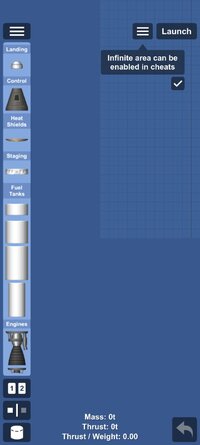
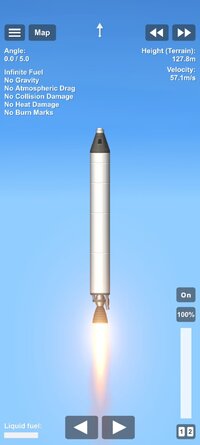
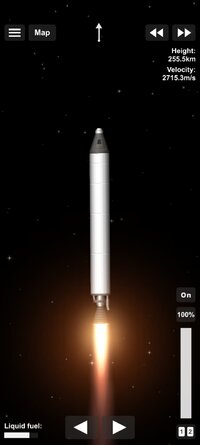
This is a game about building your own rocket from parts and launching it to explore space!
• Use parts to create any rocket you want!
• Completely accurate rocket physics!
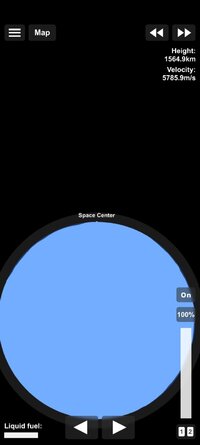
• Realistically scaled planets!
• Open universe, if you see something in the distance, you can go there, no limits, no invisible walls!
• Realistic orbital mechanics!
• Reach orbit, land on the Moon or Mars!
• Recreate your favorite SpaceX Apollo and NASA launches!
Current planets and moons:
• Mercury
• Venus ( A planet with a extremely dense and hot atmosphere)
• Earth ( Our home, our pale blue dot :) )
• Moon ( Our celestial neighbour)
• Mars ( The red planet with a thin atmosphere)
• Phobos ( Mars inner moon, with rough terrain and low gravity)
• Deimos ( Mars outer moon, with a extremely low gravity and a smooth surface)
We have a really active discord community!

 discordapp.com
Video tutorials:
Orbit tutorial:
Moon landing:
This is a game about building your own rocket from parts and launching it to explore space!
• Use parts to create any rocket you want!
• Completely accurate rocket physics!
• Realistically scaled planets!
• Open universe, if you see something in the distance, you can go there, no limits, no invisible walls!
• Realistic orbital mechanics!
• Reach orbit, land on the Moon or Mars!
• Recreate your favorite SpaceX Apollo and NASA launches!
Current planets and moons:
• Mercury
• Venus ( A planet with a extremely dense and hot atmosphere)
• Earth ( Our home, our pale blue dot :) )
• Moon ( Our celestial neighbour)
• Mars ( The red planet with a thin atmosphere)
• Phobos ( Mars inner moon, with rough terrain and low gravity)
• Deimos ( Mars outer moon, with a extremely low gravity and a smooth surface)
We have a really active discord community!
Join the Spaceflight Simulator Discord Server!
Check out the Spaceflight Simulator community on Discord - hang out with 189733 other members and enjoy free voice and text chat.
Video tutorials:
Orbit tutorial:
Moon landing:
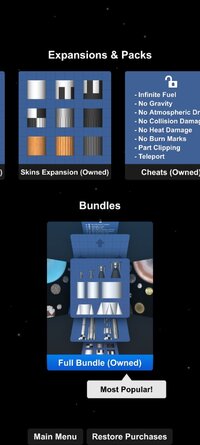
*MOD Features*
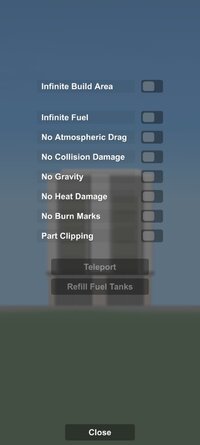
Unlock all expansion packs and unlock built-in cheat functions.
How to enable cheat functions: Enter the game, in the rocket manufacturing interface, click the three horizontal lines icon in the upper left corner -- Cheat Functions -- click the option you want to enable.
How to use blueprints:
After downloading the blueprint via the plugin, in the game, click "Create New Rocket" -- click the three horizontal lines icon in the upper right corner -- "Load Blueprint" -- select the name of the blueprint you downloaded -- click "Load" in the lower right corner.
How to use the expansion pack:
After downloading the expansion pack via plugin, in the game, click Start Game -- Create New World -- Solar System -- Select the galaxy and celestial bodies of the world.
Free Download:
! Hidden Content !
You must be registered and either click Like under this post or leave a comment before you can see the hidden links.
You may need to refresh the page after clicking Like. If you’re still having trouble revealing the hidden links, please
read this.
Did you know? VIP Members can see all links instantly, no unlocking required.
Interested? Get VIP here.
Interested? Get VIP here.
______________________________________
If credits are unknown or incorrect and you are the modder you are free to message @G-Bo and the credits will be corrected asap!
What you need to know about Shared-MODs
*How to install (click the spoilers to read)*
Signed APKs do work on all Android devices (rooted + non-rooted).
Signed APKs are in the most cases the only provided files by the mod publisher as they work for everyone.
1.) Remove the original game/app.
2.) Download the MOD APK.
3.) Install the downloaded MOD APK.
4.) Enjoy.
Regarding login methods, please note that logging in with Google will not be possible when using signed MODs. Facebook login (if available) is possible, but it requires you to remove the Facebook application from your device. Other game-specific login methods (if available), such as email, transfer code or guest login usually work fine.
Notes:
- If you used our MOD APK before and just want to update, you can install the new MOD APK on top of the old without removing the game/app first.
- In-App purchases are not possible on signed APKs as they require Google services similar to the Google login process.
Signed APKs are in the most cases the only provided files by the mod publisher as they work for everyone.
1.) Remove the original game/app.
2.) Download the MOD APK.
3.) Install the downloaded MOD APK.
4.) Enjoy.
Regarding login methods, please note that logging in with Google will not be possible when using signed MODs. Facebook login (if available) is possible, but it requires you to remove the Facebook application from your device. Other game-specific login methods (if available), such as email, transfer code or guest login usually work fine.
Notes:
- If you used our MOD APK before and just want to update, you can install the new MOD APK on top of the old without removing the game/app first.
- In-App purchases are not possible on signed APKs as they require Google services similar to the Google login process.
Unsigned APKs do only work on rooted and patched devices/environments.
These are not always provided by the mod publisher as they do only work under certain circumstances.
1.) Your device must be rooted.
2.) Your device must be patched to ignore app signatures. This can be done with the help of tools such as Luckypatcher or Xposed.
Once you fill that requirements the process is the same as with signed APKs with the difference that you can overwrite the original game/app with the MOD APK without removing it first.
1.) Download the unsigned MOD APK.
2.) Install the unsigned MOD APK.
3.) Enjoy.
Note:
For the case the unsigned APK does fail to install: Your device patch is not done correctly!
Login methods and In-App purchases on unsigned MODs function the same as in the original game. Logging in with Google works without issues. Keeping the Facebook application installed is also no problem.
You are rooted and want to know how to patch your device? Please check this for more information:
[Videotutorial] How To Login With Google+ Or Facebook App On Modded Games
These are not always provided by the mod publisher as they do only work under certain circumstances.
1.) Your device must be rooted.
2.) Your device must be patched to ignore app signatures. This can be done with the help of tools such as Luckypatcher or Xposed.
Once you fill that requirements the process is the same as with signed APKs with the difference that you can overwrite the original game/app with the MOD APK without removing it first.
1.) Download the unsigned MOD APK.
2.) Install the unsigned MOD APK.
3.) Enjoy.
Note:
For the case the unsigned APK does fail to install: Your device patch is not done correctly!
Login methods and In-App purchases on unsigned MODs function the same as in the original game. Logging in with Google works without issues. Keeping the Facebook application installed is also no problem.
You are rooted and want to know how to patch your device? Please check this for more information:
[Videotutorial] How To Login With Google+ Or Facebook App On Modded Games
OBB files are not required by every game/app. If necessary, the mod publisher will usually provide them and tell you that they are needed.
1.) Download the OBB file/files.
2.) Download the MOD APK.
3.) Move the OBB files with the help of a filemanager to Android/obb/<packagecode> on your device.
4.) Install the downloaded MOD APK.
5.) Enjoy.
The OBB files are either provided as ".obb" files or as ".zip" files. ZIP files do require to be extracted first.
Still facing issues? Please check here for more details:
How to install OBB files [as detailed as possible]
1.) Download the OBB file/files.
2.) Download the MOD APK.
3.) Move the OBB files with the help of a filemanager to Android/obb/<packagecode> on your device.
4.) Install the downloaded MOD APK.
5.) Enjoy.
The OBB files are either provided as ".obb" files or as ".zip" files. ZIP files do require to be extracted first.
Still facing issues? Please check here for more details:
How to install OBB files [as detailed as possible]
Tutorials:
How to sign up and download on Platinmods.com
List of useful tutorials about how to use this website and its content