Playstore Link:
Tenmillion ZERO - Apps on Google Play
A few adventurers arrived at the continent where the demon exists.
Game Name: Tenmillion ZERO
Game Version: 1.3.3
Needs OBB: No
Needs Root: No
Story:
The stage is a magical fantasy world. The power balance of the six spirits gets broken and the world is about to be covered with darkness. A few adventurers arrived at the continent where the demon exists. This is a story they challenge the demon.
Battle:
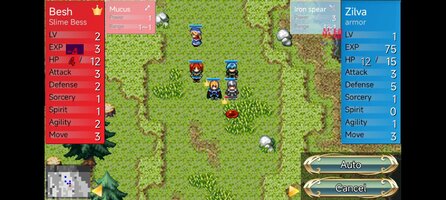
- It is a turn-based tactics battle. All of your units can act once during the turn
- Units can move, attack, and recover. Sometimes the attacked side be counterattacked
- Although victory conditions may vary from stage, basically it is to defeat the enemy's leader before your leader is defeated
- Every time attacks and recoveries are done, EXP will be raised and the level will be raised. The same applies to enemies.
Operation:
- Tap the unit you want to act on or press the "Next unit" button
- Since the movable range is displayed, you can move the unit by tapping the destination
- After moving, tap when the range of attack and recovery is displayed, or press "Complete" button
- When attacks and recoverable equipment are displayed, please tap the equipment to use
- Screen is scrollable with fingers
- If you leave a unit and equipment touching with your fingers, you can see details
Tips:
- The unit gets more EXP (experience value) as the enemy level is higher. Let's raise the level of each character evenly in consideration of it
- Considering the range of the enemy's equipment, If you attack from outside the range you will not receive a counterattack
- If you capture only the base, you can clear the game in the shortest, but if it is difficult, let's raise the level on the way off the way
More:
- Let's complete the war history
- When you defeat the demon, places you can go will unlock. All bases other than Demon's castle become rematchable, and if you capture them again, you can rematch the demon
- Each time you defeat the demon, the level of the enemies rise. Let's try challenging how many times.
- There are many nice illustrations, videos, novels, music, doujinshi goods etc. by the artists on the net. Let's search with "Tenmillion"
Special thanks:
- First Seed Material FSMマップ素材集 公式サイト - Unit and Map tip images
- Twelve constellation fragments - Effect images
- https://ki-rokoubou.booth.pm/ - Face images, etc
- Escape Escape - Item icon images
- 森の奥の隠れ里 - Button UI images
- Rittor Music, others - Sounds
- Powerd by Cocos 2d-x
The stage is a magical fantasy world. The power balance of the six spirits gets broken and the world is about to be covered with darkness. A few adventurers arrived at the continent where the demon exists. This is a story they challenge the demon.
Battle:
- It is a turn-based tactics battle. All of your units can act once during the turn
- Units can move, attack, and recover. Sometimes the attacked side be counterattacked
- Although victory conditions may vary from stage, basically it is to defeat the enemy's leader before your leader is defeated
- Every time attacks and recoveries are done, EXP will be raised and the level will be raised. The same applies to enemies.
Operation:
- Tap the unit you want to act on or press the "Next unit" button
- Since the movable range is displayed, you can move the unit by tapping the destination
- After moving, tap when the range of attack and recovery is displayed, or press "Complete" button
- When attacks and recoverable equipment are displayed, please tap the equipment to use
- Screen is scrollable with fingers
- If you leave a unit and equipment touching with your fingers, you can see details
Tips:
- The unit gets more EXP (experience value) as the enemy level is higher. Let's raise the level of each character evenly in consideration of it
- Considering the range of the enemy's equipment, If you attack from outside the range you will not receive a counterattack
- If you capture only the base, you can clear the game in the shortest, but if it is difficult, let's raise the level on the way off the way
More:
- Let's complete the war history
- When you defeat the demon, places you can go will unlock. All bases other than Demon's castle become rematchable, and if you capture them again, you can rematch the demon
- Each time you defeat the demon, the level of the enemies rise. Let's try challenging how many times.
- There are many nice illustrations, videos, novels, music, doujinshi goods etc. by the artists on the net. Let's search with "Tenmillion"
Special thanks:
- First Seed Material FSMマップ素材集 公式サイト - Unit and Map tip images
- Twelve constellation fragments - Effect images
- https://ki-rokoubou.booth.pm/ - Face images, etc
- Escape Escape - Item icon images
- 森の奥の隠れ里 - Button UI images
- Rittor Music, others - Sounds
- Powerd by Cocos 2d-x
*MOD Features*
Mod Menu:
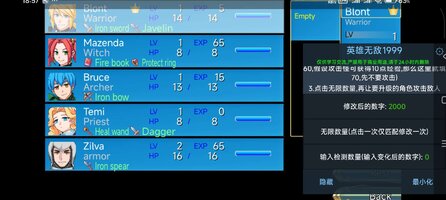
1. Enter the modified number
2. Unlimited quantity (each click only matches one modification)
3. Enter the number of tests (enter the changed number)
Revision Notes
This method has been tested and works correctly with experience points; no other issues have been encountered. When modifying it, try to ensure your current experience level is >= 20; otherwise, it's likely to fail.
1) Enter the desired [modified number] of experience points, for example, 2000. (You can then select from...)
2) [Enter the number of tests] (If the character you want to upgrade currently has 60 experience points, and attacking a monster will give you 10 experience points, then enter 70 here, but do not attack yet.)
3) Click on "Unlimited Quantity," then have the character you want to upgrade attack the enemy.
Free Download:
! Hidden Content !
You must be registered and either click Like under this post or leave a comment before you can see the hidden links.
You may need to refresh the page after clicking Like. If you’re still having trouble revealing the hidden links, please
read this.
Did you know? VIP Members can see all links instantly, no unlocking required.
Interested? Get VIP here.
Interested? Get VIP here.
______________________________________
If credits are unknown or incorrect and you are the modder you are free to message @G-Bo and the credits will be corrected asap!
What you need to know about Shared-MODs
*How to install (click the spoilers to read)*
Signed APKs do work on all Android devices (rooted + non-rooted).
Signed APKs are in the most cases the only provided files by the mod publisher as they work for everyone.
1.) Remove the original game/app.
2.) Download the MOD APK.
3.) Install the downloaded MOD APK.
4.) Enjoy.
Regarding login methods, please note that logging in with Google will not be possible when using signed MODs. Facebook login (if available) is possible, but it requires you to remove the Facebook application from your device. Other game-specific login methods (if available), such as email, transfer code or guest login usually work fine.
Notes:
- If you used our MOD APK before and just want to update, you can install the new MOD APK on top of the old without removing the game/app first.
- In-App purchases are not possible on signed APKs as they require Google services similar to the Google login process.
Signed APKs are in the most cases the only provided files by the mod publisher as they work for everyone.
1.) Remove the original game/app.
2.) Download the MOD APK.
3.) Install the downloaded MOD APK.
4.) Enjoy.
Regarding login methods, please note that logging in with Google will not be possible when using signed MODs. Facebook login (if available) is possible, but it requires you to remove the Facebook application from your device. Other game-specific login methods (if available), such as email, transfer code or guest login usually work fine.
Notes:
- If you used our MOD APK before and just want to update, you can install the new MOD APK on top of the old without removing the game/app first.
- In-App purchases are not possible on signed APKs as they require Google services similar to the Google login process.
Unsigned APKs do only work on rooted and patched devices/environments.
These are not always provided by the mod publisher as they do only work under certain circumstances.
1.) Your device must be rooted.
2.) Your device must be patched to ignore app signatures. This can be done with the help of tools such as Luckypatcher or Xposed.
Once you fill that requirements the process is the same as with signed APKs with the difference that you can overwrite the original game/app with the MOD APK without removing it first.
1.) Download the unsigned MOD APK.
2.) Install the unsigned MOD APK.
3.) Enjoy.
Note:
For the case the unsigned APK does fail to install: Your device patch is not done correctly!
Login methods and In-App purchases on unsigned MODs function the same as in the original game. Logging in with Google works without issues. Keeping the Facebook application installed is also no problem.
You are rooted and want to know how to patch your device? Please check this for more information:
[Videotutorial] How To Login With Google+ Or Facebook App On Modded Games
These are not always provided by the mod publisher as they do only work under certain circumstances.
1.) Your device must be rooted.
2.) Your device must be patched to ignore app signatures. This can be done with the help of tools such as Luckypatcher or Xposed.
Once you fill that requirements the process is the same as with signed APKs with the difference that you can overwrite the original game/app with the MOD APK without removing it first.
1.) Download the unsigned MOD APK.
2.) Install the unsigned MOD APK.
3.) Enjoy.
Note:
For the case the unsigned APK does fail to install: Your device patch is not done correctly!
Login methods and In-App purchases on unsigned MODs function the same as in the original game. Logging in with Google works without issues. Keeping the Facebook application installed is also no problem.
You are rooted and want to know how to patch your device? Please check this for more information:
[Videotutorial] How To Login With Google+ Or Facebook App On Modded Games
OBB files are not required by every game/app. If necessary, the mod publisher will usually provide them and tell you that they are needed.
1.) Download the OBB file/files.
2.) Download the MOD APK.
3.) Move the OBB files with the help of a filemanager to Android/obb/<packagecode> on your device.
4.) Install the downloaded MOD APK.
5.) Enjoy.
The OBB files are either provided as ".obb" files or as ".zip" files. ZIP files do require to be extracted first.
Still facing issues? Please check here for more details:
How to install OBB files [as detailed as possible]
1.) Download the OBB file/files.
2.) Download the MOD APK.
3.) Move the OBB files with the help of a filemanager to Android/obb/<packagecode> on your device.
4.) Install the downloaded MOD APK.
5.) Enjoy.
The OBB files are either provided as ".obb" files or as ".zip" files. ZIP files do require to be extracted first.
Still facing issues? Please check here for more details:
How to install OBB files [as detailed as possible]
Tutorials:
How to sign up and download on Platinmods.com
List of useful tutorials about how to use this website and its content