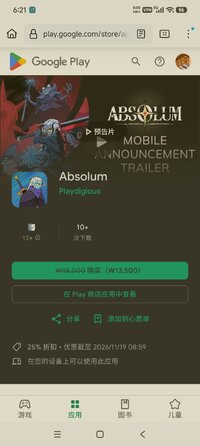
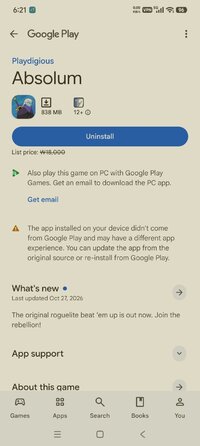
Playstore Link:

Game Name: Absolum
Game Version: 1.0.148
Needs OBB: No
Needs Root: No
A magical cataclysm left magic mistrusted by the common folk and Sun King Azra took advantage of this panic, enslaving wizards through his Crimson Order and conquering more and more lands. With the help of high enchantress Uchawi, a small group of rebels rises from the shadows.
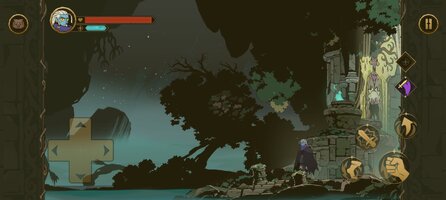
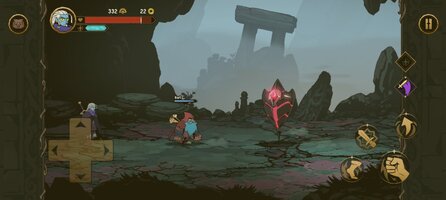
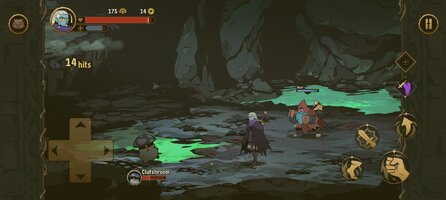
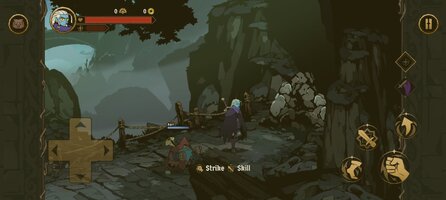
Fight as the outcast heroes of Talamh in a fierce battle to retake magic from Sun King Azra’s grasp in Absolum, an original roguelite beat ‘em up by Dotemu.
FEATURES
 Join the rebellion! With the help of the high enchantress Uchawi, wield forbidden magic to free the lands of Talamh from the iron grip of Sun King Azra.
 Four heroes, each with their own fighting style: start playing as the calm but deadly Galandra or as Karl, the last free dwarf of Talamh, and discover the prodigious Brome and the enigmatic Cider as they join your journey.
 Craft new strategies and get more powerful every run to defeat Azra’s elite guard through a gameplay that blends the best of arcade beat’em up action with modern roguelite mechanics.
 -From the majestic mines of Grandery to the lush forests of Jaroba, delve into an original fantasy world that comes alive through gorgeous art, masterful animation and a magnificent soundtrack by composer Gareth Coker (Ori, Halo Infinite, Prince of Persia), featuring collaborations with other legendary composers.
 Lead the uprising against Azra's regime as a lone hero, or team up with an ally through the two-player online coop mode. Combine your elemental powers and synchronize your attacks into incredible chained combos!
CAREFULLY REDESIGNED FOR MOBILE
- Revamped interface – exclusive mobile UI with complete touch control
- Google Play Games achievements
-Buy once, play anywhere: Enjoy cross-progression on mobile and PC with the same Google Play Games account
- Cloud Save – Share your progress between Android devices
-Compatible with controllers
Fight as the outcast heroes of Talamh in a fierce battle to retake magic from Sun King Azra’s grasp in Absolum, an original roguelite beat ‘em up by Dotemu.
FEATURES
Join the rebellion! With the help of the high enchantress Uchawi, wield forbidden magic to free the lands of Talamh from the iron grip of Sun King Azra. Four heroes, each with their own fighting style: start playing as the calm but deadly Galandra or as Karl, the last free dwarf of Talamh, and discover the prodigious Brome and the enigmatic Cider as they join your journey. Craft new strategies and get more powerful every run to defeat Azra’s elite guard through a gameplay that blends the best of arcade beat’em up action with modern roguelite mechanics. -From the majestic mines of Grandery to the lush forests of Jaroba, delve into an original fantasy world that comes alive through gorgeous art, masterful animation and a magnificent soundtrack by composer Gareth Coker (Ori, Halo Infinite, Prince of Persia), featuring collaborations with other legendary composers. Lead the uprising against Azra's regime as a lone hero, or team up with an ally through the two-player online coop mode. Combine your elemental powers and synchronize your attacks into incredible chained combos!CAREFULLY REDESIGNED FOR MOBILE
- Revamped interface – exclusive mobile UI with complete touch control
- Google Play Games achievements
-Buy once, play anywhere: Enjoy cross-progression on mobile and PC with the same Google Play Games account
- Cloud Save – Share your progress between Android devices
-Compatible with controllers
*MOD Features*
Unlock full content
Credit to: ?
Free Download:
! Hidden Content !
You must be registered and either click Like under this post or leave a comment before you can see the hidden links.
You may need to refresh the page after clicking Like. If you’re still having trouble revealing the hidden links, please
read this.
Did you know? VIP Members can see all links instantly, no unlocking required.
Interested? Get VIP here.
Interested? Get VIP here.
______________________________________
If credits are unknown or incorrect and you are the modder you are free to message @G-Bo and the credits will be corrected asap!
What you need to know about Shared-MODs
*How to install (click the spoilers to read)*
Signed APKs do work on all Android devices (rooted + non-rooted).
Signed APKs are in the most cases the only provided files by the mod publisher as they work for everyone.
1.) Remove the original game/app.
2.) Download the MOD APK.
3.) Install the downloaded MOD APK.
4.) Enjoy.
Regarding login methods, please note that logging in with Google will not be possible when using signed MODs. Facebook login (if available) is possible, but it requires you to remove the Facebook application from your device. Other game-specific login methods (if available), such as email, transfer code or guest login usually work fine.
Notes:
- If you used our MOD APK before and just want to update, you can install the new MOD APK on top of the old without removing the game/app first.
- In-App purchases are not possible on signed APKs as they require Google services similar to the Google login process.
Signed APKs are in the most cases the only provided files by the mod publisher as they work for everyone.
1.) Remove the original game/app.
2.) Download the MOD APK.
3.) Install the downloaded MOD APK.
4.) Enjoy.
Regarding login methods, please note that logging in with Google will not be possible when using signed MODs. Facebook login (if available) is possible, but it requires you to remove the Facebook application from your device. Other game-specific login methods (if available), such as email, transfer code or guest login usually work fine.
Notes:
- If you used our MOD APK before and just want to update, you can install the new MOD APK on top of the old without removing the game/app first.
- In-App purchases are not possible on signed APKs as they require Google services similar to the Google login process.
Unsigned APKs do only work on rooted and patched devices/environments.
These are not always provided by the mod publisher as they do only work under certain circumstances.
1.) Your device must be rooted.
2.) Your device must be patched to ignore app signatures. This can be done with the help of tools such as Luckypatcher or Xposed.
Once you fill that requirements the process is the same as with signed APKs with the difference that you can overwrite the original game/app with the MOD APK without removing it first.
1.) Download the unsigned MOD APK.
2.) Install the unsigned MOD APK.
3.) Enjoy.
Note:
For the case the unsigned APK does fail to install: Your device patch is not done correctly!
Login methods and In-App purchases on unsigned MODs function the same as in the original game. Logging in with Google works without issues. Keeping the Facebook application installed is also no problem.
You are rooted and want to know how to patch your device? Please check this for more information:
[Videotutorial] How To Login With Google+ Or Facebook App On Modded Games
These are not always provided by the mod publisher as they do only work under certain circumstances.
1.) Your device must be rooted.
2.) Your device must be patched to ignore app signatures. This can be done with the help of tools such as Luckypatcher or Xposed.
Once you fill that requirements the process is the same as with signed APKs with the difference that you can overwrite the original game/app with the MOD APK without removing it first.
1.) Download the unsigned MOD APK.
2.) Install the unsigned MOD APK.
3.) Enjoy.
Note:
For the case the unsigned APK does fail to install: Your device patch is not done correctly!
Login methods and In-App purchases on unsigned MODs function the same as in the original game. Logging in with Google works without issues. Keeping the Facebook application installed is also no problem.
You are rooted and want to know how to patch your device? Please check this for more information:
[Videotutorial] How To Login With Google+ Or Facebook App On Modded Games
OBB files are not required by every game/app. If necessary, the mod publisher will usually provide them and tell you that they are needed.
1.) Download the OBB file/files.
2.) Download the MOD APK.
3.) Move the OBB files with the help of a filemanager to Android/obb/<packagecode> on your device.
4.) Install the downloaded MOD APK.
5.) Enjoy.
The OBB files are either provided as ".obb" files or as ".zip" files. ZIP files do require to be extracted first.
Still facing issues? Please check here for more details:
How to install OBB files [as detailed as possible]
1.) Download the OBB file/files.
2.) Download the MOD APK.
3.) Move the OBB files with the help of a filemanager to Android/obb/<packagecode> on your device.
4.) Install the downloaded MOD APK.
5.) Enjoy.
The OBB files are either provided as ".obb" files or as ".zip" files. ZIP files do require to be extracted first.
Still facing issues? Please check here for more details:
How to install OBB files [as detailed as possible]
Tutorials:
How to sign up and download on Platinmods.com
List of useful tutorials about how to use this website and its content